| Solution | - Create a Custom RADIUS Attribute Group:
- Navigate to Network -> RADIUS -> Attribute Groups in FortiNAC.
- Add a new Attribute Group (e.g., 'Cisco-DACL').
- Add multiple Cisco-AVPair
Attribute Name: Cisco-AVPair
Response Value: ip:inacl#1=permit udp any any eq domain Attribute Name: Cisco-AVPair Response Value: ip:inacl#2=permit udp any any eq bootps - Ensure each ACL line is a separate Cisco-AVPair entry with incremental numbering (#1 ,#2, etc.).
Example: 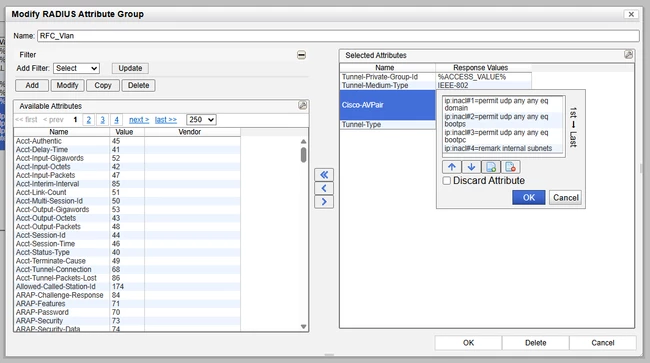
-
Assign the Attribute Group to a Logical Network: - Go to Network -> Inventory, select the Cisco switch, and open Model Configuration.
- Under Network Access, associate the Logical Network (e.g., 'Data-DACL') with the Access Value (VLAN ID) and the custom RADIUS Attribute Group ('Cisco-DACL').
-
Configure the Cisco Switch: - First of all, confirm RADIUS communication between FortiNAC and the Cisco Switch is working properly.
- Then ensure the switch is configured to accept RADIUS-Assigned ACLs via Cisco-AVPair.
- Enable DACL support on the switch port:
interface GigabitEthernet1/0/1
authentication port-control auto
mab
dot1x pae authenticator
ip access-group dynamic DACL_NAME in -
Create a Network Access Policy: - In FortiNAC, create a policy under Policy -> Network Access that matches the target hosts (e.g., by host role or group).
- Set the Logical Network to the one linked to the DACL Attribute Group ('Data-DACL').
-
Validate and Test: - Use the show access-session interface [interface] details on the Cisco switch to verify the DACL is applied.
- Check FortiNAC RADIUS logs to confirm the Cisco-AVPair attributes are being sent in the Access-Accept response.
6. Validate and Test: - After the device is connected to the network, FortiNAC will send the DACL in the RADIUS Access-Accept packet.
- To verify that, go to Network -> RADIUS -> Enable all debugs under 'Debug & Troubleshooting' section and select Submit.
- Then select View Logs -> Check Service Log. If some logs are missing select 'Refresh' to see the latest logs.
Example: 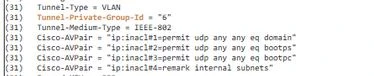
Key Considerations: - Attribute Format: Each ACL line must be a separate Cisco-AVPair attribute with sequential numbering (e.g., ip:inacl#1,ip:inacl#2).
- Switch Compatibility: Ensure the Cisco switch model supports DACLs via RADIUS attributes (IOS 12.2(25)SEE or later).
- Port Configuration: Ports must be in autoconfig mode ip access-group dynamic to apply DACLs dynamically.
Related articles: |



