- First, add the FortiAuthenticator to FortiNAC under the Network -> RADIUS Proxy tab.
- FortiAuthenticator must be set as the 'Default for Primary RADIUS Server'.
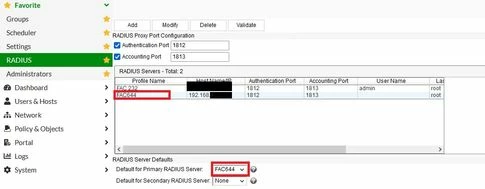 Note: In later versions of FortiNAC starting from v7.4, the default RADIUS server settings have been changed. A domain mapping is required with the 'Portal/Admin Default' option checked. 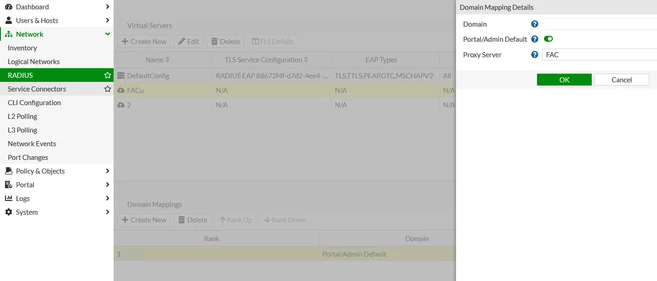 - Create a new username on FortiNAC under Users & Hosts -> Administrators -> Users tab (This username must match the username configured on FortiAuthenticator; otherwise, authentication will fail):
 - On FortiAuthenticator, create a local user and assign it to a User Group:
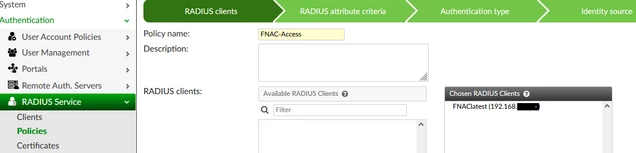
 - Add FortiNAC as a RADIUS client on FortiAuthenticator:
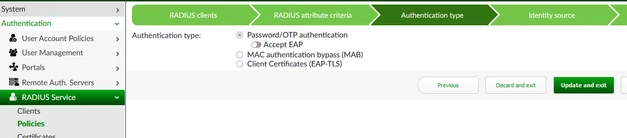
 - Then, create a RADIUS policy to allow the local user group authentication:
  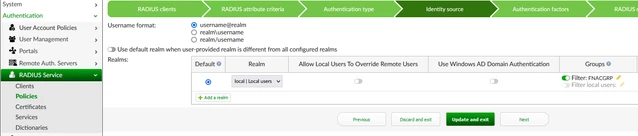 - User successfully authenticated to FortiNAC:
 FortiAuthenticator RADIUS debug logs:
2022-10-14T08:15:44.943858-07:00 FortiAuthenticator radiusd[27383]: (3) Received Access-Request Id 57 from 192.168.x.x:47221 to 192.168.x.x:1812 length 81
2022-10-14T08:15:44.943887-07:00 FortiAuthenticator radiusd[27383]: (3) User-Name = "hawada"
2022-10-14T08:15:44.943897-07:00 FortiAuthenticator radiusd[27383]: (3) User-Password: ******
2022-10-14T08:15:44.943936-07:00 FortiAuthenticator radiusd[27383]: (3) NAS-Port = 36123
2022-10-14T08:15:44.943947-07:00 FortiAuthenticator radiusd[27383]: (3) NAS-Identifier = "xxx.forti.lab"
2022-10-14T08:15:44.943957-07:00 FortiAuthenticator radiusd[27383]: (3) NAS-IP-Address = 192.168.x.x
2022-10-14T08:15:44.944001-07:00 FortiAuthenticator radiusd[27383]: (3) # Executing section authorize from file /usr/etc/raddb/sites-enabled/default
2022-10-14T08:15:44.944163-07:00 FortiAuthenticator radiusd[27383]: (3) facauth: ===>NAS IP:192.168.x.x
2022-10-14T08:15:44.944187-07:00 FortiAuthenticator radiusd[27383]: (3) facauth: ===>Username:hawada
2022-10-14T08:15:44.944204-07:00 FortiAuthenticator radiusd[27383]: (3) facauth: ===>Timestamp:1665760544.943205, age:0ms
2022-10-14T08:15:44.945745-07:00 FortiAuthenticator radiusd[27383]: (3) facauth: Found authclient from preloaded authclients list for 192.168.x.x: FNAClatest (192.168.x.x)
2022-10-14T08:15:44.948057-07:00 FortiAuthenticator radiusd[27383]: (3) facauth: Found authpolicy 'FNAC-Access' for client '192.168.x.x
2022-10-14T08:15:44.950023-07:00 FortiAuthenticator radiusd[27383]: (3) facauth: Authentication OK
2022-10-14T08:15:44.950030-07:00 FortiAuthenticator radiusd[27383]: (3) facauth: Setting 'Post-Auth-Type := FACAUTH'
2022-10-14T08:15:44.950626-07:00 FortiAuthenticator radiusd[27383]: (3) facauth: Updated auth log 'hawada': Local user authentication with no token successful
2022-10-14T08:15:44.950653-07:00 FortiAuthenticator radiusd[27383]: (3) # Executing group from file /usr/etc/raddb/sites-enabled/default
2022-10-14T08:15:44.950666-07:00 FortiAuthenticator radiusd[27383]: (3) Sent Access-Accept Id 57 from 192.168.x.x:1812 to 192.168.x.x:47221 length 0
To log in with a Two-Factor Authentication (2FA) user configured on FortiAuthenticator, follow these steps: - Create a local user on FortiNAC with the same username as the LDAP user and keep it as the local user.
- Log in to FortiNAC using this local user and accept the policy and terms in FortiNAC.
- Then switch the user Authentication type: 'RADIUS' on FortiNAC.
- It will be possible to administratively access FortiNAC with a concatenated password and Token (password+Token, for example, 'P@ssword<token>').
Note: This 2FA method is provided by FortiAuthenticator, and FortiNAC is not currently aware of the token included in the password. Native support for 2FA is planned for future releases of FortiNAC. Related articles: Technical Tip: 8021x PEAP MSCHAP-V2 with FortiAuthenticator and FortiNAC as RADIUS proxy | 

