


Troubleshooting Tip: How to troubleshoot 'The string contains XSS vulnerability characters - prop[_apn]' error during ADOM upgrade


Description
This article describes the issue of being unable to upgrade an ADOM due to 'The string contains XSS vulnerability characters - prop[_apn]' error.
The article provides a step-by-step solution to resolve this issue.
Scope
FortiGate, FortiManager, FortiExtender.
Solution
When trying to upgrade an ADOM that has FortiExtender in it, FortiManager can give an error as below:
Fail (errno=171): Package copy failed. object: fortiextender. detail: failed to copy 756-3:
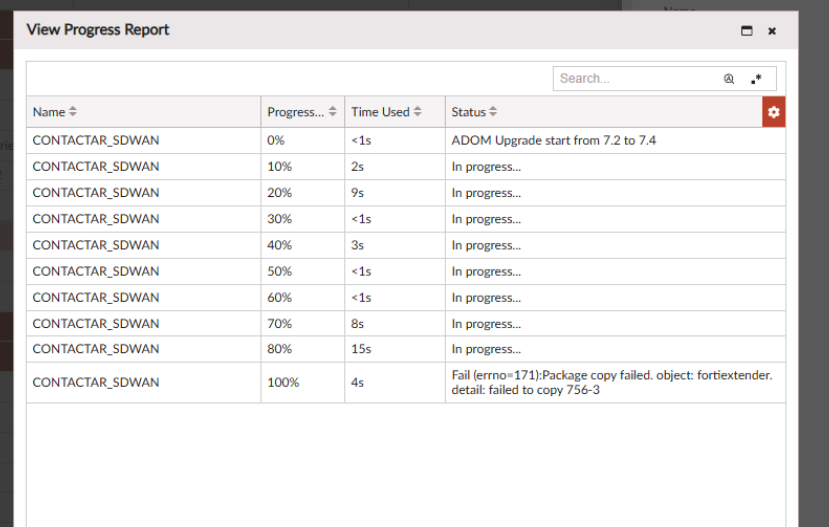
Run the following debug command first on FortiManager CLI, and try to upgrade the ADOM, to identify the issue exactly:
diagnose debug enable
diagnose debug service dvmdb 255
If there is an output similar to this, then the ADOM upgrade is failing due to FortiExtender values in FortiManager DB. This error is caused by FortiExtender that sends unsupported characters for '_cid', and '_apn' values.
__do_cdb_node_attr_check error:_gsm_profile._apn У̿
--> commit [cate: 4026] copy _gsm_profile.(soid=10916) to dparent=29505, fail: err=-999,The string contains XSS vulnerability characters - prop[_apn]: string(У̿)
======= Dump sentry and dentry======
       10916 ---> 29507
_cid: ѣ̿ ---> ѣ̿
_apn: У̿ ---> У̿
===================================
[cate: 4026] copy _gsm_profile.(soid=10916) to dparent=29505, :fail.
[cate: 4024] copy _modem1.(soid=10914) to dparent=10912, :fail.
[cate: 3228] copy extension-controller extender.FEX511F(soid=10912) to dparent=10911, :fail.
__upgrade_one_adom,4574: reap child 24369 (r = 255)
To resolve the issue, follow these steps:
Disable dynamic update for FortiExtender from FortiGate by running the following command on FortiManager CLI:
config system dm
set fortiap-refresh-itvl 0
end
Remove the FortiExtender dynamic data in ADOM by running the following command on FortiManager CLI:
diagnose dvm extender reset-adom <adom-name>Upgrade the ADOM
Set the default value for 'fortiap-refresh-itvl’ back by running the following command on FortiManager CLI:
config system dm
unset fortiap-refresh-itvl
end