When performing FortiManager ADOM upgrade from v7.2 to v7.4, the ADOM upgrade failed and reported the error: Fail (errno=33):duplicate
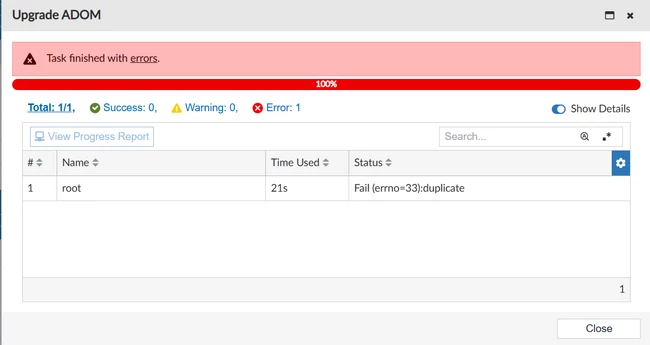 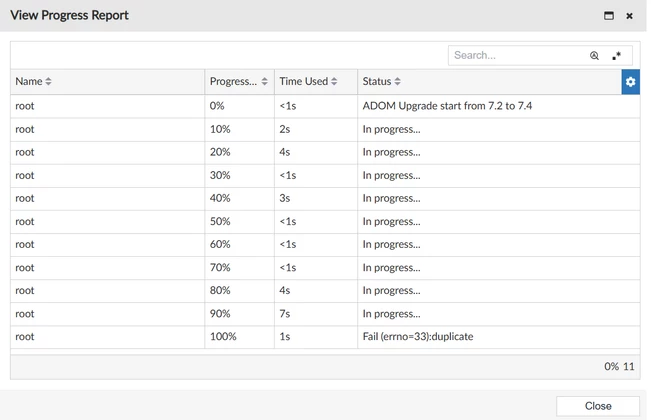 Troubleshooting steps for the issue:
To get the details on what triggers the error during the ADOM upgrade, enable the FortiManager diagnose commands and redo the ADOM upgrade.
diagnose debug reset
diagnose debug timestamp enable
diagnose debug service cdb 255
diagnose debug service dvmdb 255
diagnose debug enable
When the ADOM upgrade failed, check the output from the debugs. It shows the following debug output:
copy fsp managed-switch.GMI-Napoleon-424E-Distrib-Bott(soid=8996) to dparent=8992, fail: err=33,duplicate
 It reports an error when copying the managed FortiSwitches.
It is known that when there are multiple FortiSwitches, if the first 16 characters of FortiSwitch names are the same, FortiManager will report an error during the ADOM upgrade. For example, the FortiSwitches 'FortiSwitches-HubOffice-01' and 'FortiSwitches-HubOffice-02' are considered duplicates by the FortiManager, since the first 16 characters of the names are the same.
The reason is that the FortiSwitch name limit has been changed to 16 characters on the FortiManager to follow FortiOS behavior at v7.4 ADOM. If the FortiSwitch name exceeded 16 characters, the extract characters will be removed during the ADOM upgrade. Go to FortiManager GUI -> Policy & Object -> Advanced -> CLI Configurations-> FSP -> managed-switch. OR FortiSwitch Manager -> Managed Switches -> Search for the switches -> Edit.
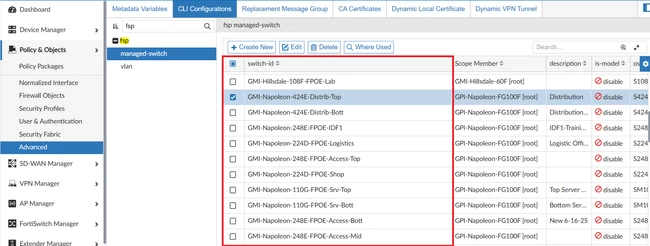 Update the value of switch-id to limit to 16 characters and with different values. After that, the ADOM upgrade from v7.2 to v7.4 will be successful.
Note:
This will be fixed in the upcoming FortiManager release versions v7.6.7 and v8.0.1. | 


