


Technical Tip: How to reset password & configure password policy for administrator using JSON API
Description
This article describes how to reset the password and configure the password policy for FortiManager/FortiAnalyzer administrators using JSON API.
Scope
FortiManager, FortiAnalyzer.
Solution
Following is the base URL for FortiManager/FortiAnalyzer API request:
POST : https://{{host}}/jsonrpc
Before taking any of the steps below, obtain the JSON API Session ID using the following API request.
Note: The session ID will be used in rest of the JSON API request.
{ "id": 1, "method": "exec", "params": [{ "data": { "user": "{{admin}}", "passwd": "{{password}}" }, "url": "/sys/login/user" }] }
Scenario 1: Reset the administrator password.
- Username: fpc1.
- New password: Fortinet@123.
- URL: "/cli/global/system/admin/user/{{username}}".
{ "method": "update", "params": [ { "data": { "password": "Fortinet@123" }, "url": "/cli/global/system/admin/user/fpc1" } ], "session": "{{session}}", "verbose": 1, "id": 1 }
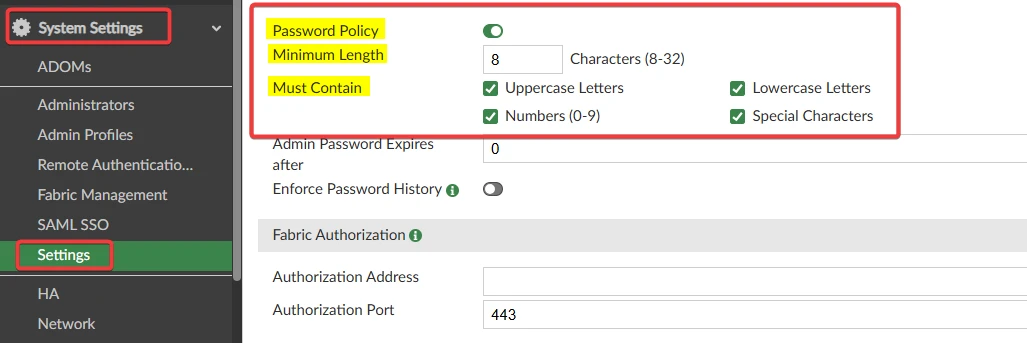
Scenario 2: Configure password policy:
- Enable password policy.
- Minimum length for password.
- Password to contain letters, numbers, alphanumeric characters.
{ "method": "update", "params": [ { "data": { "minimum-length": 8, "must-contain": [ "upper-case-letter", "lower-case-letter", "number", "non-alphanumeric" ], "status": "enable" }, "url": "/cli/global/system/password-policy" } ], "session": "{{session}}", "verbose": 1, "id": 1 }
Here is the password policy once the API is run successfully:
Related documents:
Technical Tip: Using FortiManager API
Fortinet Development Network (FNDN) - FortiManager
Technical Tip: How to create new administrator for FortiManager/FortiAnalyzer using JSON API
