Table of contents: Section 1. Symptoms. The issue appears suddenly on one or more FortiMail units that share the same NFS server, with no configuration change on FortiMail. The NFS server itself reports no alert, and the NFS mount status on FortiMail shows as connected.
The following entries are logged at the time of the issue.
In Monitor -> Log -> AntiSpam, the milter task fails while reading the safe or block list from the NFS mount:
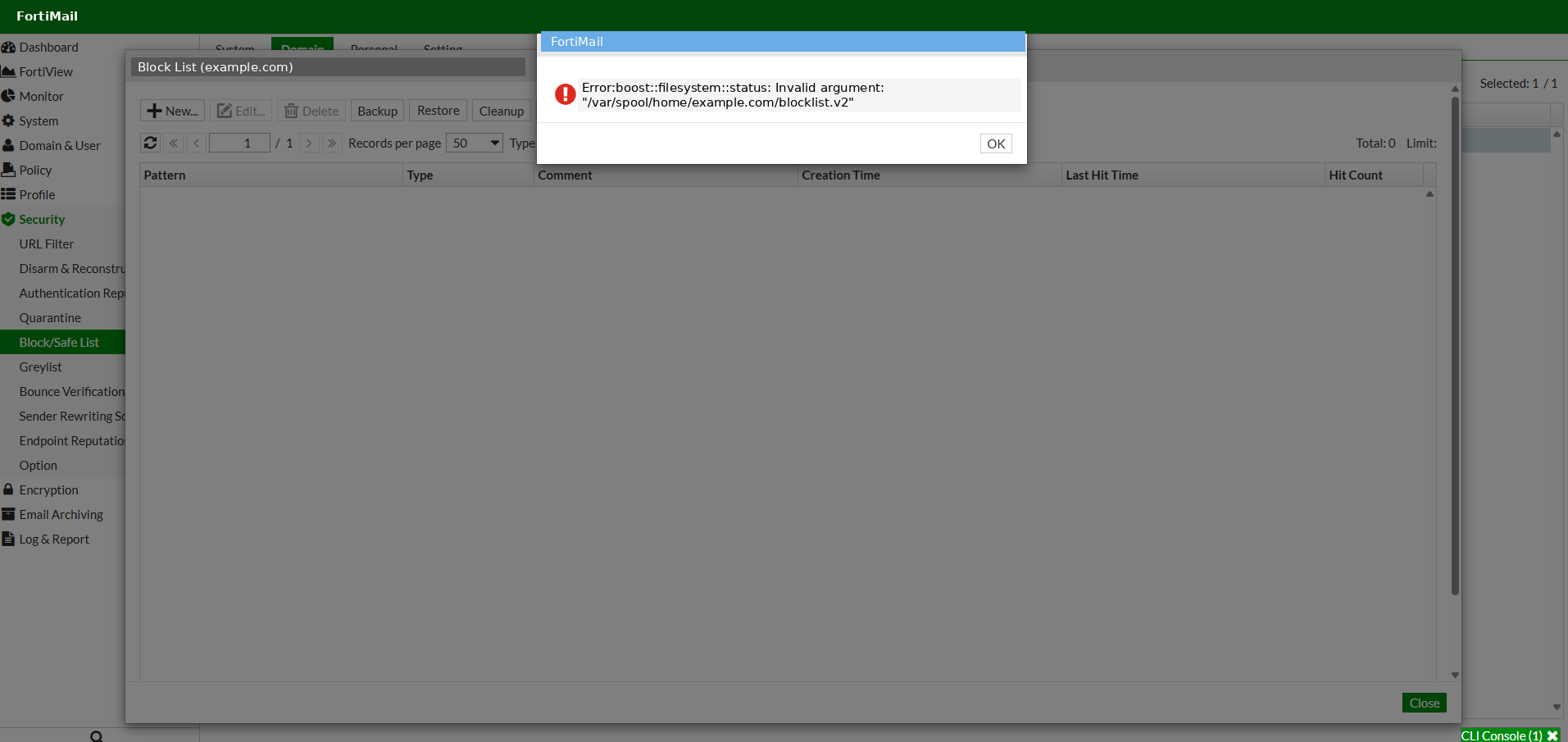
MilterTask: endOfHeader: boost::filesystem::status: Invalid argument: '/var/spool/home/example.com/blocklist.v2'
The NFS error code itself, NFS4ERR_INVAL, does not appear in the FortiMail logs. FortiMail receives it from the file system as 'Invalid argument' and logs that text instead. The NFS error code is visible only in a packet capture of the NFS traffic, as described in the Verification section.
In Monitor -> Log -> Mail Event, the same session is rejected with a temporary failure:
Milter: data, reject=451 4.3.2 Please try again later
In the trace log, the listd process may also crash and restart during the same period.
When 'ACK EOM before AntiSpam check' is enabled in the session profile, the sending MTA logs that the message was accepted:
250 2.0.0 Message accepted for delivery
In that case, the email is neither delivered nor returned to the sender, because the 250 reply was already sent before the antispam scan failed.
Section 2. Root cause.
The NFS server returns an error such as NFS4ERR_INVAL to a file operation (for example, a LOOKUP on the safe or block list). Up to the versions listed in the scope, the file system call used by the milter raises an exception instead of returning an error code, and the whole session is rejected with 451. The same exception can crash the listd process.
With 'ACK EOM before AntiSpam check' enabled, FortiMail replies 250 to the client first and performs the antispam scan afterwards. If the scan fails on the milter exception, the sending MTA has already received 250, so it does not retry, and FortiMail does not generate a DSN. The email is lost silently.
The existing article Technical Tip: Error: 'reject=451 4.3.2 Please try again later' from FortiMail covers the LDAP alias and address mapping cause of the same reply code and does not apply to this scenario.
Section 3. Verification.
Confirm the AntiSpam log contains the 'boost::filesystem::status: Invalid argument' entry and that the Mail Event log shows the 451 reject for the same session ID. Confirm that the path in the error points to the NFS mount (/var/spool/home/...), which indicates that the list file could not be read from the NFS server. Capture the NFS traffic between FortiMail and the NFS server while the issue is present, and check the NFS reply to the failing operation. An NFS4ERR_INVAL (or similar) reply from the server confirms the trigger is on the storage side:
diagnose sniffer packet port1 'host 192.0.2.10 and port 2049' 6 0 a
Check for kernel messages related to the NFS mount:
diagnose debug kernel display
Section 4. Debug commands and expected output.
Collect the following while the issue is present, before switching the storage back to local, as the debug output is only meaningful during the failure. NAS daemon debug, to see how the NFS mount is handled by FortiMail:
diagnose debug application nasd enable
diagnose debug application nasd display
Expected output during the issue: the mount is reported as connected and no reconnect or remount is attempted, which matches the GUI showing the NFS status as normal while file operations fail.
GUI daemon debug, to confirm that the GUI error on the block or safe list page is the same file system error:
diagnose debug enable
diagnose debug application fcgi enable
diagnose debug application fcgi 73
Reproduce the error by opening the domain block list in the GUI, then stop the debug:
diagnose debug application fcgi disable
diagnose debug disable
Expected output: the request for the block list collection returns an error response containing the same text as the AntiSpam log:
boost::filesystem::status: Invalid argument: '/var/spool/home/example.com/blocklist.v2'
Trace log, to confirm whether the listd process crashed at the same time. Download it from System -> Maintenance and search for entries at the time of the first rejected session. Expected output: a crash and restart of listd shortly before the first 451 reject. Packet capture of the NFS traffic, which is the only place the NFS error code itself is visible:
diagnose sniffer packet port1 'host 192.0.2.10 and port 2049' 6 0 a
Expected output: an NFS V4 reply from the server whose status is NFS4ERR_INVAL for the operation (for example LOOKUP) on the file named in the FortiMail error. A reply of NFS4_OK for the same operation means the error is not coming from the NFS server, and the case should be opened with Fortinet support with the outputs above.
On a fixed version, the same NFS error produces the following AntiSpam log entry instead of the exception, and the session is no longer rejected:
Milter: File system invalid argument error when checking list
Section 5. Workaround.
Restore mail flow immediately by switching the mail data storage from NFS to local, then back to NFS, under System -> Mail Setting -> Storage. This re-initializes the NFS mount: Selecting the mail data storage location. Disable 'ACK EOM before AntiSpam check' in the session profile under Profile -> Session for the affected policies. FortiMail then completes the antispam scan before replying to the client, so a temporary failure is reported as 451 and the sending MTA retries instead of considering the email delivered: Configuring session settings.
Section 6. Solution. The behavior is corrected in FortiMail v7.4.7, v7.6.5, and v8.0.0. Starting from these versions: An NFS error while reading the safe or block list no longer raises a milter exception and no longer crashes the listd process. The AntiSpam log instead records 'Milter: File system invalid argument error when checking list' only when the NFS server actually returns such an error. When 'ACK EOM before AntiSpam check' is enabled and the email cannot be delivered after the 250 reply, FortiMail now sends a DSN to the sender, so the message is no longer lost silently.
Upgrade to one of the fixed versions. The NFS server error itself still has to be resolved on the storage side, as the fix only changes how FortiMail handles it.
|