cysaw
Staff & Editor
Staff & Editor
Jun 13, 2022 4:52 AM UTC

Technical Tip: How to remove specific headers from email headers

  • Apr 16, 2026 1:01 PM UTC
  • 0 replies
  • 5115 views
  • Translate All
Description

This article describes how to remove specific headers from email headers.

Scope

FortiMail v7.0.+, v7.2.+, v7.4.+, v7.6.+, On-premise, Cloud.

Solution
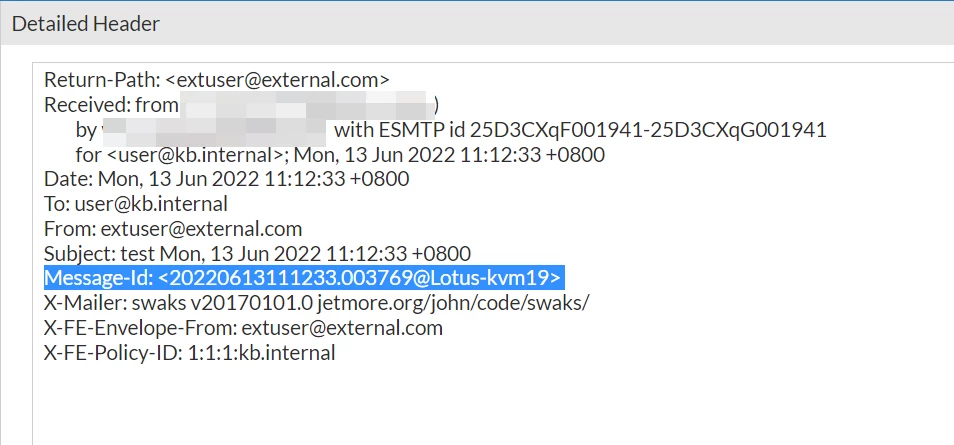
  1. Before, configuring the FortiMail to remove specific headers from the email header, below is the email header sample:


cysaw_0-1655090701472.png


  1. In this case, FortiMail will be configured to remove the header 'Message-Id'.
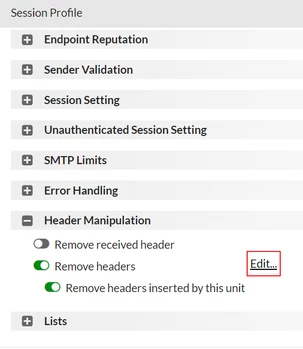
  2. Go to the session profile currently used.
  3. Go to Header Manipulation to enable 'Remove headers'.
  4. Select 'Edit'.


cysaw_1-1655090701478.png


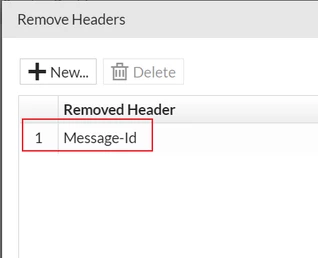
  1. Add the header to remove here.


cysaw_2-1655090701481.png


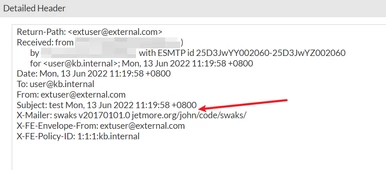
  1. Below is the result, the header 'Message-Id' has been removed.


cysaw_3-1655090701485.png

Risk and Resilience in the Age of AI. An OT Thought Leadership Summit for Houston's Critical Infrastructure Leaders. Date: Thursday, December 3, 2026. Time: 8:30 am - 1:30 pm (CT). Location: The Westin Houston, Memorial City | 945 Gessner Road, Houston, TX 77024