


Technical Tip: How to create and update local certificate via REST API
Description
This article describes how to create a new certificate/update an existing certificate and assign the certificate as default via REST API.
Scope
FortiMail versions 7.6 and 8.0.
Solution
This article uses curl to give an idea about the certificate creation/update process and the test setup, which involves the following:
Name | Value |
|---|---|
admin user | admin |
admin password | fortinet |
FortiMail URL | https://fml-gw1.internal100.lab/ |
API method to create | POST |
API method to update | PUT |
API end point for certificate | SysCertificateCertificate_local |
API end point for login | AdminLogin |
Fetch the cookie used in the subsequent requests.
#curl -v \
     -H "Content-Type: application/json" \
     -X POST -d '{"name":"admin","password":"fortinet"}' \
     https://fml-gw1.internal100.lab/api/v1/AdminLogin \
     -c cookie.txt
Place the certificate and private key in separate files as shown.
Note: The certificates have been truncated for brevity to show the format.
# cat apicert1.crt
-----BEGIN CERTIFICATE-----
MIIDijCCAnKgAwIBAgIJAN4unP52sHQGMA0GCSqGSIb3DQEBCwUAMIGbMQswCQYD
XXXX
s16iqya9woUZbbRuyGXR/y1/BDf0D7ODW4SLET2omCBQrFhB5cTD/mb34O6NhA==
-----END CERTIFICATE-----

root@dns1:~/Tools/Rest# cat apicert1.key
-----BEGIN PRIVATE KEY-----
MIIEvgIBADANBgkqhkiG9w0BAQEFAASCBKgwggSkAgEAAoIBAQDOfZcb6gBDFS82
XXXXX
K12itmX0L+utJM+0yHY3GdXtSpr461ihCaz+wlOOtTHFFaIfm3aoHG1rcqB2YWPo
Qh/ejH9oxz5Tvw7SOKl6uX+F
-----END PRIVATE KEY-----
Create a new certificate on FortiMail with the name "mynewapicert3".
#curl -k --cookie cookie.txt \
  -H "Content-Type: application/json" \
  -X POST \
  -d "$(jq -n \
    --arg key "$(cat apicert1.key)" \
    --arg cert "$(cat apicert1.crt)" \
    '{
      password: "fortinet",
      comments: "",
      private_key: $key,
      certificate: $cert,
      csr: ""
    }')" \
  https://fml-gw1.internal100.lab/api/v1/SysCertificateCertificate_local/mynewapicert3
Confirm that the certificate has been created.
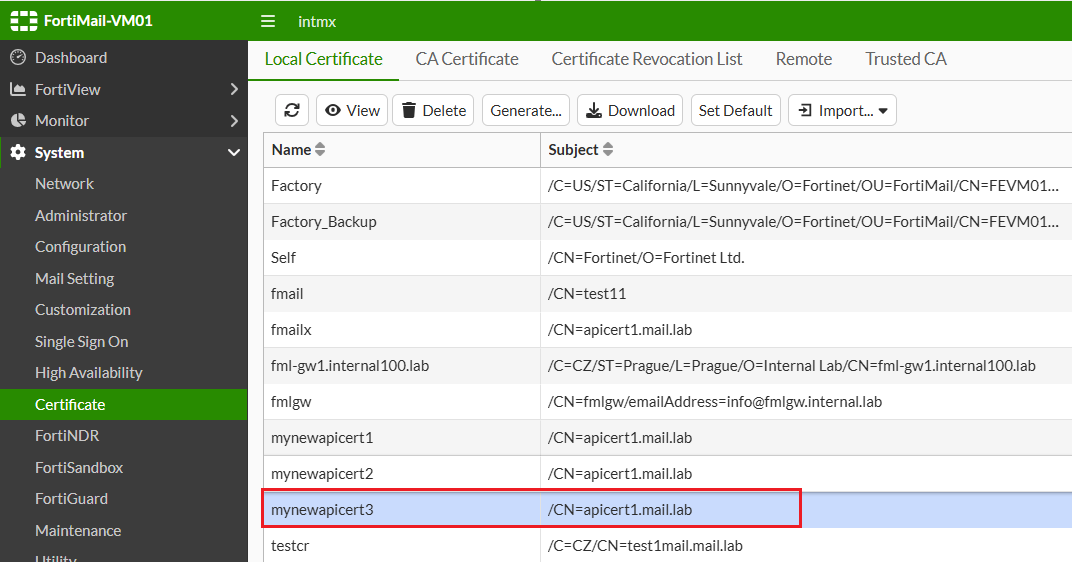
Update the certificate which has just been created:
Note: The method has been changed from POST to PUT, and certificate files are different.
Everything else remains the same, including endpoint and certificate name.
#curl -k --cookie cookie.txt \
  -H "Content-Type: application/json" \
  -X PUT \
  -d "$(jq -n \
    --arg key "$(cat apicert1new.key)" \
    --arg cert "$(cat apicert1new.crt)" \
    '{
      password: "fortinet",
      comments: "",
      private_key: $key,
      certificate: $cert,
      csr: ""
    }')" \
  https://fml-gw1.internal100.lab/api/v1/SysCertificateCertificate_local/mynewapicert3
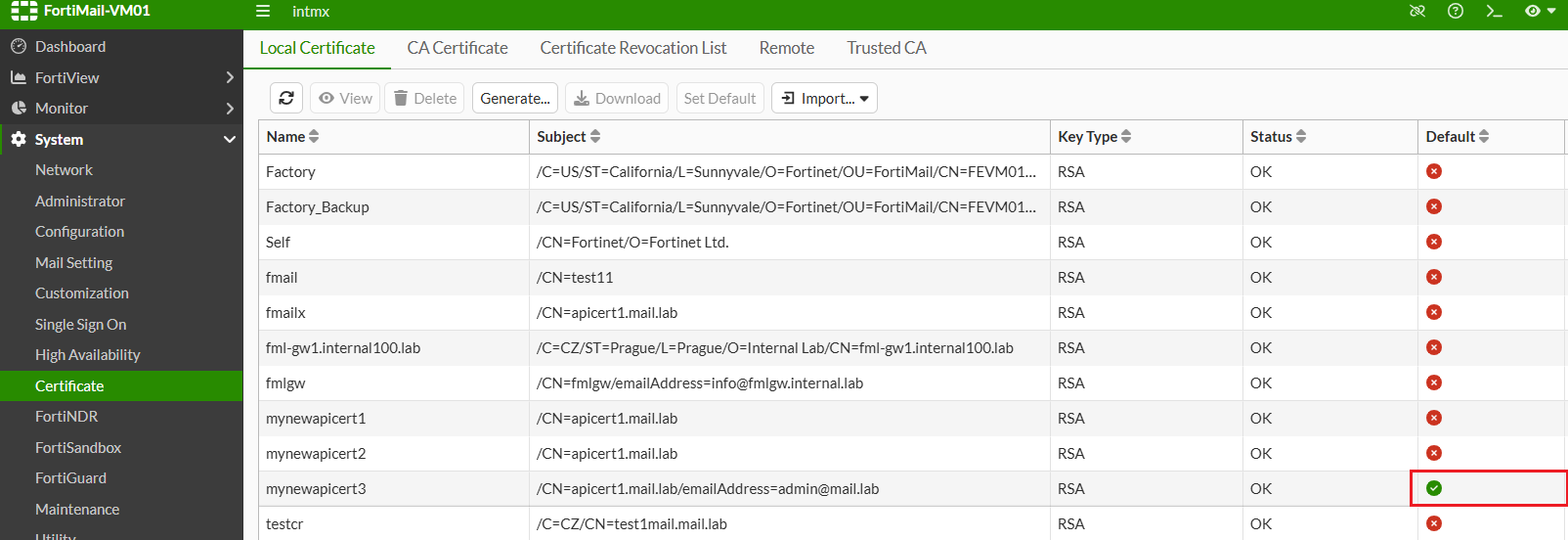
If it is desired to assign this new cert as the default certificate, it can be done as follows:
Note: Method is PUT.
curl -vk \
  -H "Content-Type: application/json" \
  -X PUT \
  -d '{"default_certificate":"mynewapicert3"}' \
  -b cookie.txt \
  https://fml-gw1.internal100.lab/api/v1/SysGlobal
The new certificate is now the default one.
Note: The password parameter in the certificate API request is for the certificate private key, it is not the administrator password used for REST API login. The REST API administrator credentials are sent separately to the AdminLogin endpoint. Ensure that the password value is appropriate for the private key and the FortiMail version in use.
