pchee
Staff
Staff
Mar 4, 2026 9:35 AM UTC

Technical Tip: How to block specific email address while trust the rest of the mail from particular domain

Description This article describes how to block a specific email address while trusting the rest of the mail from a particular domain.
Scope FortiMail.
Solution
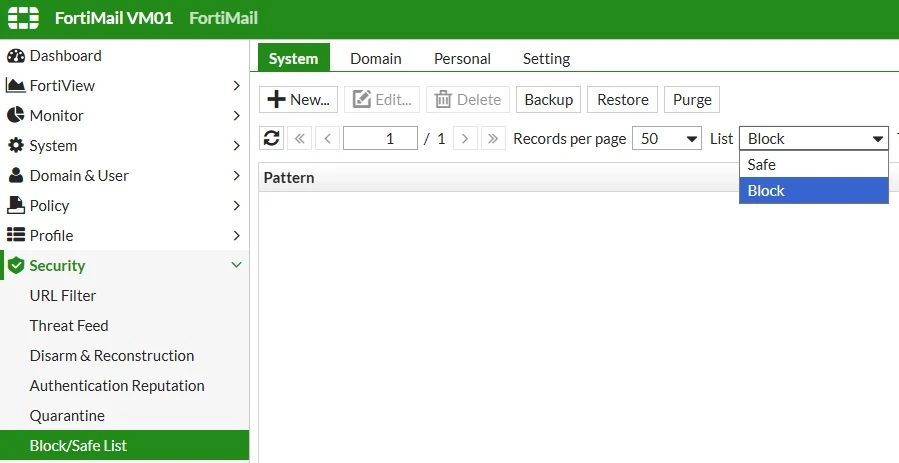
  1. Navigate to Security -> Block/Safe List -> System.

  2. Change the List = Block.

navigate.jpg


  1. Select '+New' and create the block list Pattern for System.
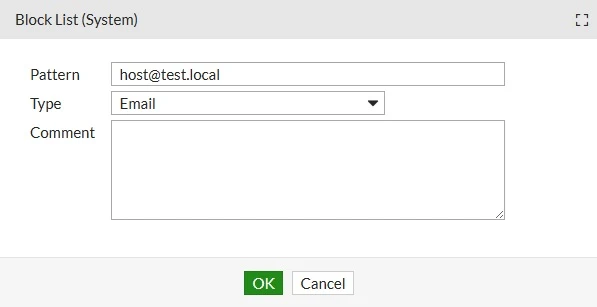
     

    blocklist system.jpg


  2. Navigate under Security -> Block/Safe List -> Domain.


  3. Select the relevant Domain and select safeList.
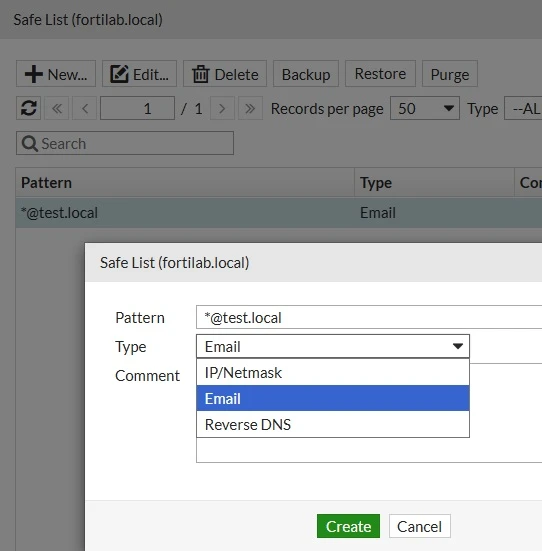
     

    domain.jpg


  4. Key in the Pattern for the Email and switch the Type = Email.


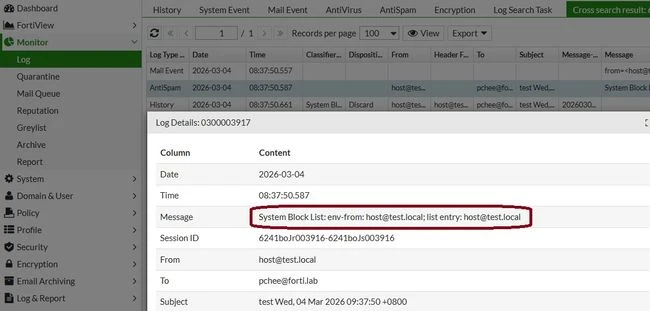
  5. FortiMail will reject the particular email address while accepting the rest of the email coming from this particular domain.



accept.jpg


block.jpg
Note: Adding an entry to a safelist will only bypass the antispam profile, while antivirus scanning and content filtering will still remain active.

    Risk and Resilience in the Age of AI. An OT Thought Leadership Summit for Houston's Critical Infrastructure Leaders. Date: Thursday, December 3, 2026. Time: 8:30 am - 1:30 pm (CT). Location: The Westin Houston, Memorial City | 945 Gessner Road, Houston, TX 77024