cysaw
Staff & Editor
Staff & Editor
Apr 1, 2025 4:54 AM UTC

Technical Tip: Behavior of the Domain Safe list

  • Oct 12, 2026 10:27 AM UTC
  • 0 replies
  • 620 views
  • Translate All

Description

This article describes the Behaviour of the email that matched the domain safe list.

Scope

FortiMail Cloud, FortiMail.

Solution

  1. Before adding the sender’s domain to the domain safe list in FortiMail, FortiMail will perform all the AntiSpam, AntiVirus, and Content scanning.

  2. Referring to the screenshot below, FortiMail will perform the scanning and the email with a malicious link will get detected by FortiMail.


cysaw_0-1743467122034.png


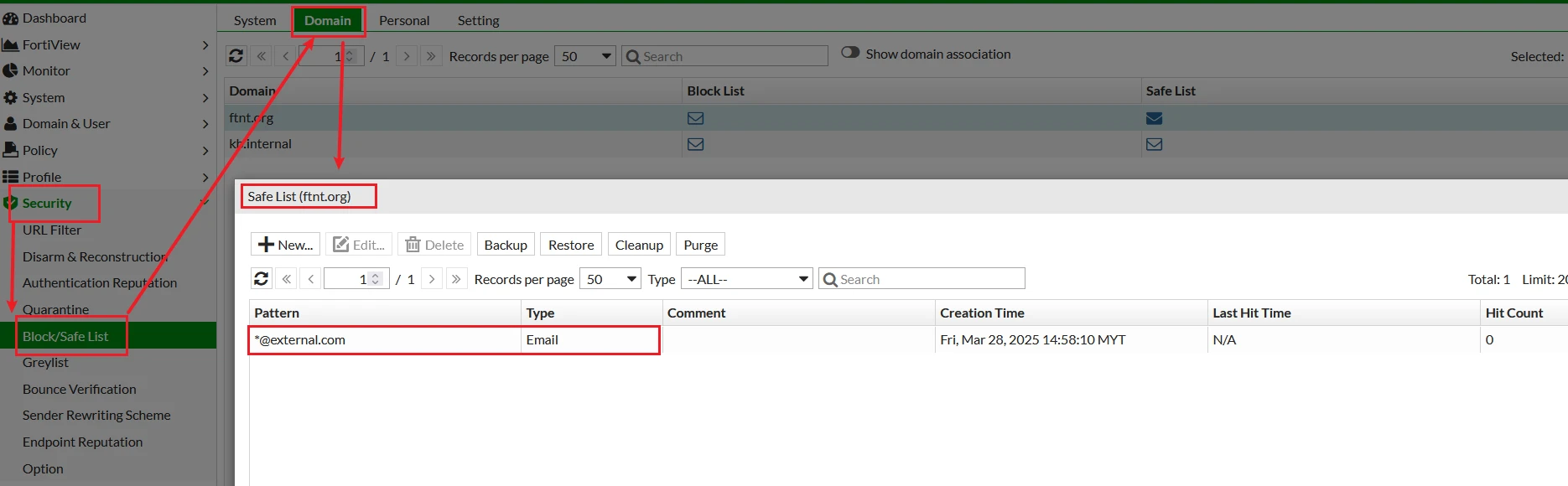
  1. Now, navigate to Security -> Block/Safe List -> Domain -> Edit the Safe list of the domain and add the sender’s email domain *@external.com to the domain safe list in the FortiMail.


cysaw_1-1743467122042.png


  1. The same email with the same malicious link will be accepted by FortiMail because the sender matched to the domain safe list and the email will get delivered to the recipient.


cysaw_2-1743467122044.png


As of FortiMail version 8.0.x, safelisting with the Reply-To feature has been added.

config antispam setting
    set safelist-check-reply-to {enable | disable}
end

    Risk and Resilience in the Age of AI. An OT Thought Leadership Summit for Houston's Critical Infrastructure Leaders. Date: Thursday, December 3, 2026. Time: 8:30 am - 1:30 pm (CT). Location: The Westin Houston, Memorial City | 945 Gessner Road, Houston, TX 77024