


Troubleshooting Tip: WCCP redirection fails with 'cannot find cache server: 0.0.0.0'
Description
WCCP traffic is not redirected to the web cache even though the cache is registered and usable. The FortiGate receives the Redirect Assign message but rejects it during mask assignment validation, logging 'cannot find cache server: 0.0.0.0'. Switching both devices to hash assignment resolves it.
This article describes how to troubleshoot a WCCP service that negotiates successfully but never redirects traffic, where the FortiGate rejects the Redirect Assign message sent by the web cache.
The symptom is easily misread as a FortiGate policy problem, because a firewall policy carrying 'set wccp enable' stops matching traffic altogether when the WCCP service is not installed in the kernel.
The article covers the diagnostic sequence used to separate a control-plane failure from an assignment failure, the meaning of the 'cannot find cache server: 0.0.0.0' message, and the resolution.
Scope
FortiGate acting as a WCCP router, with any third-party web cache acting as the WCCP cache engine.
The behavior described here applies to dynamic WCCP services using mask assignment. It is not specific to one cache vendor, it arises whenever the cache populates the mask value elements in a form the FortiGate does not accept.
Solution
Symptoms:
The client HTTP and HTTPS traffic are not intercepted. The traffic reaches the internet directly, or is denied, depending on the policy set.
The misleading indicator is the firewall policy itself. A policy configured with 'set wccp enable' does not appear in the session list or in 'diagnose debug flow', and traffic falls through to a lower policy. Removing 'set wccp enable' from that policy causes it to match immediately.
This is expected behavior, not a policy fault. A policy marked for WCCP interception requires the kernel WCCP service to claim the flow. If no assignment is installed, there is no redirection table, the policy cannot be used, and policy lookup continues to the next matching rule.
The addresses used in the examples below are as follows. Substitute the values from the environment being investigated.
Element | Value |
|---|---|
FortiGate Router ID | 192.168.1.1 |
FortiGate interface toward the cache | port8 |
Web Cache (proxy) | 192.168.2.10 |
WCCP Service ID | 20 (dynamic, TCP 80 and 443) |
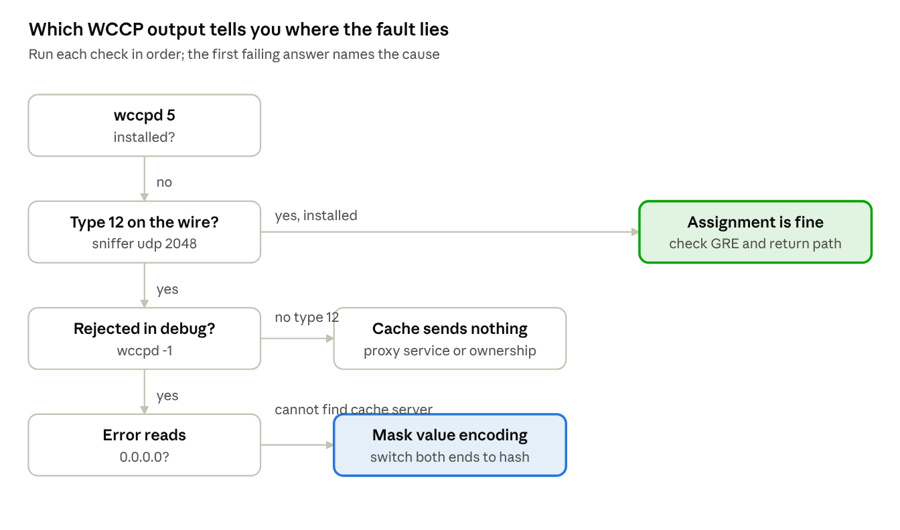
Each check narrows the fault to one side. The first three steps below walk the left-hand column in order.
Step 1: Establish whether the service is installed:
Run the five WCCPD sub-commands in order. The fifth is the decisive one.
diagnose test application wccpd 1

vdoms=1
pkts=0
pkts=0
This confirms that no packet has been redirected.
diagnose test application wccpd 2

vdom-root: work mode:router working NAT first_phy_id=14
interface list:
intf=port8, gid=14 phy_id=14
service list:
service: 20, router_id=192.168.1.1, group=0.0.0.0, auth(no)
access 192.168.2.0/255.255.255.0
server_type=1 forward=1 return=1 assign=3
erouter_id=192.168.1.1
This confirms the service definition, the WCCP-enabled interfaces, and the negotiable methods.
The value 'assign=3' means that the FortiGate will accept either hash or mask assignment.
diagnose test application wccpd 3

service-20 in vdom-root: num=1, usable=1
cache server ID:
len=32, addr=192.168.2.10, sip_mask=0.0.0.21, dip_mask=0.0.0.21
rcv_id=94373, usable=1, fm=1, nq=0, dev=14(k14), to=192.168.1.1
The cache is registered and usable, and is proposing mask assignment on both source and destination IP.
diagnose test application wccpd 5

service-20 in vdom-root: not installed
key: ip=0.0.0.0, change-number=0
cache_list: 0
This is the key output. The value 'not installed' with an empty cache list and a null assignment key means no redirection table exists in the kernel. A healthy service shows an assignment key containing the cache address, a non-zero change number, and a populated bucket list.
If this reports the service as installed, the fault lies elsewhere (forwarding method, GRE path, or return path).
Step 2: Separate a control-plane failure from an assignment failure.
With the service not installed, there are two possibilities: the cache never sends a Redirect Assign, or it sends one that the FortiGate rejects. Capture both the wire and the daemon.
diagnose sniffer packet port8 'udp port 2048' 6 0 l
diagnose debug reset
diagnose debug application wccpd -1
diagnose debug enable
Allow at least two 10-second 'Here_I_Am' intervals. Identify the WCCP message types in the capture. The type is the fourth byte group of the WCCP payload:
Type | Message | Direction |
|---|---|---|
10 (0x0a) | Here_I_Am | Cache to FortiGate |
11 (0x0b) | I_See_You | FortiGate to Cache |
12 (0x0c) | Redirect_Assign | Cache to FortiGate |
In some cases, only types 10 and 11 are present, and the debug shows nothing but a repeating message like this:
wccp2_handle_here_i_am() followed by wccp2_send_i_see_you()
This means the cache is not sending the assignment. The fault is on the cache, not the FortiGate. The most common causes are the proxy service itself being down or in bypass, or the cache not having taken designated-cache ownership.
Two fields confirm the control plane is otherwise healthy, which is worth establishing before handing the issue to the cache vendor:
The receive ID in the FortiGate's Router Identity Info is echoed back in the cache's next 'Here_I_Am'. This proves the cache is receiving and parsing the 'I_See_You'.
The cache appears in the router's view, which is the precondition for it to issue an assignment.
If a type 12 message is present, continue to step 3.
Step 3: identify the assignment rejection.
When the Redirect Assign arrives but the service still shows as not installed, the wccpd debug shows the rejection:
_wccp_on_recv()-112: vdom-root recv: num=1120, dev=14(14), 192.168.2.10->192.168.1.1
wccp2_receive_pkt()-1288: len=1120, type=12, ver=0200, length=1112
wccp2_receive_pkt()-1311: found component:t=0, len=4
wccp2_receive_pkt()-1311: found component:t=1, len=24
wccp2_receive_pkt()-1311: found component:t=13, len=1072
wccp2_handle_assignment()-1067
wccp2_check_mask_assignment()-527: rnum=1, snum=1
wccp2_check_mask_assignment()-537: i=0 vnum=64
wccp2_check_mask_assignment()-547: cannot find cache server: 0.0.0.0
When reading this output:
'type=12' is the Redirect Assign. It is being received.
Component 't=13' is the Alternate Assignment, carrying the mask and value sets.
The 'rnum=1, snum=1' is one router and one cache in the assignment.
The 'vnum=64' is the number of the value elements, consistent with six mask bit across 'sip_mask' and 'dip_mask'.
The rejection occurs at value element index 0.
Each value element must identify which registered cache handles that traffic bucket. The FortiGate reads 0.0.0.0 in the first element, finds no cache registered under that address, and discards the entire assignment rather than installing it partially. No bucket table is programmed, so WCCPD continues to report 'not installed'.
WCCPv2 permits a value element to identify its cache either as a literal IP address or as an index into the cache list carried in the same message. Where the cache uses the index form and there is a single cache in the group, that index is zero, which the FortiGate reads as the address 0.0.0.0. This explains why the same cache configuration can interoperate with other WCCP routers and fail here.
The same symptom would arise if the cache genuinely left value elements unpopulated. The debug reports only the first failing element, so the two cannot be distinguished from the FortiGate alone. A full decode of the type 12 payload from the packet capture, or confirmation from the cache vendor, is required to separate them.
Resolution:
Switch both the FortiGate and the cache to hash assignment. Hash assignment does not use value elements, so it avoids the field on which the two implementations disagree.
On the FortiGate:
config system wccp
    edit 20
        set assignment-method HASH
    next
end
The cache must be reconfigured for hash assignment at the same time. Changing only one side does not resolve the problem, as it produces a different negotiation failure.
Where a single cache serves the service group, there is no functional loss. Mask and hash assignment differ only in how buckets are distributed across multiple caches.
This is a workaround rather than a fix for the underlying encoding difference. Where mask assignment is a requirement, for example in a multi-cache deployment that depends on it, decode the full type 12 payload from the packet capture and open a case with both vendors.
Verification:
Confirm the assignment is installed:
diagnose test application wccpd 5
The service should now report as installed, with an assignment key containing the cache address, a non-zero change number, and a populated cache list.
Confirm traffic is being redirected:
diagnose test application wccpd 1
Packet count should increment as client traffic passes.
The firewall policy carrying WCCP now matches, and intercepted sessions can be identified in the session list:
diagnose sys session list
An intercepted session carries 'state=wccp' and a 'wccp:' line naming the cache, the router ID, and the encapsulation method in use.
Where GRE forwarding is used, traffic flowing end to end also confirms the GRE forward and return paths are working. If the assignment installs but traffic still does not complete, investigate the GRE path separately: the cache must be able to return traffic to the FortiGate through the tunnel, and reverse path filtering on the cache is a common cause of failure.
