Troubleshooting Tip: SAML authentication fails with FortiAuthenticator with error '403 Forbidden You are not allowed to access this resource Please contact your Administrator.'
| Description | This article describes the issue where the SAML authentication for the user is failing, and FortiAuthenticator is acting as IDP. The following error message is prompted '403 Forbidden You are not allowed to access this resource Please contact your Administrator.' |
| Scope | FortiGate, FortiAuthenticator. |
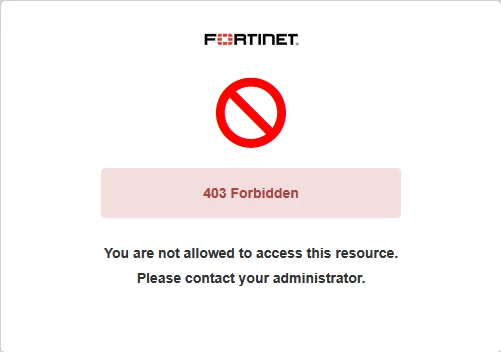
| Solution | In the attached image, the following error is shown to the end user after SAML authentication:
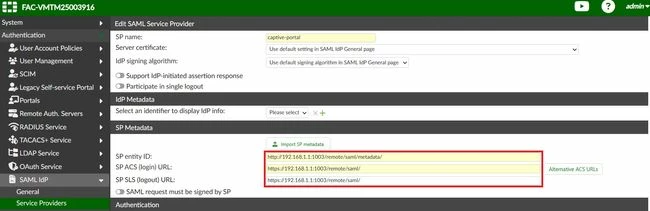
This is because the misconfigured SAML SP Metadata aa shown in the image:
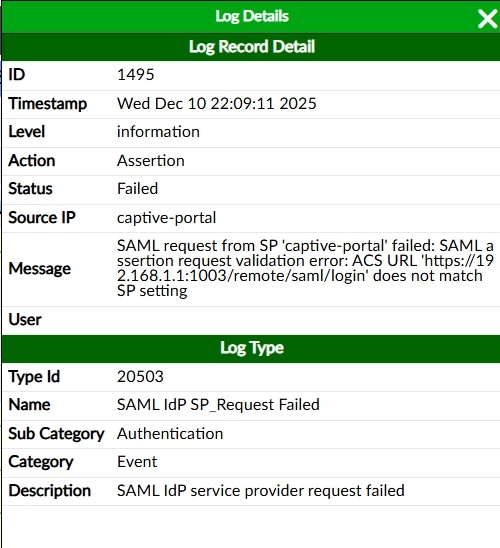
The same can be verified in the FortiAuthenticator logs.
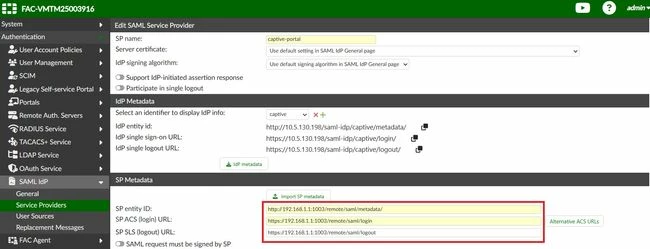
The correct SAML SP Metadata is:
http://192.168.1.1:1003/remote/saml/metadata/
Once the SP Metadata is corrected, the SAML auth succeeds without any issue.
The administration guide explaining how to configure FortiAuthenticator as a SAML Identity Provider (IdP) can be found here: Configuring FortiAuthenticator as SAML IdP and FortiGate as SAML SP |