


Troubleshooting Tip: Remote LDAP Administrator login bypassing two-factor authentication
Description
This article explains the circumstances in which remote LDAP administrators on FortiGate may bypass two-factor authentication (2FA) requirements, as well as possible solutions.
Scope
FortiOS.
Solution
FortiGate offers the option of adding a second factor to user and administrator authenticator for additional security, and is generally recommended for increased security.
However, under specific circumstances it may be possible to bypass second factor requirements for LDAP users or administrators on FortiGate.
Details on bypassing two-factor authentication for remote LDAP users, and how to resolve it, may be found here:
For LDAP administrators, the following conditions have to be met for a bypass to be possible:
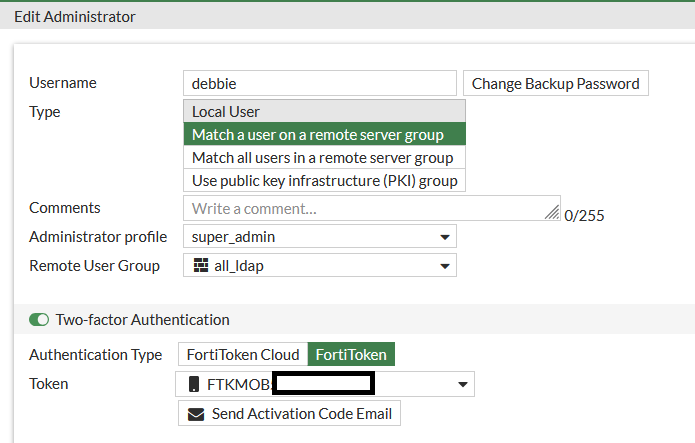
A remote LDAP administrator exists on FortiGate and is linked to a two-factor authentication method.
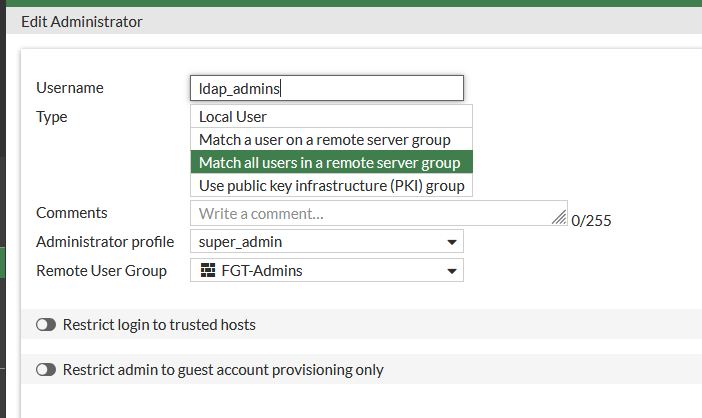
A remote wildcard administrator account exists on FortiGate. A wildcard administrator account is mapped to an LDAP group, so any user within that group is able to login to FortiGate.
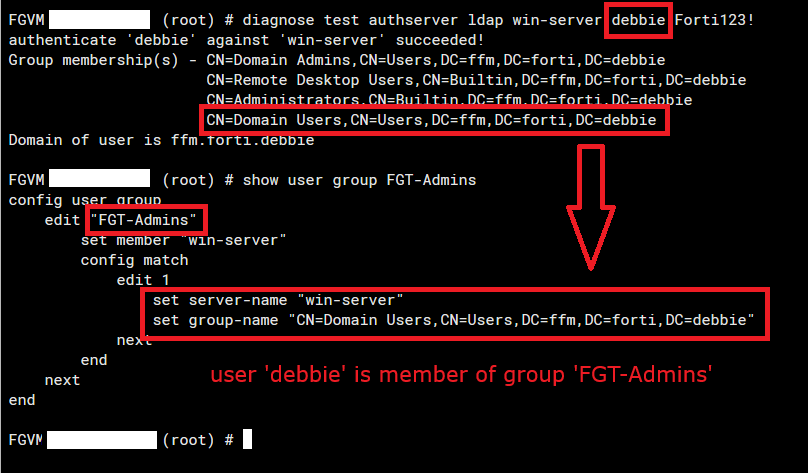
The remote LDAP administrator with two-factor authentication is a member of the LDAP group (server) that the wildcard administrator points to.
FortiGate is case-sensitive with regards to its user and administrator accounts. This means that when an administrator logs in with their proper account name, but a different capitalization, they will not match the administrator account with a second factor.
Instead, the FortiGate will check if the administrator potentially matches the wildcard administrator account, and sends the submitted credentials to LDAP.
LDAP is not case-sensitive, so assuming the password is correct, it will accept the credentials, and the FortiGate will allow the administrator login as part of the wildcard account, with no two-factor authentication, rather than the specific administrator account.
As an example:
An administrator account 'debbie' exists in FortiGate, with a FortiToken assigned. The administrator is member of the LDAP group 'FGT-Admins'.
A wildcard administrator account 'ldap_admins' exists in FortiGate, mapped to the LDAP group 'FGT-Admins'.
If the administrator logs in with username 'debbie', this will match the specific administrator account, and a second factor is required.
If the administrator logs in with the username 'Debbie', or 'DEBBIE' or 'debBie', or any other variation, this will NOT match the administrator account 'debbie'. Instead, it will be checked against the wildcard account 'ldap_admins'.
As the LDAP server is case-insensitive, any variation of the string 'debbie' is acceptable, and if the password is correct, the LDAP server returns a success message.
FortiGate allows the administrator to log in without second factor.
There are two options to resolve this:
Remove the wildcard administrator account. Without the wildcard administrator account, there is no alternative to the account with two-factor authentication, and any username with different capitalization will simply be rejected.
Ensure the administrator with two-factor authentication does not match the wildcard administrator. If the administrator is not a member of the group the wildcard account points to, then while the authentication itself may be successful, FortiGate will reject it due to missing group membership.
Note: For regular LDAP users, FortiGate offers the option of making the username case-insensitive. This option does not exist for administrator accounts.
Following the example above: if the administrator 'debbie' is NOT a member of the group 'FGT-Admins', then while the FortiGate will test login attempts for 'debBie' or 'DEBBIE' or 'Debbie' (etc.) against the wildcard account, it will fail because the user is not a member of the required group.
Related document:
Configuring wildcard admin accounts (FortiOS Administration Guide)
