darisandy
Staff
Staff
May 5, 2025 6:22 AM UTC

Troubleshooting Tip : Internal Traffic stop working after Policy Route configuration

Description This article describes how to troubleshoot traffic issues after configuring Policy Route for Internet traffic.
Scope FortiGate.
Solution

The Policy Route is needed to steer Internet traffic from the usual outgoing Internet line:


config router policy
    edit 1
        set input-device "port2"
        set src "10.10.10.1/255.255.255.255"
        set dstaddr "all"
        set gateway 192.168.30.1
        set output-device "port3"
    next
end


After this setting, internal traffic may be disrupted.


This happens because the destination address on Policy Route is the 'ALL' address. It will steer Internet traffic and all internal traffic as well, because it is being matched.


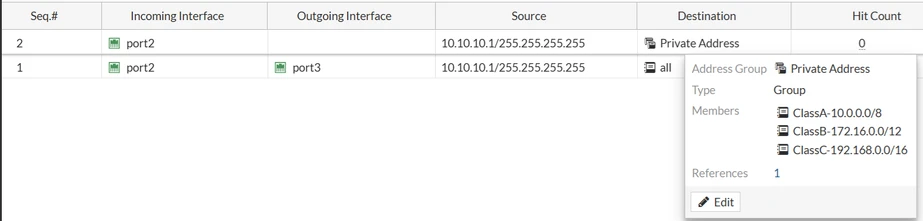
To resolve this, there needs to be another policy on top to stop Policy Route for internal traffic:


PR-03.png


FGT-VM (root) # sh router policy
config router policy
    edit 2
        set input-device "port2"
        set src "10.10.10.1/255.255.255.255"
        set dstaddr "Private Address"
        set action deny
    next
        edit 1
            set input-device "port2"
            set src "10.10.10.1/255.255.255.255"
            set dstaddr "all"
            set gateway 192.168.30.1
            set output-device "port3"
        next
    end


FGT-VM (root) # sh firewall addrgrp Private\ Address
config firewall addrgrp
    edit "Private Address"
        set member "ClassA-10.0.0.0/8" "ClassB-172.16.0.0/12" "ClassC-192.168.0.0/16"
     next
end


    Risk and Resilience in the Age of AI. An OT Thought Leadership Summit for Houston's Critical Infrastructure Leaders. Date: Thursday, December 3, 2026. Time: 8:30 am - 1:30 pm (CT). Location: The Westin Houston, Memorial City | 945 Gessner Road, Houston, TX 77024