
johnathan
Staff
Staff
Oct 12, 2026 1:47 PM UTC

Troubleshooting Tip: Inserting X-Forwarded-For headers without using the FortiGate as an Explicit Proxy

Description

This article describes how to insert the X-Forwarded-For headers into web traffic without forcing the user to use the FortiGate as an explicit proxy.

Scope

FortiOS.

Solution

Sometimes the X-Forwarded-For headers are wanted for web traffic passing through the FortiGate. This is possible to achieve without forcing the user to use the FortiGate as an explicit proxy.
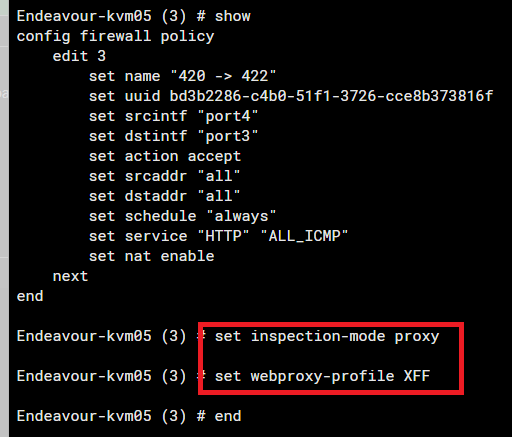
The web-proxy profile is the same as it would be when using the Explicit Proxy. Only 'X-Forwarded-For' is wanted, so the following configuration is applied:

config web-proxy profile
    edit "XFF"
        set header-x-forwarded-for add
    next
end


The policy used to carry the web traffic must be set to Proxy-based inspection. This will expose the webproxy-profile option, which will be used to select the profile that was created:

6542929a.png


If HTTPS is going to be used, deep-inspection would need to be enabled. For this scenario, only HTTP is used.

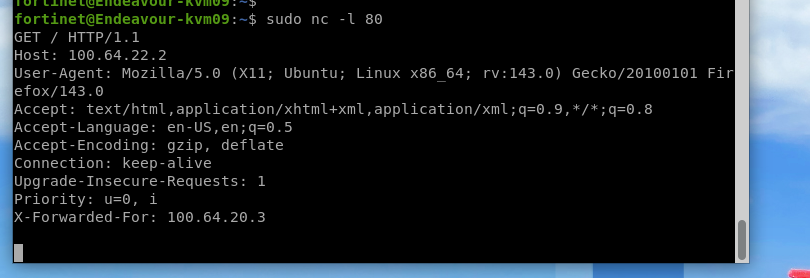
When making a request from the client to an HTTP server through this policy, the headers are added on:

3590b6b1.png

    Thought Leadership. Security Summit. Thursday, November 12th, PGA National Resort, Palm Beach Gardens, FL.
    Security Operations Summit: Modernize SecOps. Operate AI-Native.AMER: November 4 | 9:00 AM PST. India and SAARC: November 5 | 10:00 AM IST. EMEA: November 5 | 10:30 AM CET. APAC: November 5 | 11:00 AM SGT

