


Troubleshooting Tip: FortiAnalyzer event-based automation stitch fails to pass parameters in Security Fabric
Description
This article describes an issue where an Automation Stitch triggered by a 'FortiAnalyzer Event Handler' does not correctly pass the variable to other FortiGate devices in a Security Fabric. As a result, the Action CLI Script failed due to variable is not populated.
Scope
FortiGate.
Solution
In this scenario, an Automation Stitch is configured to quarantine the source IP address using the following command:
diagnose user banned-ip add src4 %%log.srcip%% 30 admin
When the associated FortiAnalyzer Event Handler is triggered, the Automation Stitch executes; however, the %%log.srcip%% variable is not replaced with the actual source IP address.
As a result, the command is executed with the unresolved variable and fails with the error 'Invalid IP address format'.
Network Topology:
FortiGate VM --------> FortiAnalyzer VM
FortiGate 200G ------> FortiAnalyzer VM
Configuration:
FortiGate VM on FortiOS 7.6.7 (Fabric Root):
Navigate to Security Fabric -> Fabric Connectors -> Right Click 'Security Fabric Setup' -> Edit.
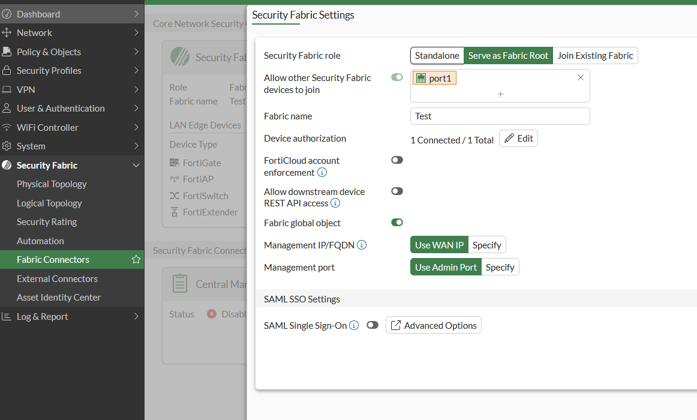
CLI configuration:
config system csf
    set status enable
    set uid "e5219ba1fcea97b6b45b06bfbc9f2822"
    set group-name "Test"
        config trusted-list
            edit "FG2H1G0000000000"
                set serial "FG2H1G0000000000"
                set index 2
            next
        end
    end
Navigate to Security Fabric -> Automation -> Trigger -> FortiAnalyzer Event Handler -> Select <Event Handler Name> -> Edit / Create New.
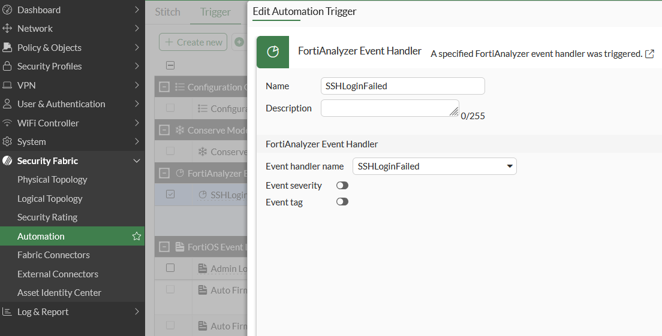
CLI configuration:
config system automation-trigger
    edit "SSHLoginFailed"
        set event-type faz-event
        set faz-event-name "SSHLoginFailed"
    next
end
Navigate to Security Fabric -> Automation -> Action -> CLI Script -> Select <CLI Script Name> -> Edit -> Edit / Create New.
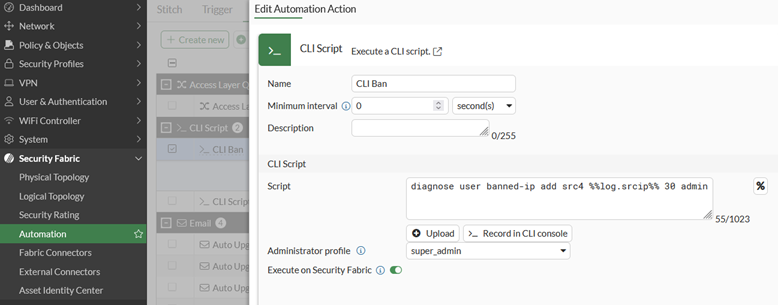
CLI configuration:
config system automation-action
    edit "CLI Ban"
        set action-type cli-script
        set script "diagnose user banned-ip add src4 %%log.srcip%% 30 admin"
        set execute-security-fabric enable
        set accprofile "super_admin"
    next
end
Navigate to Security Fabric -> Automation -> Stitch -> FortiAnalyzer Event Handler -> Select <FortiAnalyzer Event Handler Name> -> Edit / Create New.
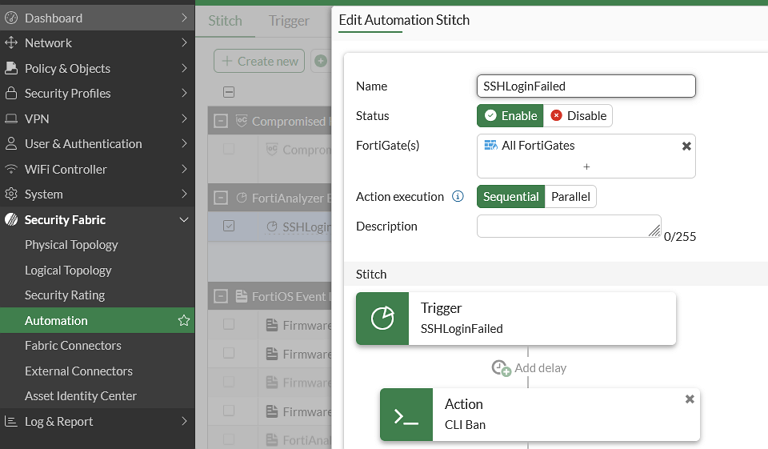
CLI configuration:
config system automation-stitch
    edit "SSHLoginFailed"
        set trigger "SSHLoginFailed"
            config actions
                edit 1
                    set action "CLI Ban"
                    set required enable
                next
            end
        next
    end
FortiGate 200G on FortiOS 7.6.7 (Fabric Member) - Automation Stitch is not configured on Fabric member since root Fabric will sync the configuration.
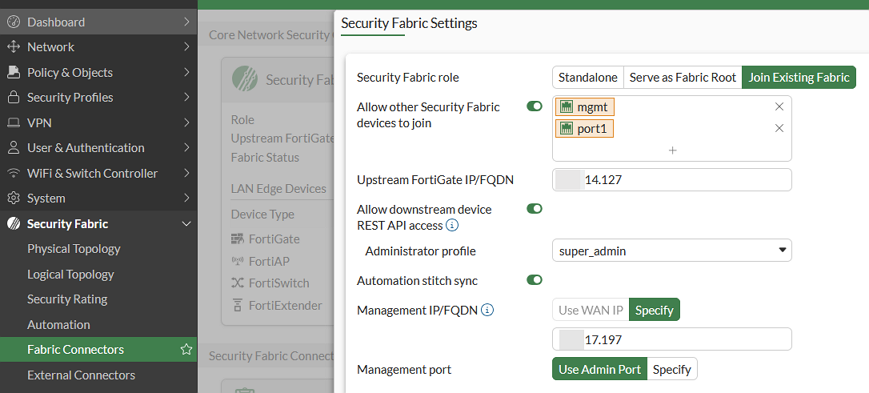
CLI configuration:
config system csf
    set status enable
    set uid "9458c5403b5f72e7edc96c2fea32950c"
    set upstream "10.9.14.127"
    set downstream-access enable
    set downstream-accprofile "super_admin"
end
FortiAnalyzer 7.6.7:
Navigate to Incidents & Events -> Event Handlers.
Event Handler:
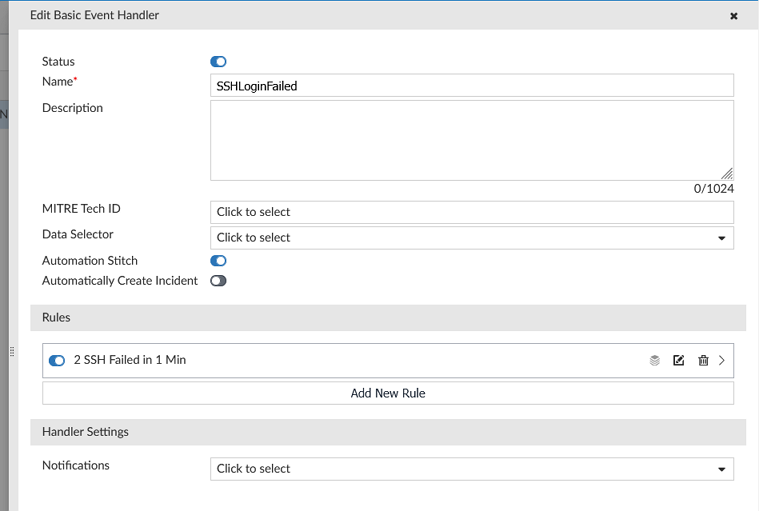
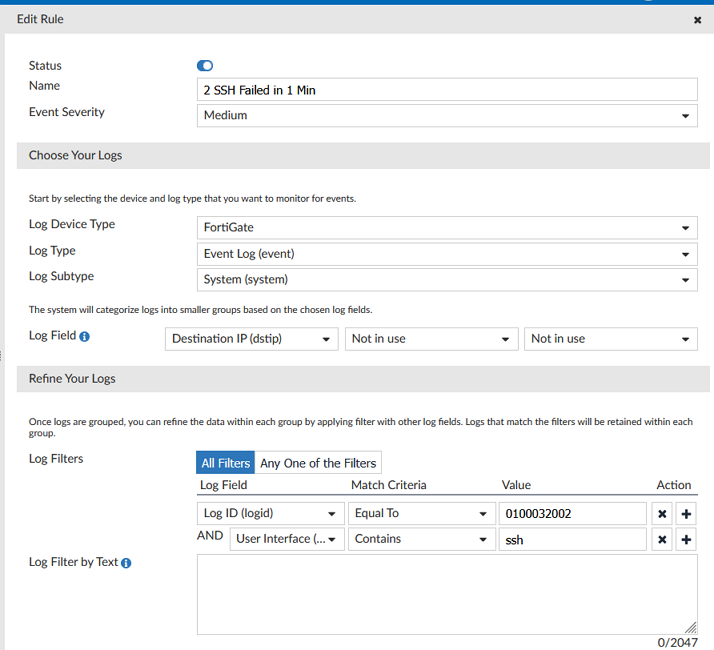
Event Handler Rule:
Event Handler Rule Advanced Settings:
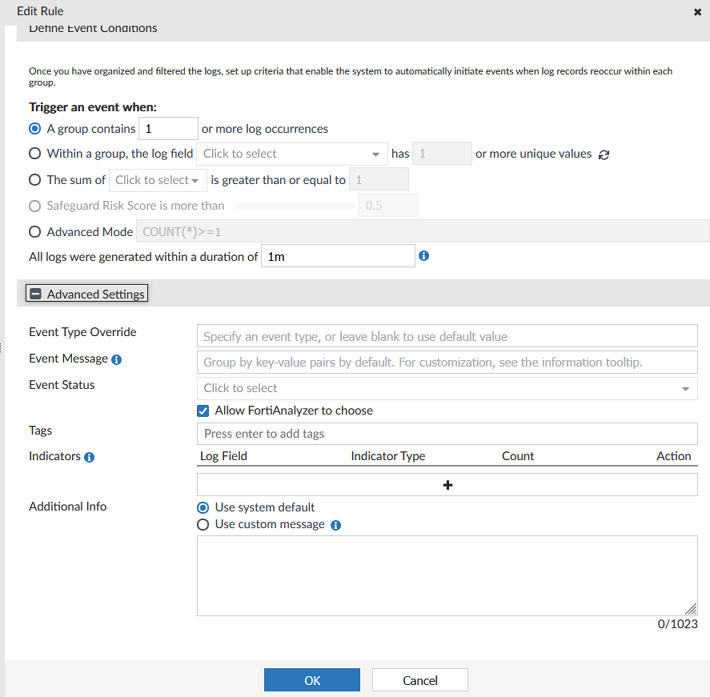
When two SSH login failures occur, the Event Handler triggers the Automation Stitch and executes the CLI script. However, the variable %%log.srcip%% is not replaced with the actual source IP address.
Debug on FortiGate 200G:
diagnose debug console timestamp enable
diagnose debug application autod -1
diagnose debug enable


========== #1, 2026-10-14 11:07:26 ==========

FortiGate VM diagnose user banned-ip add src4 %%log.srcip%% 30 admin

Invalid IP address format.

======= end of #1, 2026-10-14 11:07:26 ======


diagnose debug disable
To inspect the raw event payload received by the Automation Stitch, modify the automation action script to:
config system automation-action
    edit "CLI Ban"
        set script "%%log%%"
    next
end
Generate another two failed SSH login attempts to trigger the Event Handler. The debug output shows that the log data is truncated immediately after the groupby2 field:
========== #1, 2026-10-14 11:14:51 ==========
Gwyn-l3ott-kvm42 date=2026-10-14 time=11:14:53 eventtime=1791990892486476171 tz="-0400" logid="0100065300" type="event" subtype="system" level="notice" vd="root" logdesc="Internal Message" ackflag="no" alertid="202610141000000009" logcount="1" alerttime="1791990800" devid="FG2H1G0000000000" devname="FortiGate-201G" groupby1="x.x.17.197" groupby2=

Unknown action 0

======= end of #1, 2026-10-14 11:14:51 ======
The raw event payload generated by the FortiAnalyzer Event Handler is truncated when one or more Event Handler fields contain empty values.
Workaround:
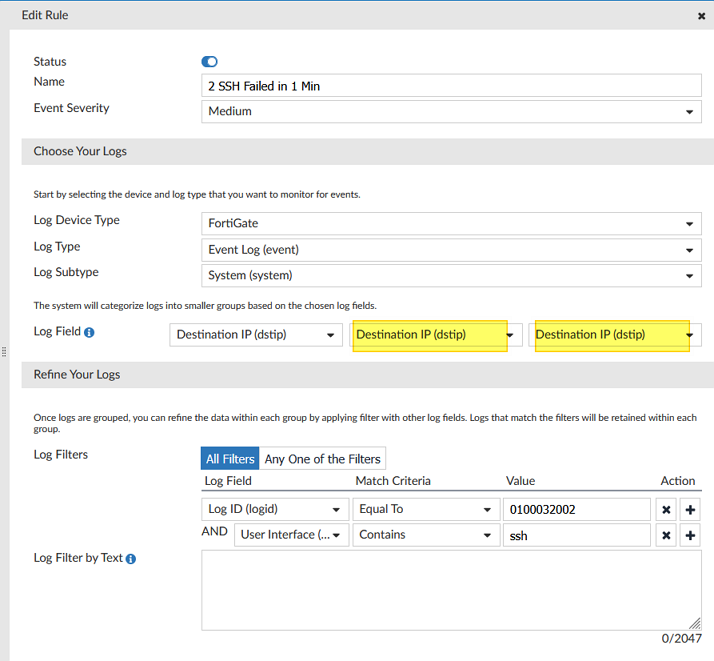
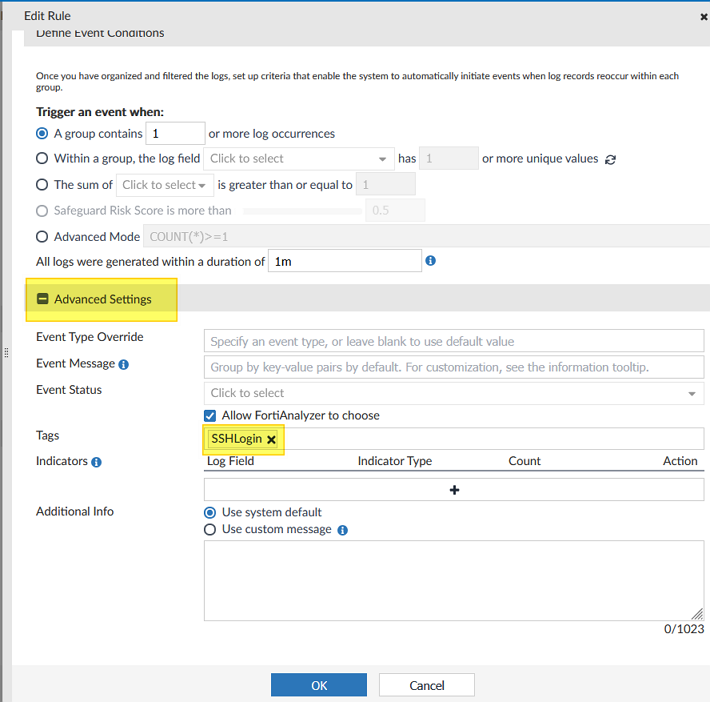
Populate the following Event Handler fields with valid values: Group By 2, Group By 3 and Tags on FortiAnalyzer.
Navigate to Incidents & Events -> Event Handlers -> Search <Event handler name> -> Edit -> Edit Rule -> Log Field.
Navigate to Incidents & Events -> Event Handlers -> Search <Event handler name> -> Edit -> Edit Rule -> Advanced Settings -> Tags.
diagnose debug console timestamp enable
diagnose debug application autod -1
diagnose debug enable

========== #1, 2026-10-14 16:18:32 ==========
Gwyn-l3ott-kvm42  date=2026-10-14 time=16:18:33 eventtime=1792009113574702915 tz="-0400" logid="0100065300" type="event" subtype="system" level="notice" vd="root" logdesc="Internal Message" ackflag="no" alertid="202610141000000014" logcount="1" alerttime="1792009026" devid="FG2H1G0000000000" devname="FortiGate-201G" groupby1="x.x.17.197" groupby2="x.x.17.197" groupby3="x.x..17.197" readflag="no" severity="medium" subject="dstip:x.x.17.197 dstip:x.x.17.197 dstip:x.x.17.197" tag="SSHLogin" triggername="SSHLoginFailed" vdom="root" epid="3" euid="3" epip="x.x.31.254" srcip=x.x.31.254 dstip=x.x..17.197 epname="x.x.31.254" euname="N\/A" extrainfo="{ }" ephostname=
Unknown action 0
======= end of #1, 2026-10-14 16:18:32 ======

diagnose debug enable
Change the CLI script back to banning the IP and trigger the Event Handler again.
FortiGate VM:
config system automation-action
    edit "CLI Ban"
        set script "diagnose user banned-ip add src4 %%log.srcip%% 30 admin"
    next
end
Result:
FortiGate 200G:
diagnose user banned-ip list
src-ip-addr       created                  expires                  cause

x.x.31.254       Wed Oct 14 16:24:29 2026 Wed Oct 14 16:24:59 2026 Administrative
FortiGate VM:
diagnose user banned-ip list
src-ip-addr       created                  expires                  cause

x.x.31.254       Wed Oct 14 16:24:27 2026 Wed Oct 14 16:24:57 2026 Administrative
This issue is expected to be resolved in FortiOS 8.0.1. Until then, use the workaround described above.
Related article:
Troubleshooting Tip: Security Fabric automation-stitch not running on downstream devices
