Symptom:
In the FortiGate system event log, there is a critical error message displayed as follows. Log Description is 'FortiGate database signature invalid', it is a critical-level message. 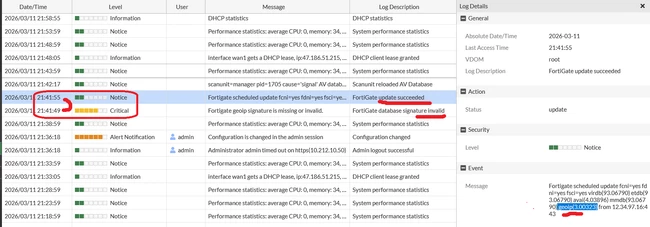 Reason:
Around early March 2026, FortiGuard starts to send out the geoIP database in a delta package to FortiGate running v7.4+ and v7.6+ however, this new feature has been introduced in FortiOS v7.4.10+ and v7.6.7+. Due to this change, FortiGate generates this error message the first time it receives the partial package, as seen in the log, for the FortiGate in the above screenshot. This happened at 21:41, March 11, 2026.
As a result, and shown in the log above, a request for the full package is made, and the full package of geoIP dB with version number 3.00323 was downloaded and successfully installed along with other packages, including Virus and IPS update.
The version of geoIP dB can be checked via CLI (as seen below):
diagnose autoupdate versions | grep -A5 Geo
IP Geography DB
---------
Version: 3.00323 signed
Version #.
Contract Expiry Date: n/a
Last Updated using scheduled update on Wed Mar 11 21:41:54 2026
Last Update Attempt: Thu Mar 12 14:13:31 2026
This message does indicate a failure with incremental package update, but as the fix with full package update comes in a few seconds later, it is considered a false alarm.
This issue has been fixed by FortiGuard in the v3.00326 geoIP dB package updated around April 6 to April 7 2026. In some cases, the update debug may show 'Failed to bspatch', followed by 'Failed to apply patch obj IPGO'.
This indicates that the GeoIP package signature was verified successfully, but FortiGate could not apply the incremental patch to the existing GeoIP database.
2026-08-14 18:10:05 installUpdateObject[450]-Signature verified for obj 28, ret=0, data_len=126859, obj_len=123628, sig_len=3231.

2026-08-14 18:10:05 [754] ftnt_code_signing_split:

2026-08-14 18:10:05 [685] __ftnt_code_signing_verify:

2026-08-14 18:10:05 installUpdateObject[487]-Step 2:Prepare temp file for delta obj 28

2026-08-14 18:10:05 updGEOIPPatchApply[176]-Failed to bspatch /tmp/delta/upd.0.delta, code=65280

2026-08-14 18:10:05 patchGEOIP[241]-Failed to apply patch obj IPGO

2026-08-14 18:10:05 installUpdateObject[545]-patch temp fail for obj (28,1)
The supported workarounds for the effected FortiOS :
1. Enable 'Fallback to FortiGuard' on the FortiGate side.
2.FortiGate devices configured to use FortiManager as local FortiGuard Distribution Server (FDS) can use the commands below:
diagnose fmupdate del-object fds
diagnose fmupdate updatenow
The issue that caused the IP Geography database (IPGO) update to fail when the bspatch operation was unsuccessful will be fixed in FortiOS v7.4.13:2922 and FortiOS v7.6.8:3728.
| 


