| Starting from FortiClient v7.4.3, EAP-TTLS is now supported with IKEv2 authentication: EAP-TTLS support for IPsec VPN 7.4.3..
In earlier versions of FortiClient, EAP-MSCHAPv2 was the method used for username + password authentication and did not work with LDAP. EAP-TTLS now works with LDAP authentication. This article assumes that the initial configuration for IPsec IKEv2 has been completed, but the tunnel is not coming up due to an 'EAP-TTLS' failure error in the eap_proxy and fnbamd debugs on the FortiGate:
EAP entering state RECEIVED
EAP: parseEapResp: rxResp=1 respId=0 respMethod=21 respVendor=0 respVendorMethod=0
EAP: EAP entering state INTEGRITY_CHECK
EAP: EAP entering state METHOD_RESPONSE
SSL: Received packet(len=13) - Flags 0x00
SSL: Received packet: Flags 0x0 Message Length 0
SSL: (where=0x4004 ret=0x230)
SSL: SSL3 alert: read (remote end reported an error):fatal:unknown CA
SSL: (where=0x2002 ret=0xffffffff)
SSL: SSL_accept:error in error
OpenSSL: openssl_handshake - SSL_connect error:0A000418:SSL routines::tlsv1 alert unknown ca
SSL: 0 bytes pending from ssl_out
SSL: Failed - tls_out available to report error
EAP-TTLS: PHASE1 -> FAILURE
EAP: EAP entering state SELECT_ACTION
EAP: getDecision: method failed -> FAILURE
EAP: EAP entering state FAILURE
EAP: Building EAP-Failure (id=0) If the certificate used by the FortiOS EAP server has expired, the following debug messages can be seen instead: EAP: EAP entering state RECEIVED
EAP: parseEapResp: rxResp=1 respId=241 respMethod=21 respVendor=0 respVendorMethod=0
EAP: EAP entering state INTEGRITY_CHECK
EAP: EAP entering state METHOD_RESPONSE
SSL: Received packet(len=13) - Flags 0x00
SSL: Received packet: Flags 0x0 Message Length 0
SSL: (where=0x4004 ret=0x22d)
SSL: SSL3 alert: read (remote end reported an error):fatal:certificate expired
SSL: (where=0x2002 ret=0xffffffff)
SSL: SSL_accept:error in error
OpenSSL: openssl_handshake - SSL_connect error:0A000415:SSL routines::ssl/tls alert certificate expired
SSL: 0 bytes pending from ssl_out
SSL: Failed - tls_out available to report error
EAP-TTLS: PHASE1 -> FAILURE When either error is seen, it is required to check if the FortiGate Server certificate for the EAP-TTLS connection is trusted by the FortiClient endpoint. config system global set wifi-certificate Fortinet_Wifi <-- default setting end - The default 'Fortinet_Wifi' certificate is trusted by most endpoints, but if a different certificate was selected or the endpoints are not configured to trust certificates signed by public CA's, the certificate may need to be updated.
- If FortiOS authenticates VPN users against a remote RADIUS server, the remote RADIUS server acts as the EAP server rather than the FortiGate, and the correct EAP methods and certificates must be configured on the remote server. See Technical Tip: FortiOS IKEv2 EAP user authentication operation.
The steps below provide an overview of how this issue can be identified and resolved:
- Run IKE debugs on the FortiGate and filter for the public IP of the endpoint:
diagnose vpn ike log filter rem-addr4 x.x.x.x
diagnose debug app ike -1
diagnose debug application fnbamd -1
diagnose debug application eap_proxy -1
diagnose debug enable
diagnose debug disable <----- To disable debugs. To validate this using Wireshark, follow the steps below. -
Start a packet capture on the FortiGate and filter for the public IP of the endpoint under: Network -> Diagnostics -> Packet Capture, select 'New Packet Capture', and add the public IP to the 'Host' filter.
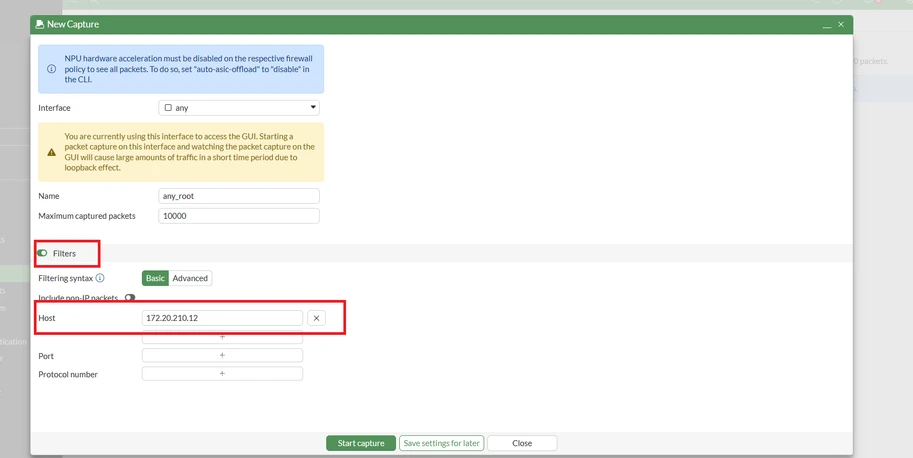
- Attempt a VPN connection from the endpoint, and check the IKE debugs for the 'EAP Failed for user' error.
- Stop the packet capture and take note of the following values from IKE debugs:
- Initiator.
- Responder.
- SK_ei.
- SK_ai.
- SK_ar.
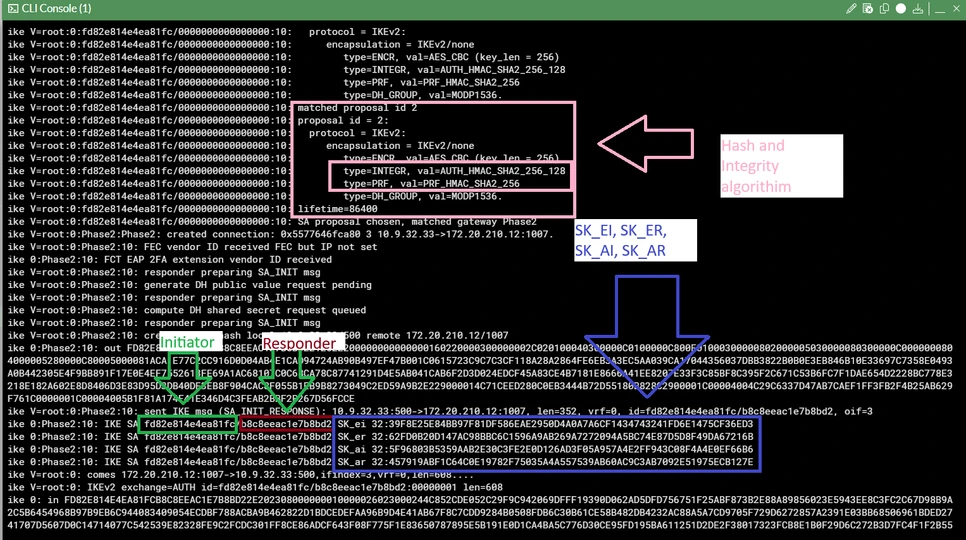
- After taking note of the values above, refer to the document below to decrypt the ISAKMP packets through Wireshark: Technical Tip: How to decrypt IPSec Phase-2 (ISAKMP) packets IKEv2
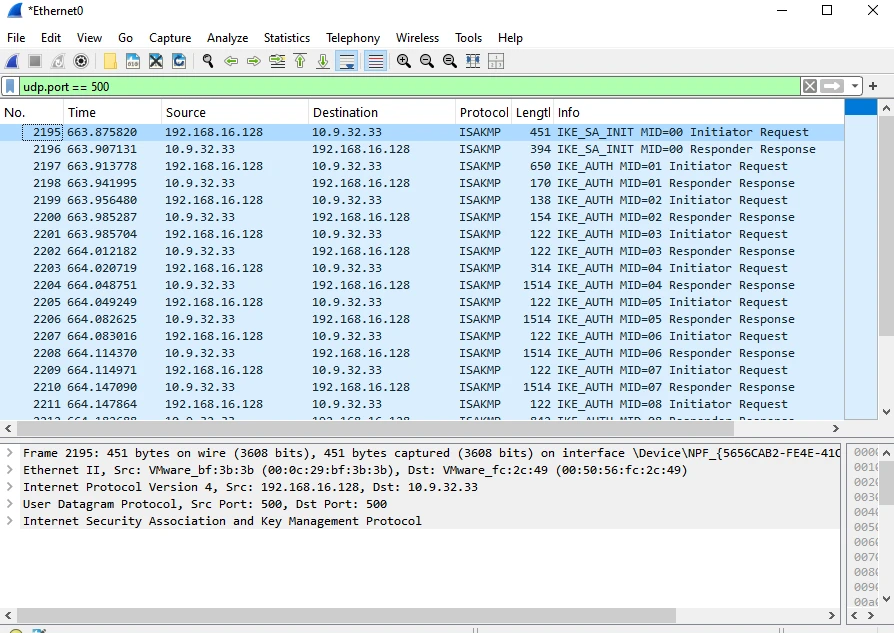
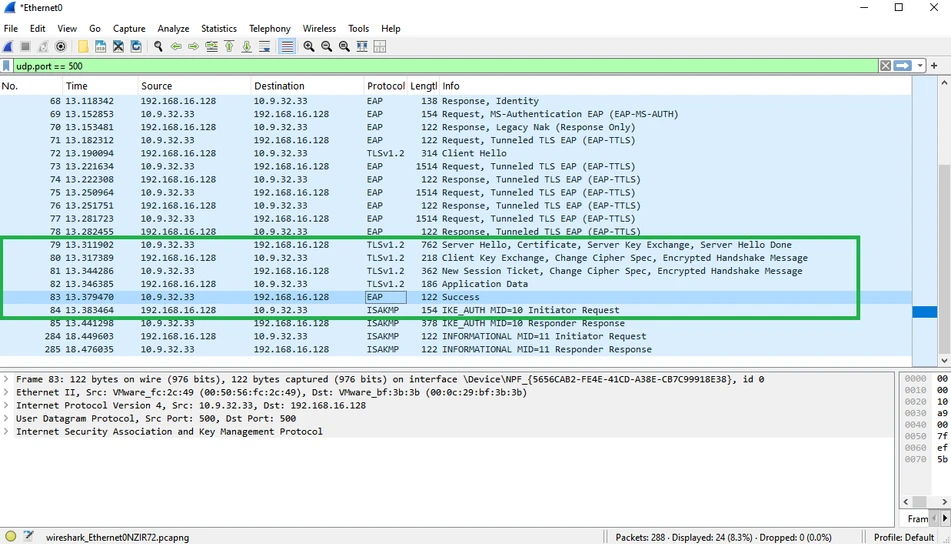
If the correct values were assigned in Wireshark, the PCAP should change and show EAP packets. Refer to the before and after images below.
Before:
After:
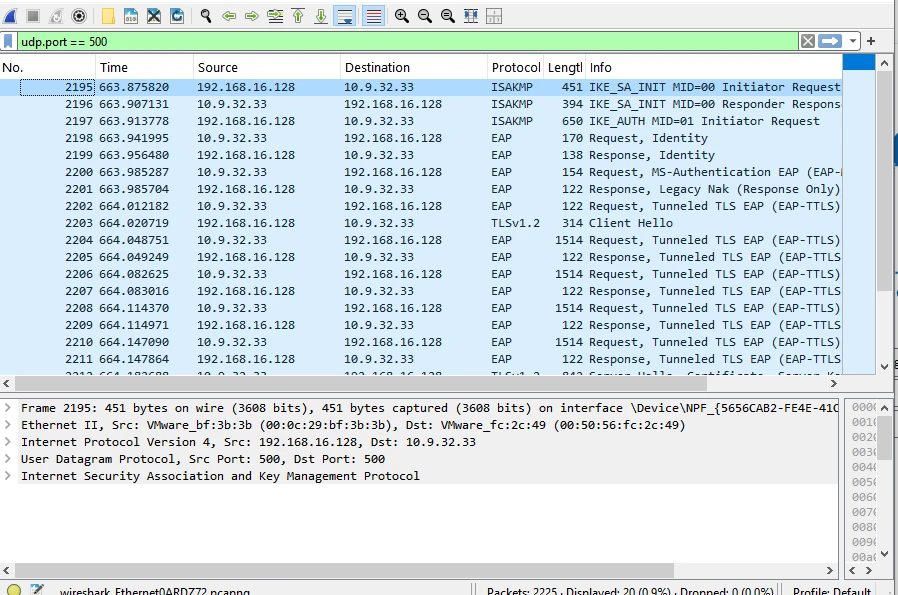
- Check the Wireshark capture to see if there is a TLS error with the message 'Unknown CA'.
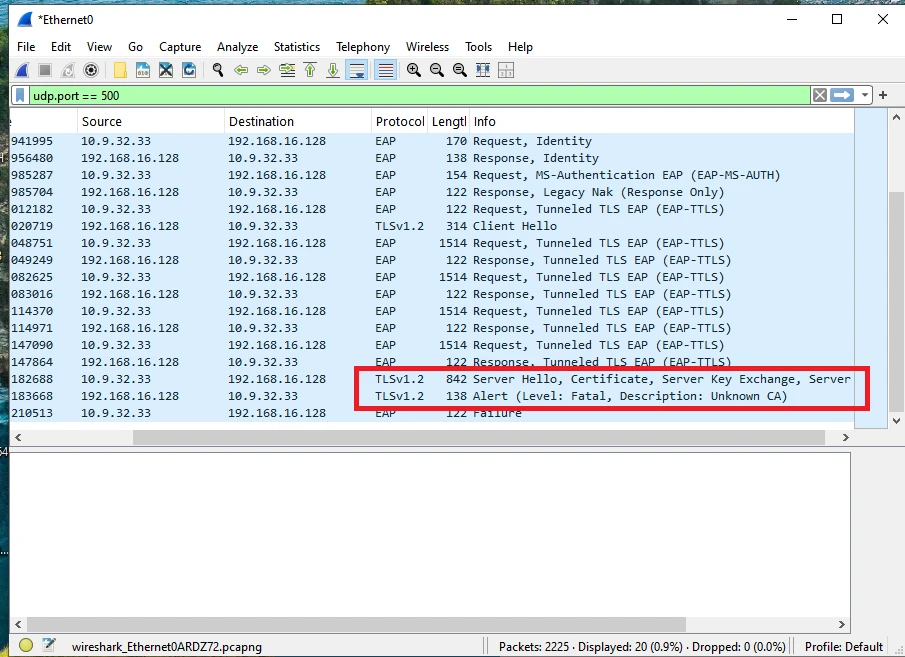
The TLS alert above generates the following FortiOS debug messages: EAP entering state RECEIVED
EAP: parseEapResp: rxResp=1 respId=0 respMethod=21 respVendor=0 respVendorMethod=0
EAP: EAP entering state INTEGRITY_CHECK
EAP: EAP entering state METHOD_RESPONSE
SSL: Received packet(len=13) - Flags 0x00
SSL: Received packet: Flags 0x0 Message Length 0
SSL: (where=0x4004 ret=0x230)
SSL: SSL3 alert: read (remote end reported an error):fatal:unknown CA - Verify the FortiGate WIFI certificate and ensure that it is selected as a trusted certificate instead:
show full system global | grep wifi-certificate
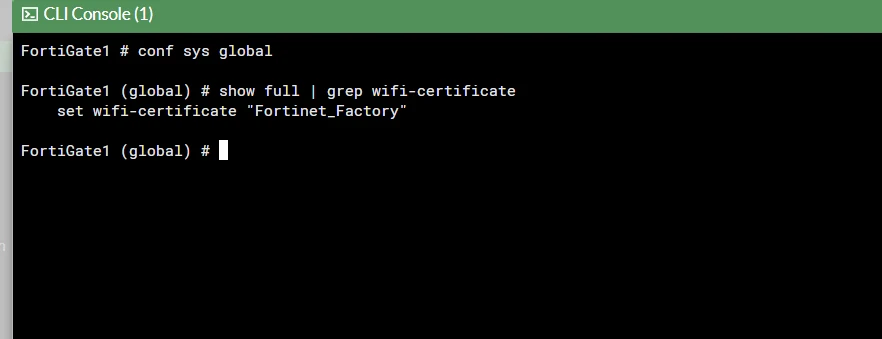
Note:
The 'Fortinet_Wifi' certificate will be generally be trusted by most endpoints since it is signed by a valid public CA:
config system global
set wifi-certificate Fortinet_Wifi
end
- After changing the Wi-Fi certificate option to use a trusted certificate, attempt the VPN connection again and confirm that the certificate error goes away. Repeat steps 2-6 for this part:
Note: User authentication with IKEv2 dial-up tunnels requires some CLI-only configuration including enabling EAP as shown below. See Technical Tip: A guide to dial-up IPSec VPN authentication and policy matching for more information. 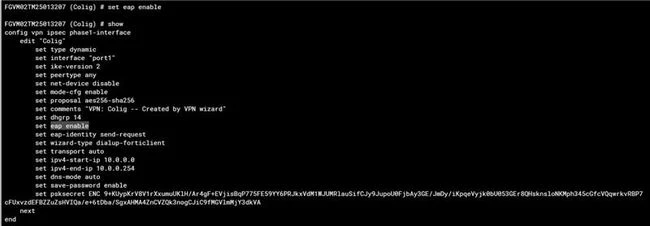
| 



