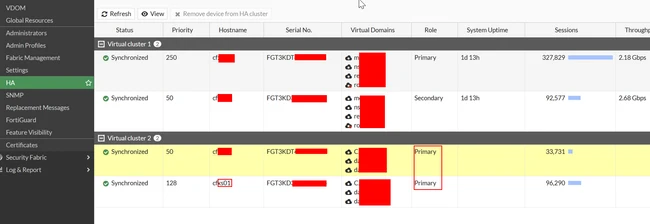

Troubleshooting Tip: Both FortiGate devices appearing as the primary device in an HA virtual cluster
| Description | This article describes a known issue where both FortiGate devices appear as primary device in the HA virtual cluster. |
| Scope | FortiGate. |
| Solution | This issue occurs after making an upgrade to firmware version FortiOS 7.2.11. Navigate to System and then select HA.
Both devices show that they are the primary devices in the HA virtual cluster.
This is a known issue that has been resolved in v7.4.5 and v7.6.0.
The issue is cosmetic and only appears in the GUI. When running 'diagnose sys ha status' on FortiGate CLI, both devices correctly show the primary/secondary role.
FGT (global) # diagnose sys ha status
[Debug_Zone HA information]
[Kernel HA information]
vcluster 2, state=standby, primary_ip=169.254.0.1, primary_id=1 |