Error: 'gw validation failed'.
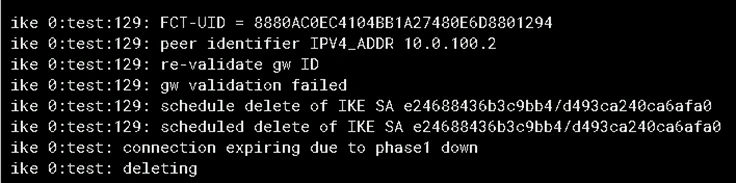 If this error appears, it means EAP is not enabled in the Phase1-interface. The configuration on the FortiClient should look like this:
If the Authentication (EAP) is set to Disable in the FortiClient settings, this will cause a 'gw validation failed' error.
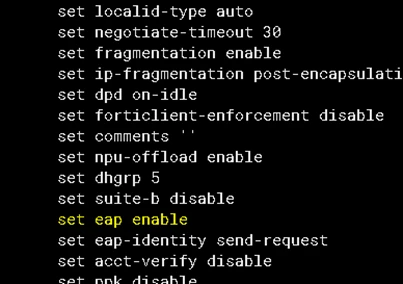
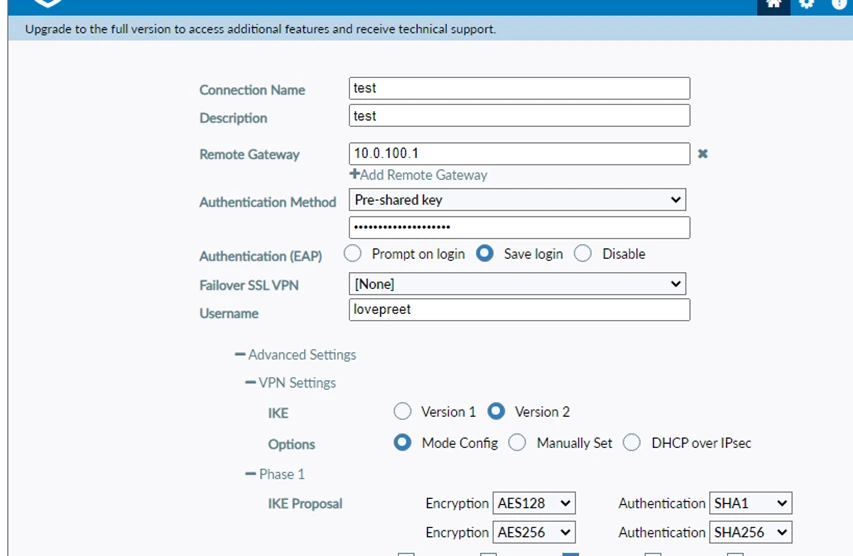 Since EAP is used, the settings will be as follows:
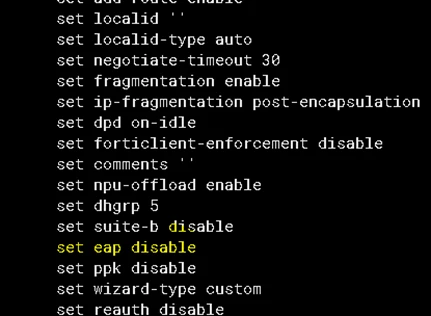 Solution: Change that EAP setting to 'enable' under IPsec phase1 interface settings. This will fix the error in most cases:
config vpn ipsec phase1-interface
    edit <VPN_Name>
        set eap enable
end
 For example: 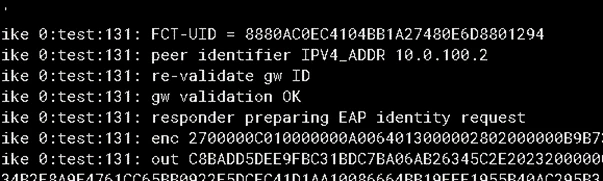 Receiving a 'gw validation failed' error when using IPsec IKEv2 dial-up VPN for Android users.
ike V=VPN:4:3rdpart_IPSEC:876: responder received AUTH msg
ike V=VPN:4:3rdpart_IPSEC:876: received peer identifier KEY_ID ''
ike V=VPN:4:3rdpart_IPSEC:876: re-validate gw ID
ike V=VPN:4:3rdpart_IPSEC:876: gw validation failed
In this case, authentication is configured using a pre-shared key combined with Username and Password, which is not compatible with FortiClient on Android when using IKEv2 with EAP. Error does not occur when using FortiClient Android and IPsec IKEv1.
FortiClient (Android) supports IPsec VPN using either pre-shared key or X.509 certificate-based authentication, but does not support combining PSK with EAP (Username/Password).
Refer to the following document for more information: Technical Tip: Getting 'gw validation failed' when using IPsec IKEv2 dial-up VPN for android users.
Error: 'EAP response is empty'. 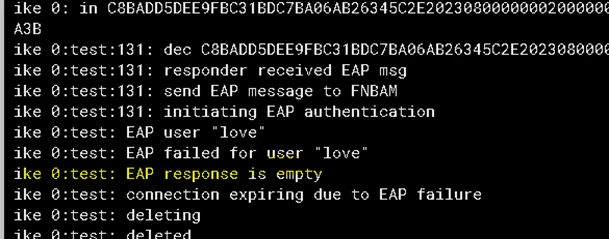
Additionally, EAP will fail if individual user(s) are specified in the firewall policy. Ensure to use the user group, either in the firewall policy or in the phase 1 VPN configuration.

Explanation: This error message appears when no user group is defined in the IPsec tunnel for authentication.
Solution:
There are two types of EAP identity methods:
 It is necessary to change it to 'send-request'. By default, it is 'use-id-payload'. It is necessary to specify the group to authenticate against:
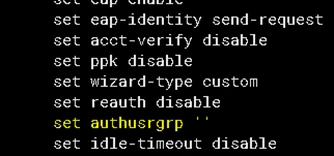 This setting will only appear after enabling the EAP in phase 1. The final setting should look like the following:
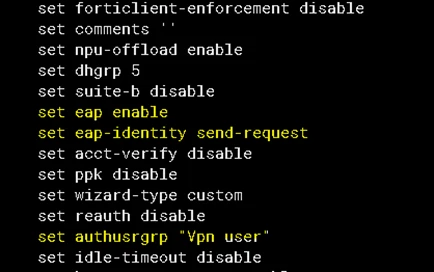
Starting from version 7.6.1, EAP options and the authusrgrp parameter are also available in the GUI.
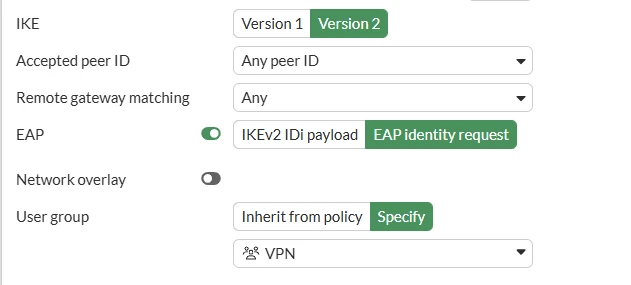
If required, instead of applying the user group in the VPN settings, it is also possible to apply it to a firewall policy.
The firewall policy will look like this:

To unset the group from the IPsec VPN settings:
config vpn ipsec phase1-interface
    edit <VPN_Name>
        unset  authusrgrp
end
Note: Make sure to set the group either in the IPsec VPN settings or in the Firewall policy to match and allow the traffic.
If the user group is set at both, then the configured policy will not be matched, and users will not be able to access the internal servers after connecting to the VPN, as it will match the implicit deny policy.
In the debug logs, the following error is observed:
denied by forward policy check (policy 0)
It is now possible to connect with a local user. If a RADIUS or LDAP server is used for the authentication server, it would not be possible to authenticate. Username case sensitivity can also lead to the EAP fail error. If the local user account is disabled on the FortiGate, this can also result in an empty EAP response. Ensure that the user is enabled before testing authentication.
Another possibility of this error, 'EAP response' is empty, is seen if the response from the Radius server is not coming back, and as a result, a timeout occurs.
To fix it, increase the remote auth timeout in the FortiGate global settings as well as RADIUS settings as shown below:
config system global
    set remoteauthtimeout 60
end
Enter an integer value from <1> to <300> (default = <5>).
Under RADIUS settings:
config user radius
    edit <Name of the Radius server>
        set timeout 45
end
Enter an integer value from <1> to <300> (default = <5>).
If the IPsec negotiation time is about to expire (the default is 30 seconds) and the user authentication accept request is not sent to the FortiGate, such as when the user delays entering the authentication token or delay in receiving the authentication code, the IPsec negotiation may time out. In these cases, it is recommended to increase the IPsec negotiation timeout, ideally to the same value as the 'set remoteauthtimeout' or the RADIUS timeout value above.
Logs:
2026-03-27 13:10:14.065834 ike V=root:0:DIALUP:7639546 EAP 15487719276646 result FNBAM_NEED_TOKEN
2026-03-27 13:10:14.065852 ike V=root:0:DIALUP: EAP requires token for user "mayur"
2026-03-27 13:10:14.065861 ike V=root:0:DIALUP:7639546: responder preparing EAP pass through message
.
.
2026-03-27 13:10:14.280311 ike V=root:0:DIALUP: EAP 15487719276647 pending
2026-03-27 13:10:14.280568 ike V=root:0:DIALUP:7639546 EAP 15487719276647 result FNBAM_CHALLENGED
2026-03-27 13:10:14.280584 ike V=root:0:DIALUP: EAP challenged for user "mayur"
2026-03-27 13:10:14.280591 ike V=root:0:DIALUP:7639546: responder preparing EAP pass through message
.
.
2026-03-27 13:10:14.280635 ike V=root:0:DIALUP:7639546: sent IKE msg (AUTH_RESPONSE): 11.11.11.1:4500->12.12.12.2:13074, len=96, vrf=0, id=6407d2b18e2751d5/d95636c3ade
0a625:0000000b, oif=17
2026-03-27 13:10:23.531985 ike V=root:0:DIALUP:7639546: negotiation timeout, deleting
2026-03-27 13:10:23.532032 ike V=root:0:DIALUP: connection expiring due to phase1 down
2026-03-27 13:10:23.532040 ike V=root:0:DIALUP: going to be deleted
Command:
config vpn ipsec phase1-interface
    edit <tunnel name>
        set negotiate-timeout 60
end
Enter an integer value from <1> to <300> (Default = <30>).
Notes:
IKEv2:
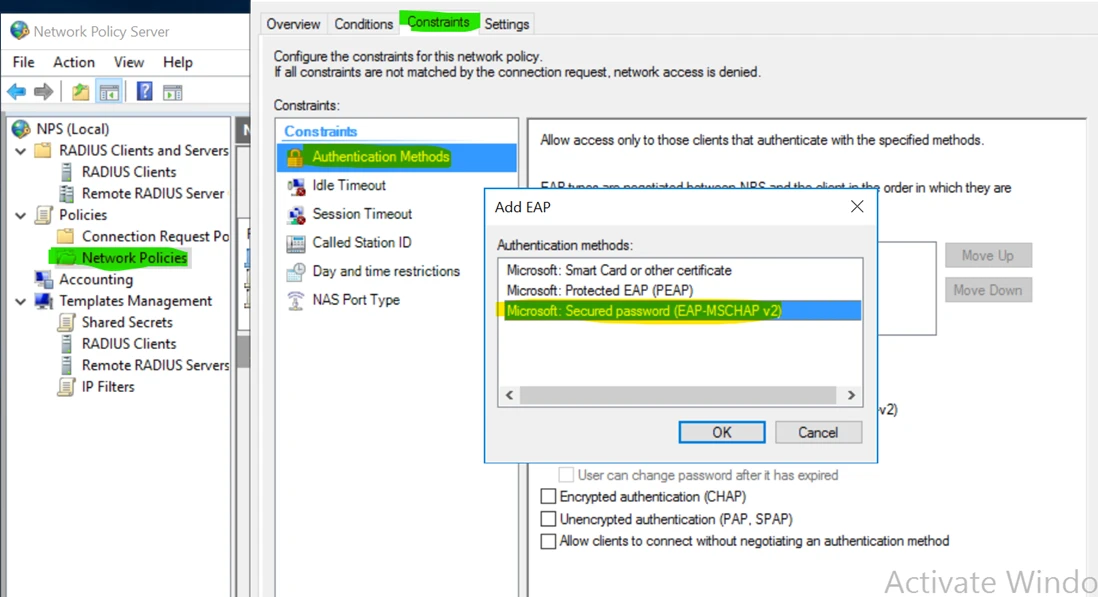
For IKEv2, FortiClient will use EAP-MSCHAPv2. For this setup to work, the remote radius server must support EAP-MSCHAPv2 authentication (EAP-MS-CHAP) (Microsoft NPS, DUO, for example).
The error 'Can not proxy Radius Requests to the primary authenticator. Try using PAP on the system communicating with the Authentication Proxy' is observed when EAP-MSCHAPv2 is not enabled on DUO. The DUO server then responds with an Access-Reject (response code 3).

To enable EAP-MSCHAPv2, refer to the DUO support knowledge base: Does the Duo Authentication Proxy support MS-CHAPv2 or EAP-MSCHAPv2?.
Starting from FortiClient 7.4.3, EAP-TTLS is now supported with IKEv2 authentication: EAP-TTLS support for IPsec VPN 7.4.3.
In earlier versions of FortiClient, EAP-MSCHAPv2 was the method used for username + password authentication and did not work with LDAP. EAP-TTLS now works with LDAP authentication.
Related article: Technical Tip: IKEv2 dialup IPsec tunnel with Radius server authentication and FortiClient. Error:
EAP 94840547 pending
EAP 94840547 result 1
EAP failed for user "lovepreet"
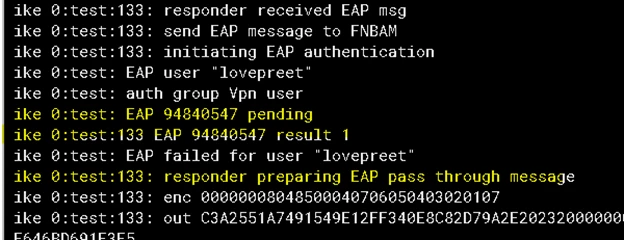 If it is authenticated against the RADIUS server, then this error will be encountered. Troubleshooting: Run debug commands:
diagnose debug console timestamp enable
diagnose debug app fnbamd -1
diagnose debug app ike -1
diagnose debug app eap_proxy -1
diagnose debug enable
In order, these commands:
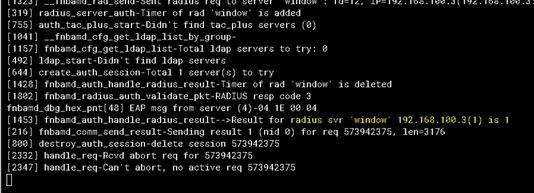
Focus on the response code:
This one means the RADIUS server denied the request:
0: Success
1: Deny
2: Challenged (password renewal or token is needed)
3: unknown
4: Pending
5: Error
6: Framed IP Conflict
7: Token code is required
8: Need another token due to the previous one is out of sync
9: Response Buffer is too small
10: Authentication time out
11: Max Concurrent authentication sessions are reached
12: Token code is already used
FortiOS 8.0.1 and above enhances tunnel-down logging by providing clearer, more detailed log information to help administrators identify and troubleshoot IPsec tunnel failures faster. Refer to the documentation for detailed information: Logging enhancements for tunnel down.
Related article:
Technical Tip: RADIUS authentication troubleshooting. It is possible to verify this fact by running the packet capture on the RADIUS server and filtering for RADIUS traffic.
 The reason this is happening is that the credentials used for authenticating against other schemes, such as mschap2 on the NPS in Windows AD, are not accepted for this example. Verify the credentials against FortiGate by using the command below:
diagnose test authserver radius <radius server_name> <authentication scheme><username> <password>
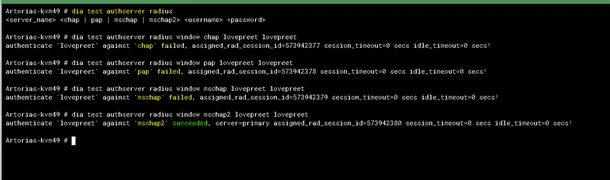 On the RADIUS server, there was no mschap2 scheme selected.
To solve this, go to the RADIUS server.
Go to Network policies -> Virtual private connection -> Select Constraints -> Authentication method -> Choose the right Authentication method.
 Related articles: |