


Technical Tip: Webfilter appears to be unavailable
Description
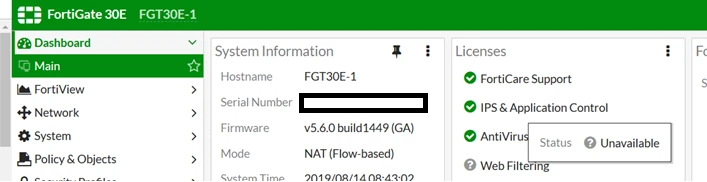
This article explains why the Webfilter may appear to be unavailable even if a valid contract is purchased.
Scope
FortiGate.
Solution
The web filter will always appear to be unavailable if it’s not used in a policy and this can appear from the following command :
T30E-1 # diag debug rating
Locale : english
The service is not enabled.
As soon as the web filter is added to a firewall policy, run the following debug:
diagnose debug application update -1
diagnose debug enable
execute update-now
To stop the debugging:
diagnose de disable
diagnose de reset
After that, the webfilter will appear as follows:
FGT30E-1 # diag debug rating
Locale : english
License : Contract
-=- Server List (Wed Aug 14 08:52:08 2019) -=-
IP Weight RTT Flags TZ Packets Curr Lost Total Lost
62.209.40.73 10 10 1 1 0 0
62.209.40.72 10 10 1 1 0 0
45.75.200.85 20 37 0 1 0 0
FGT30E-1 #
Related articles:
Troubleshooting Tip: Unable to connect to FortiGuard servers
Technical Tip: Web Page Blocked using WebFilter when failed to connect to FortiGuard
