


Technical Tip: Unable to access websites that use Google reCAPTCHA
Description
This article describes that users are unable to access websites that use Google reCAPTCHA.
Static URL filter allowed a few websites and blocked others.
Google APIs and reCAPTCHA websites are added to the exempt list, still unable to access websites that use reCAPTCHA. SSL inspection in Certificate-inspection mode.
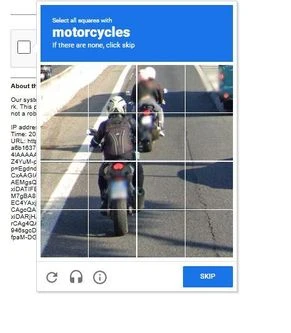
Example of the reCAPTCHA:
Scope
FortiGate v7.2.
Solution
Step 1:
Create an Application Control profile to allow the application Google.Analytics. This will allow the traffic.
Then apply that Application Control profile to the policy.
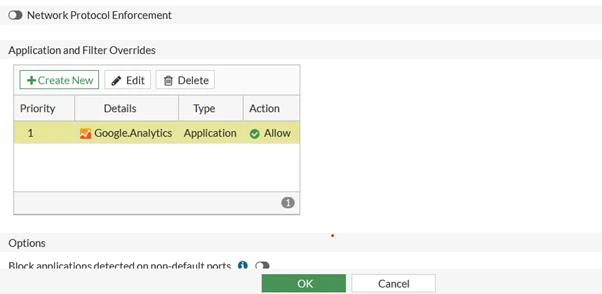
Note: Google Analytics is a web analytics service provided by Google that tracks and reports website traffic.
Check if the policy is using deep-inspection (install the FortiGate certificate in the local machine if not installed previously).
If disabling UTM profiles did not resolve the issue, turn on App control without the Web Filter and test to see if the reCAPTCHA works. If it does, then check the Web Filter if it is causing the issue.
Step 2:
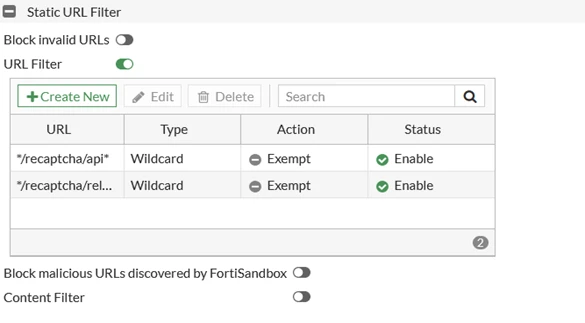
Add URL filters the following Wildcards with action 'exempt':
*/recaptcha/api*
*/recaptcha/releases*
Then apply this filter profile to the policy.
Step 3:
If Google is being blocked, modify the static URL filter with a 'Simple' filter for Google and choose the 'Exempt' action.
This will allow access to websites that use Google reCAPTCHA.
Note: When multiple users share a single public IP address through NAT (for example, using an overload IP pool), external services such as Google may detect a high volume of requests from that IP. This can be interpreted as automated or suspicious traffic and may result in repeated CAPTCHA challenges.
If this behavior is observed, verify how many users are sharing the same public IP address and consider expanding the IP pool or redistributing traffic across multiple IPs. For more information on configuring IP pools, refer to the following article: Technical Tip: How to configure SNAT with IP pool.
