
Technical Tip: SSL VPN is not working when FortiGate is on NGFW Policy-based
| Description | This article describes that SSL VPN is not working when FortiGate is on NGFW Policy-based. |
| Scope | FortiGate. |
| Solution | When FortiGate is operating in NGFW policy-based mode, SSL VPN may not work, although it is configured under SSL VPN settings with a security policy to allow traffic. When running the sniffer, the TCP three-way handshake is not completing:
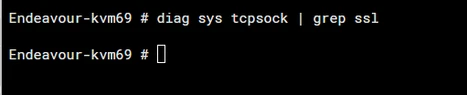
Here, SSL VPN debugs do not show any output. However, running debug flow for the public IP address of the test PC and SSL VPN port number, will show error 'iprope_in_check() check failed on policy 0, drop' in debugs:
Debug flow Commands:
diagnose debug reset diag debug flow show function-name enable diagnose debug flow filter addr x.x.x.x <----- Replace x.x.x.x with the Public IP address of the SSL VPN user PC. diagnose debug flow filter port zzzz <----- Replace zzzz with SSL VPN port number. diagnose debug console timestamp enable diagnose debug flow trace start 100 diagnose debug enable
To stop Debugs:
diagnose debug flow filter clear diagnose debug disable diagnose debug reset
Debug flow output:
2024-12-23 18:15:36 id=65308 trace_id=1 func=print_pkt_detail line=5862 msg="vd-root:0 received a packet(proto=6, x.x.x.x:55795->y.y.y.y:zzzz) tun_id=0.0.0.0 from port1. flag [S], seq 3180712052, ack 0, win 65535" 2024-12-23 18:15:36 id=65308 trace_id=1 func=init_ip_session_common line=6047 msg="allocate a new session-00a7d620" 2024-12-23 18:15:36 id=65308 trace_id=1 func=__vf_ip_route_input_rcu line=1990 msg="find a route: flag=80000000 gw-0.0.0.0 via root" 2024-12-23 18:15:36 id=65308 trace_id=1 func=fw_local_in_handler line=615 msg="iprope_in_check() check failed on policy 0, drop"
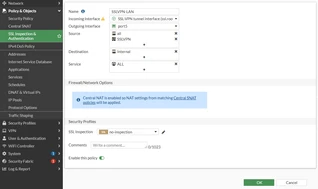
In Policy-based NGFW, it is also necessary to have an SSL inspection policy under Policy&Objects -> SSL Inspection&Authentication for the SSL VPN traffic otherwise the sslvpnd will not start.
firewall # set groups "SSLVPN"
If the user or user group is included in the security policy but not the SSL Inspection & Authentication Policy, it will still show a 'Permission Denied' error while attempting to establish an SSL VPN connection.
Related document: |