FortiGate configuration:
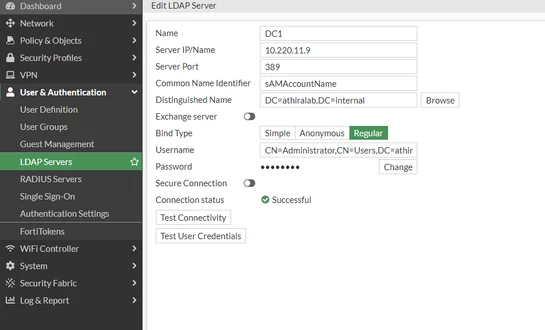
Set up the LDAP profile under User & Authentication -> LDAP server:
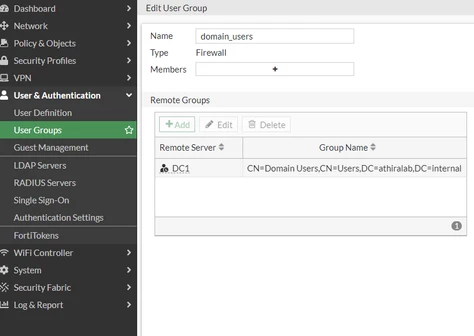
 Create a user group corresponding to AD group under User & Authentication -> User groups:
 Create a VPN by using the wizard and make use of the 'remote access' and 'native windows' template.
Note: Set the authentication method as 'Pre-shared key' and select the AD user group. It will look like the following in the CLI:
config vpn ipsec phase1-interface
    edit "ipsec-l2tp"
        set type dynamic
        set interface "port1"
        set peertype any
        set net-device enable
        set proposal aes256-md5 3des-sha1 aes192-sha1
        set dhgrp 2
        set wizard-type dialup-windows
        set psksecret xxxx
    next
end
Note: 'net-device' must be enabled in order to allow multiple VPN connections from behind the same NAT device (the same public IP address).
config vpn ipsec phase2-interface
    edit "ipsec-l2tp"
        set phase1name "ipsec-l2tp"
        set proposal aes256-md5 3des-sha1 aes192-sha1
        set pfs disable
        set encapsulation transport-mode
        set l2tp enable
        set keylifeseconds 3600
    next
end
config vpn l2tp
    set status enable
    set eip 1.1.1.10
    set sip 1.1.1.1
    set usrgrp "domain_users"
end
In FortiOS v7.0, two policies are required. The first will be used for L2TP tunnel setup, and the second will be used for traffic across the tunnel.
config firewall policy
    edit 1
        set name "vpn_ipsec-l2tp_l2tp"
        set srcintf "ipsec-l2tp"
        set dstintf "port1"
        set action accept
        set srcaddr "all"
        set dstaddr "all"
        set schedule "always"
        set service "L2TP"
    next
    edit 2
        set name "vpn_ipsec-l2tp_remote_0"
        set srcintf "l2t.root"
        set dstintf "port2"
        set action accept
        set srcaddr "ipsec-l2tp_range"
        set dstaddr "lan"
        set schedule "always"
        set service "ALL"
        set nat enable
    next
end
Client configuration:
On Windows, select Start -> Settings -> Network & Internet -> VPN -> Add a VPN connection.
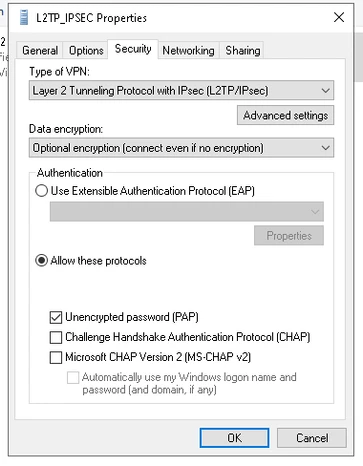
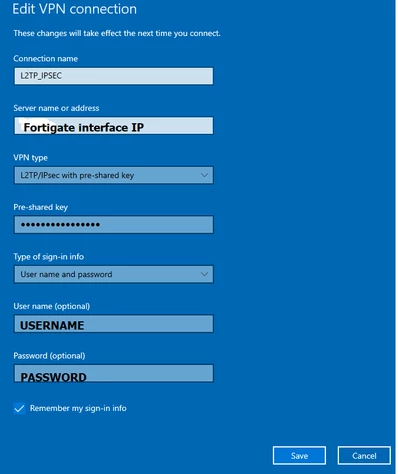 Due to point-to-point protocol limitations, only PAP is supported for LDAP authentication for L2TP. It is highly important to set this under VPN adapter properties to be able to connect to VPN successfully.
To set PAP: Go to the appropriate adapter, open Properties -> Security and select PAP as shown below:
 Verfication:
If PAP is not explicitly set under client adapter settings, the connection will fail with the following error in L2TP debug logs on FortiGate:
l2tp_ppp_recv()-525: tunnel=1 (len=64)
RCV: CHAP Response id(1)
SND: CHAP Failure id(1) msg(Authentication Fail!O1)
l2tp_ppp_send()-345: tunnel=1
MSCHAP-v2 peer authentication failed for remote host <username>: LCP Termiate_Request id(5) len(25)
l2tp_ppp_send()-345: tunnel=1
l2tp_handle_ppp_packet()-197:
l2tp_ppp_recv()-525: tunnel=1 (len=29)
RCV: LCP Terminate_Ack id(5) len(25)
Connection terminated.
On a successful connection:
diagnose vpn ike gateway list
vd: root/0
name: ipsec-l2tp_0
version: 1
interface: port1 3
addr: 10.5.27.1:500 -> 10.5.25.1:500
tun_id: 10.5.25.1/::10.0.0.5
remote_location: 0.0.0.0
created: 11s ago
IKE SA: created 1/1 established 1/1 time 10/10/10 ms
IPsec SA: created 1/1 established 1/1 time 20/20/20 ms
id/spi: 6 98dd5febdb7cbbce/6d34247b5bfb1fcb
direction: responder
status: established 11-11s ago = 10ms
proposal: 3des-sha1
key: 0c176b18ba911f63-68476d0d7860feb4-ccc1f23d85597d44
lifetime/rekey: 28800/28518
DPD sent/recv: 00000000/00000000
diagnose vpn tunnel list
name=ipsec-l2tp_0 ver=1 serial=5 10.5.27.1:0->10.5.25.1:0 tun_id=10.5.25.1 tun_id6=::10.0.0.5 dst_mtu=1500 dpd-link=on weight=1
bound_if=3 lgwy=static/1 tun=tunnel/255 mode=dial_inst/3 encap=none/728 options[02d8]=npu create_dev no-sysctl rgwy-chg frag-rfc accept_traffic=1 overlay_id=0
parent=ipsec-l2tp index=0
proxyid_num=1 child_num=0 refcnt=6 ilast=0 olast=4 ad=/0
stat: rxp=67 txp=20 rxb=6307 txb=1140
dpd: mode=on-demand on=1 idle=60000ms retry=3 count=0 seqno=0
natt: mode=none draft=0 interval=0 remote_port=0
proxyid=ipsec-l2tp proto=17 sa=1 ref=3 serial=1 transport-mode add-route
src: 17:10.5.27.1-10.5.27.1:1701
dst: 17:10.5.25.1-10.5.25.1:0
SA: ref=3 options=20182 type=00 soft=0 mtu=1470 expire=3576/0B replaywin=2048
seqno=15 esn=0 replaywin_lastseq=00000043 itn=0 qat=0 hash_search_len=1
life: type=01 bytes=0/0 timeout=3591/3600
dec: spi=511656c5 esp=3des key=24 1046f73abfe8085201264c692c7cb63c6073f33e23930157
ah=sha1 key=20 7003236905bb0912758cec75fb451b90bf35fe4c
enc: spi=3181a9c6 esp=3des key=24 19850800e3f80aba66cd4a1bec04ff5ab99e05d52f69d678
ah=sha1 key=20 b7c480f88cf405333397d298030f626327508441
dec:pkts/bytes=134/12614, enc:pkts/bytes=40/2956
npu_flag=00 npu_rgwy=10.5.25.1 npu_lgwy=10.5.27.1 npu_selid=3 dec_npuid=0 enc_npuid=0
diagnose debug enable
diagnose vpn l2tp tunnel
Expected output:
--- L2tp tunnels (VD: 0) -------
-----------------------
Num of tunnels: 1
-----------------------
Tunnel ID = 1 (local id), 6 (remote id) vfid = 0 vrf = 0
peer 10.5.25.1:1701 duration = 28
control_seq_num = 2, control_rec_seq_num = 4,
last recv pkt = 2
Call ID = 1 (local id), 1 (remote id), serno = 0
assigned ip = 1.1.1.2
data_seq_num = 0,
tx = 654 bytes (19), rx= 6642 bytes (81)
|