salmas
Staff
Staff
May 19, 2025 4:41 AM UTC

Technical Tip: OIDs for monitoring HA

  • Aug 20, 2026 3:57 PM UTC
  • 0 replies
  • 1691 views
  • Translate All

Description

This article describes how to find and set the correct OID to monitor HA cluster units.

Scope

FortiGate.

Solution

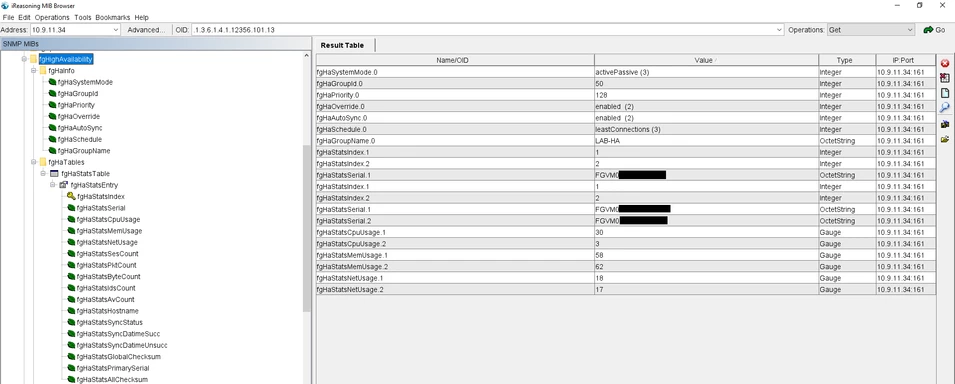
Refer to this KB article to load and view the MIB tree: Technical Tip: The correct OID to monitor each interface state.


Once the MIB tree is loaded, navigate to

fnFortiGateMib -> fgHighAvailability.


The main HA branch is 'fgHighAvailability .1.3.6.1.4.1.12356.101.13'.


Two main sections are available under this branch:

  • fgHaInfo.

  • .1.3.6.1.4.1.12356.101.13.1.

  • fgHaStatsTable.

  • .1.3.6.1.4.1.12356.101.13.2.1.


MIB tree.png


Note: fgHaStatsTable is an SNMP table. An HA member index is appended to the OID when querying a specific member.

It is recommended to first perform an SNMP walk:

snmpwalk -v2c -c <community> <FortiGate_IP> .1.3.6.1.4.1.12356.101.13


This will show the available HA objects and the indexes assigned to the individual cluster members.

For monitoring HA synchronization specifically, fgHaStatsSyncStatus can be used together with the member index discovered from the SNMP walk.


    Risk and Resilience in the Age of AI. An OT Thought Leadership Summit for Houston's Critical Infrastructure Leaders. Date: Thursday, December 3, 2026. Time: 8:30 am - 1:30 pm (CT). Location: The Westin Houston, Memorial City | 945 Gessner Road, Houston, TX 77024