Technical Tip: Not able to enable VDOM in FortiGate and showing error 'node_check_object fail!'
| Description | This article describes the scenario when an admin user cannot enable VDOM in FortiGate and shows the error 'node_check_object fail!'. |
| Scope | FortiGate. |
| Solution | In this example, when the admin user 'Andy' logs in to the FortiGate and try to enable multi-VDOM. The admin user 'Andy' is able to modify every setting in FortiGate.
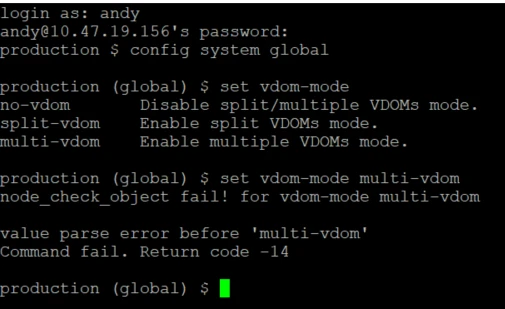
When showing the 'vdom-mode' options, the options no-vdom, split-vdom and multi-vdom are visible to 'Andy'. However, attempting to modify the setting results in an error 'node_check_object fail!'.
VDOM from the CLI:
 VDOM from the GUI:
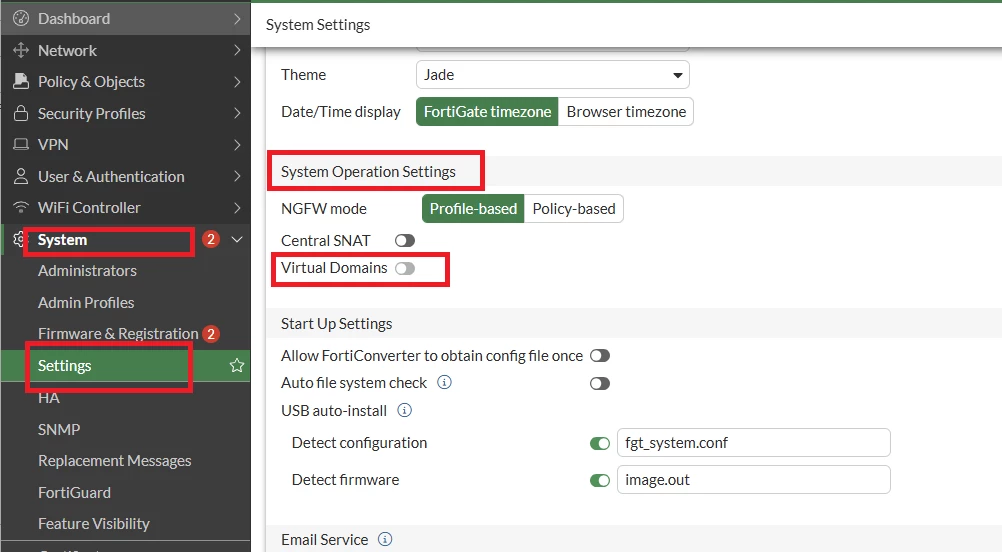
When checking from GUI by navigating to System -> Settings. Then, under 'System Operation settings', the 'Virtual Domains' option to enable Virtual Domains is greyed out.
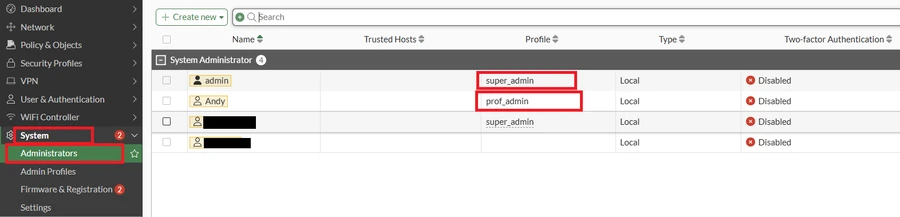
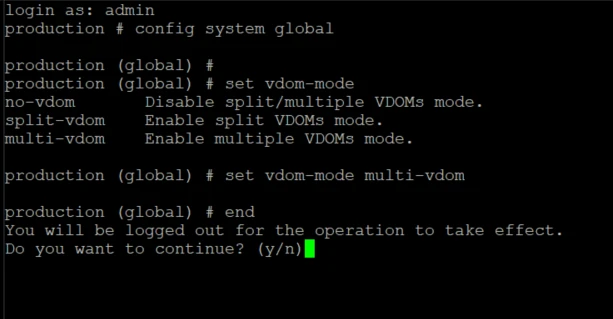
This will happen when the user does not have full privileges to make changes to the FortiGate. Changing this setting will require to login with an admin username that has 'super_admin' admin profile applied to change VDOM settings:
Go to System -> Administrators and verify the profile for user 'Andy'. User Andy has a prof_admin profile which is an insufficient privilege to enable VDOM.
Conclusion: Only admin users with a super_admin profile can enable/delete VDOM.
Note: The prof_admin is another default profile. It also provides full access, but unlike super_admin, it applies only to its virtual domain - not the global settings of FortiGate.
Related document: |