For most configurations, enabling IKE fragmentation allows connections to automatically establish when they otherwise might have failed due to intermediate nodes dropping IKE messages containing large certificates, which typically push the packet size over 1500 bytes. FortiOS will fragment a packet on sending if only all the following are true: Phase 1 contains set fragmentation enable. The packet is larger than the minimum MTU (576 for IPv4, 1280 for IPv6). The packet is being re-transmitted.
By default, IKE fragmentation is enabled. To configure IKEv1 fragmentation: config vpn ipsec phase1-interface
edit ikev1-tunnel
set fragmentation [enable | disable]
next
end
IKEv2 fragmentation:
Requirements:
IKEv2 fragmentation is not part of the main IKEv2 spec; it is defined in RFC 7383. Both IKEv2 peers must notify support for RFC 7383 with IKEv2_FRAGMENTATION_SUPPORTED. FortiOS includes the 'IKEv2_FRAGMENTATION_SUPPORTED' notification if 'set fragmentation enable' is configured on the phase1-interface (enabled by default).
IKEv2 negotiation packets requiring fragmentation are commonly seen in deployments using EAP-TTLS authentication for LDAP users or certificate-based authentication.
To configure IKEv2 fragmentation on FortiOS:
config vpn ipsec phase1-interface
    edit ike
        set ike-version 2
        set fragmentation [enable|disable]
        set fragmentation-mtu <500-16000>
    next
end
To configure IKEv2 fragmentation on FortiClient EMS:
Licensed FortiClient v7.2.5 and higher supports IKEv2 fragmentation.
In FortiClient EMS v7.4.5 and later, IKE fragmentation is enabled automatically on new VPN tunnel configurations.
EMS GUI manual EMS configuration:
In EMS, go to Endpoint Profiles -> Remote Access -> Edit Remote Access Profile. In VPN Tunnels, select Tunnel to modify -> Select 'Edit Tunnel'. Select Phase 1 -> Ensure 'Enable IKE Fragmentation' is selected.
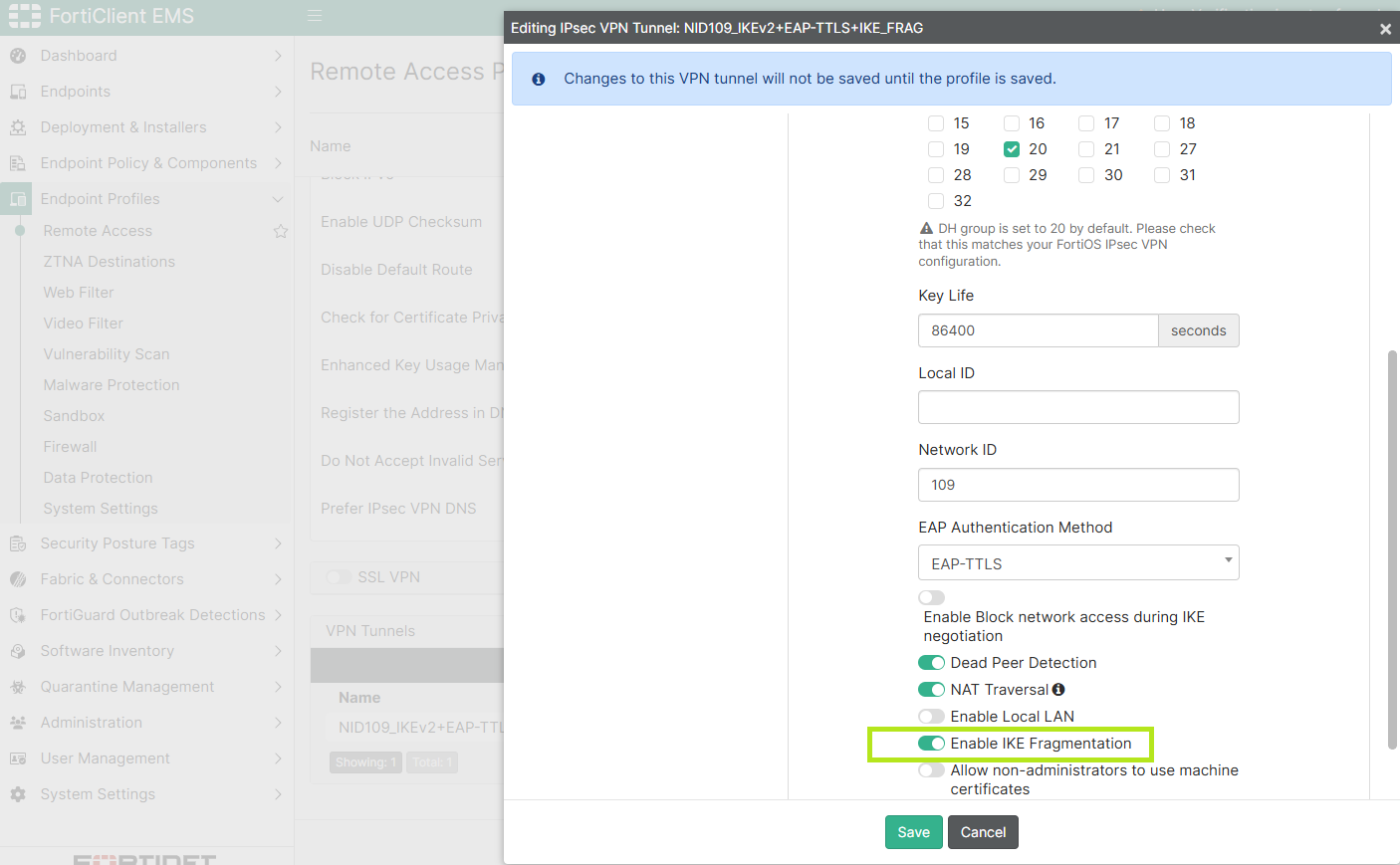
Select 'Save' to save the VPN tunnel changes to the Remote Access Profile. Select 'Save' to save the Remote Access Profile changes.
For EMS CLI configuration, see the IKE fragmentation example.
Unlike IKEv1, fragments are sent on the first attempt if the IKE payload size is greater than the fragmentation MTU.
Only some IKEv2 negotiation packets are considered fragmentable: AUTH (including AUTH_RESPONSE), CREATE_CHILD_SA, and some INFORMATIONAL.
Maximum number of IKEv2 fragments = 64 (for reassembly).
Reassembly timeout = 15 sec (same as IKEv1).
| 


