| See the following topology: 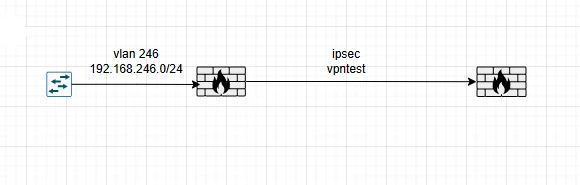 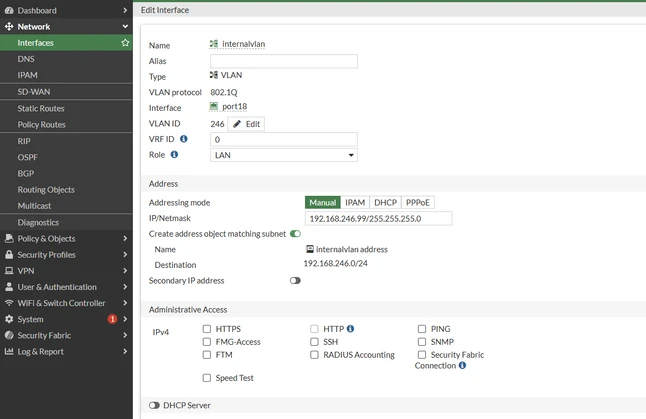
The following CLI commands are used to configure the VLAN interface: edit "internalvlan" set vdom "root" set ip 192.168.246.99 255.255.255.0 set device-identification enable set role lan set snmp-index 49 set ip-managed-by-fortiipam disable set interface "port18" set vlanid 246 next - Configure an IPsec tunnel.
Use the article below, or leverage an existing IPsec tunnel if one is already in place. Technical Tip: How to configure VPN Site to Site between FortiGates (Using VPN Setup Wizard). - Firewall Policy Configuration.
A firewall policy must be created to allow traffic from the VLAN interface to the IPsec tunnel. Navigate to Policy & Objects -> Firewall Policy, and create a new policy with the following settings: - Set the incoming interface to the VLAN interface (internalvlan).
- Set the outgoing interface to the IPsec tunnel (vpntest).
All other policy parameters (such as addresses, services, security profiles, and logging) should be configured according to the requirements of the environment and overall network design. Note: If bidirectional communication is required, a corresponding reverse policy must also be configured. 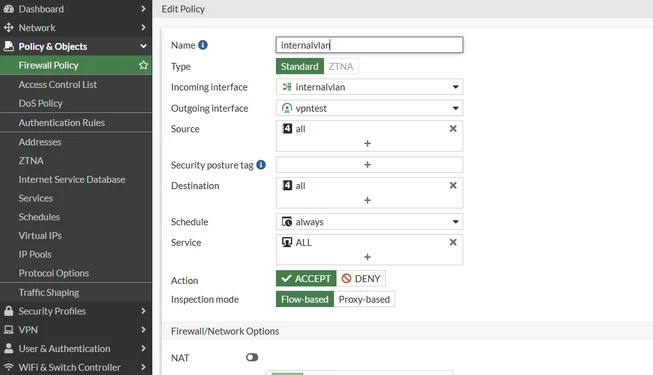
The policy can be configured using the following CLI commands: config firewall policy edit 0 set name "VLAN to tunnel" set srcintf "internalvlan" set dstintf "vpntest" set action accept set srcaddr "all" set dstaddr "all" set schedule "always" set service "ALL" next end - Configure Phase 2 Selectors on the VPN Tunnel.
- Navigate to VPN -> IPsec Tunnels.
- Open the relevant VPN tunnel and expand the Phase 2 section.
- Configure the Local Address and Remote Address to match the required Phase 2 selectors.
- Select OK to save the changes.
Note: If the Phase 2 selectors are configured as 0.0.0.0/0, explicit selectors are not required. 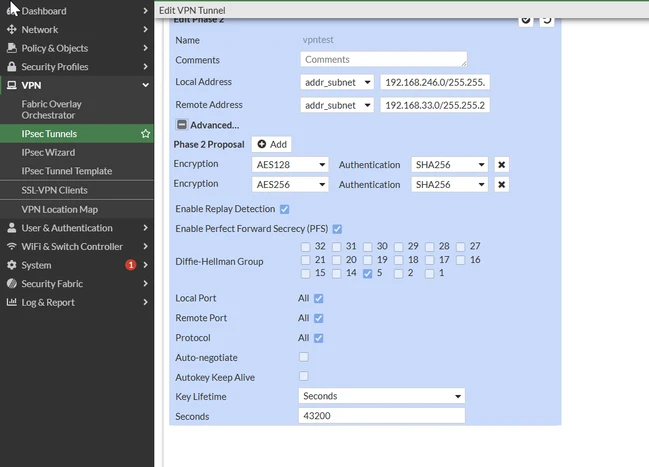
Use the following CLI configuration to set up Phase 2 of the VPN: config vpn ipsec phase2-interface edit "vpntest" set phase1name "vpntest"
set proposal aes128-sha256 aes256-sha256
set dhgrp 5
set src-subnet 192.168.246.0 255.255.255.0
set dst-subnet 192.168.33.0 255.255.255.0 next end At this point, the tunnel should be operational. If troubleshooting is required, initiate a debug flow using the article below: Troubleshooting Tip: Basic FortiGate connectivity diagnostics. The following is an example of the working debug flow output: id=65308 trace_id=1 func=__iprope_fwd_check line=806 msg="in-[internalvlan], out-[vpntest], skb_flags-02000000, vid-0, app_id: 0, url_cat_id: 0"
id=65308 trace_id=1 func=__iprope_tree_check line=528 msg="gnum-100004, use int hash, slot=2, len=2"
id=65308 trace_id=1 func=__iprope_check_one_policy line=2136 msg="checked gnum-100004 policy-1, ret-matched, act-accept"
id=65308 trace_id=1 func=__iprope_user_identity_check line=1899 msg="ret-matched"
id=65308 trace_id=1 func=__iprope_check line=2400 msg="gnum-4e20, check-ffffffffa002f520"
id=65308 trace_id=1 func=__iprope_check_one_policy line=2136 msg="checked gnum-4e20 policy-6, ret-no-match, act-accept"
id=65308 trace_id=1 func=__iprope_check_one_policy line=2136 msg="checked gnum-4e20 policy-6, ret-no-match, act-accept"
id=65308 trace_id=1 func=__iprope_check_one_policy line=2136 msg="checked gnum-4e20 policy-6, ret-no-match, act-accept"
id=65308 trace_id=1 func=__iprope_check line=2417 msg="gnum-4e20 check result: ret-no-match, act-accept, flag-00000000, flag2-00000000"
id=65308 trace_id=1 func=__iprope_check_one_policy line=2370 msg="policy-1 is matched, act-accept"
id=65308 trace_id=1 func=__iprope_fwd_check line=843 msg="after iprope_captive_check(): is_captive-0, ret-matched, act-accept, idx-1"
id=65308 trace_id=1 func=iprope_fwd_auth_check line=872 msg="after iprope_captive_check(): is_captive-0, ret-matched, act-accept, idx-1"
id=65308 trace_id=1 func=fw_forward_handler line=992 msg="Allowed by Policy-1:"
id=65308 trace_id=1 func=ipsecdev_hard_start_xmit line=669 msg="enter IPSec interface vpntest, tun_id=0.0.0.0"
id=65308 trace_id=1 func=_do_ipsecdev_hard_start_xmit line=229 msg="output to IPSec tunnel vpntest, tun_id=192.168.194.75, vrf 0"
id=65308 trace_id=1 func=esp_output4 line=876 msg="IPsec encrypt/auth"
id=65308 trace_id=1 func=ipsec_output_finish line=667 msg="send to 192.168.194.75 via intf-port17"
id=65308 trace_id=2 func=print_pkt_detail line=5938 msg="vd-root:0 received a packet(proto=1, 192.168.246.66:1->192.168.33.99:2048) tun_id=0.0.0.0 from internalvlan. t
ype=8, code=0, id=1, seq=2."
id=65308 trace_id=2 func=resolve_ip_tuple_fast line=6040 msg="Find an existing session, id-002494a6, original direction"
id=65308 trace_id=2 func=npu_handle_session44 line=1238 msg="Trying to offloading session from internalvlan to vpntest, skb.npu_flag=00000400 ses.state=00000200 ses.np
u_state=0x01040000"
id=65308 trace_id=2 func=fw_forward_dirty_handler line=442 msg="state=00000200, state2=00000000, npu_state=01040000"
id=65308 trace_id=2 func=ipsecdev_hard_start_xmit line=669 msg="enter IPSec interface vpntest, tun_id=0.0.0.0"
id=65308 trace_id=2 func=_do_ipsecdev_hard_start_xmit line=229 msg="output to IPSec tunnel vpntest, tun_id=192.168.194.75, vrf 0"
id=65308 trace_id=2 func=esp_output4 line=876 msg="IPsec encrypt/auth"
id=65308 trace_id=2 func=ipsec_output_finish line=667 msg="send to 192.168.194.75 via intf-port17"
id=65308 trace_id=3 func=print_pkt_detail line=5938 msg="vd-root:0 received a packet(proto=1, 192.168.246.66:1->192.168.33.99:2048) tun_id=0.0.0.0 from internalvlan. t
ype=8, code=0, id=1, seq=3."
id=65308 trace_id=3 func=resolve_ip_tuple_fast line=6040 msg="Find an existing session, id-002494a6, original direction" | 


