Topology: 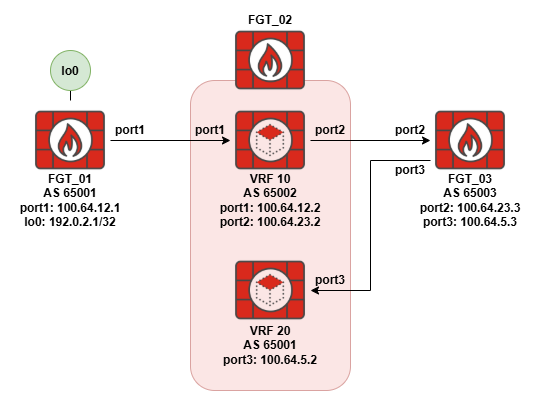 For the above example, consider the following: FGT_01 (AS 65001) has a local prefix 192.0.2.1/32 (belonging to lo0) that will be advertised out via BGP. This prefix will be received and re-advertised by VRF 10 in FGT_02 (AS 65002) towards FGT_03 (AS 65003), then FGT_03 will finally re-advertise towards VRF 20 (local AS 65001, also within FGT_02). Note that VRF 10 and VRF 20 are not separate VDOMs. Instead, they are separate Virtual Routing and Forwarding (VRF) instances within FGT_02. Additionally, note how VRF 20 has a local AS of 65001, which overlaps with FGT_01. This is commonly observed in situations where there are multiple geographically-separated sites (FGT_01 and VRF 20), as well as cases with MSPs where a single device (e.g. FGT_02) is acting as both the Provider Edge (PE, VRF 10) and Customer Edge (CE, VRF 20) routers.
However, this design can have consequences with regards to how route advertisement is handled since a single BGP routing instance is being utilized here (as opposed to using fully-separate VDOMs). To demonstrate, the following is the output for prefix 192.0.2.1/32 as it is being advertised from FGT_03 towards VRF 20/FGT_02: FGT_03 # get router info bgp neighbors 100.64.5.2 advertised-routes
VRF 0 BGP table version is 3, local router ID is 10.0.0.3
Status codes: s suppressed, d damped, h history, * valid, > best, i - internal
Origin codes: i - IGP, e - EGP, ? - incomplete
Network Next Hop Metric LocPrf Weight RouteTag Path
*> 192.0.2.1/32 100.64.5.3 0 0 65002 65001 i <-/->
Notice how the AS path of the prefix includes both 65002 (VRF 10, FGT_02) and 65001 (FGT_01, the originator). By default, BGP disallows the installation of prefixes whose AS path includes any local AS belonging to the FortiGate, and so the 192.0.2.1/32 prefix will not be installed to the BGP RIB: FGT_02 # diagnose ip router bgp all enable
Debug messages will be on for 30 minutes.
FGT_02 # diag ip router bgp level info
Debug messages will be on for 30 minutes.
FGT_02 # diag deb enable
[...]
[root] BGP: 100.64.5.3-Outgoing [ENCODE] Msg-Hdr: Type 5
[root] BGP: 100.64.5.3-Outgoing [ENCODE] Route-Refresh: RR-Type New MsgSize 23
[root] BGP: 100.64.5.3-Outgoing [RIB] Update: Prefix 192.0.2.1/32 path_id 0 denied due to as-path contains our own AS
In cases like this, administrators have two options available for addressing this issue: Option 1 - replace the current AS path before advertising the prefix: As noted above, FGT_02 will reject prefixes whose AS path includes 65002 and/or 65001. As a workaround, FGT_03 can be used to modify/replace the AS path before prefix 192.0.2.1/32 is advertised out. To do this, administrators will need to create an aspath-list object as well as a route-map that can be applied in the outgoing BGP direction.
For example, the following configuration will use regex to match any AS path that contains 65002 or 65001, and if it matches, it will then fully replace the existing AS path with a different admin-specified path. It also offers an alternative aspath-list that matches any AS path and replaces it: FGT_03 # show router aspath-list
config router aspath-list
edit "All_ASPATH"
config rule
edit 1
set action permit
set regexp ".*"
next
end
next
edit "Only_Specific_AS"
config rule
edit 1
set action permit
set regexp "65001|65002"
next
end
next
end
FGT_03 # show router route-map
config router route-map
edit "Modify_ASPATH"
config rule
edit 1
set match-as-path "Only_Specific_AS"
set set-aspath-action replace
set set-aspath "12345"
unset set-ip-prefsrc
next
end
next
end
FGT_03 # show router bgp
config router bgp
set as 65003
set router-id 10.0.0.3
config neighbor
[...]
edit "100.64.5.2"
set interface "port3"
set remote-as 65001
set route-map-out "Modify_ASPATH"
next
end
end
Once the route map is applied and the BGP peering is restarted on FGT_03, VRF 20 on FGT_02 will be able to successfully accept the prefix since there are no further AS conflicts: FGT_02 # get router info bgp neighbors 100.64.5.3 routes
Status codes: s suppressed, d damped, h history, * valid, > best, i - internal,
S Stale
Origin codes: i - IGP, e - EGP, ? - incomplete
VRF 20 BGP table version is 2, local router ID is 10.0.0.2
Network Next Hop Metric LocPrf Weight RouteTag Path
*> 192.0.2.1/32 100.64.5.3 0 0 0 65001 65003 12345 i <-/1>
Option 2 - use allowas-in-enable to ignore any AS overlaps and import the prefix as-is: The allowas-in-enable option instructs the FortiGate to bypass BGP loop prevention by ignoring the presence of its own AS in the AS path. In this scenario, configuring this option on FGT_02 for the FGT_03 neighbor entry (100.64.5.3) will allow BGP to import prefix 192.0.2.1/32 by ignoring 65002 and 65001 in the AS path: FGT_02 # show router bgp
config router bgp
set as 65002
set router-id 10.0.0.2
config neighbor
[...]
edit "100.64.5.3"
set allowas-in-enable enable
set interface "port3"
set remote-as 65003
set local-as 65001
next
end
end
FGT_02 # get router info bgp neighbors 100.64.5.3 routes
Status codes: s suppressed, d damped, h history, * valid, > best, i - internal,
S Stale
Origin codes: i - IGP, e - EGP, ? - incomplete
VRF 20 BGP table version is 6, local router ID is 10.0.0.2
Network Next Hop Metric LocPrf Weight RouteTag Path
*> 192.0.2.1/32 100.64.5.3 0 0 0 65001 65003 65002 65001 i <-/1>
Note: Administrators may think to use as-override in this scenario, but that will not work, as this option only replaces the remote-as specified in the neighbor configuration.
For example, FGT_03 could enable as-override to change 65001 into 65003, but that would still leave 65002 in the AS path. This would result in the prefix still being rejected by FGT_02 since it treats 65002 and 65001 as its own local AS: FGT_03 # show router bgp
[...]
config neighbor
[...]
edit "100.64.5.2"
set as-override enable
set interface "port3"
set remote-as 65001
next
end
end
FGT_03 # get router info bgp neighbors 100.64.5.2 advertised-routes
VRF 0 BGP table version is 3, local router ID is 10.0.0.3
Status codes: s suppressed, d damped, h history, * valid, > best, i - internal
Origin codes: i - IGP, e - EGP, ? - incomplete

   Network          Next Hop            Metric     LocPrf Weight RouteTag Path
*> 192.0.2.1/32     100.64.5.3                             0        0 65002 65001 i <-/->
Related article: RFC 4271 - Section 9.1.2 - Discusses BGP route selection and AS_PATH loop detection. Technical Tip: BGP : 'allowas-in-enable' or 'as-override' when local AS in the AS-path conflicts with the received prefix. | 


