Technical Tip: How to fix DNS Query showing ‘dns-response’ with values of Category :‘255’ and Category Description : ‘Unknown’
| Description | This article describes how to fix the DNS Query showing ‘dns-response’ with values of Category:‘255’ and Category Description: ‘Unknown’. under FortiGate -> Log&Report -> DNS Query. |
| Scope | FortiGate v6.2.x. |
| Solution | - Make sure to configure the DNS setting and DNS filter profile including putting the setting in the firewall policy ID correctly.
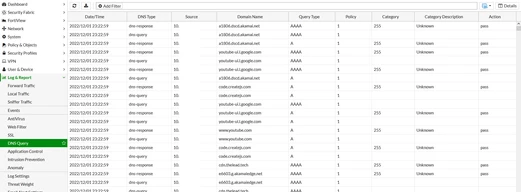
-Under FortiGate -> Log&Report -> DNS Query, for 'DNS Type' : dns-response packet, it shows with 'Action':: pass with the correct firewall policy ID wanted. But it shows the value of 'Category' column with ‘255’ and the value of 'Category Description' column with ‘Unknown’
- Everything works fine and the DNS setting is properly configured , the FortiGate can connect to FortiGuard service, and FortiGate gets the correct rating.
- Check and correct the CLI commands as below: It is possible to do it with CLI commands of the FortiGate via Telnet,SSH , or CLI Console on GUI of FortiGate.
FGT # config system fortiguard FGT (fortiguard) # set sdns-server-ip "208.91.112.220 173.243.140.53 210.7.96.53" FGT (fortiguard) # end
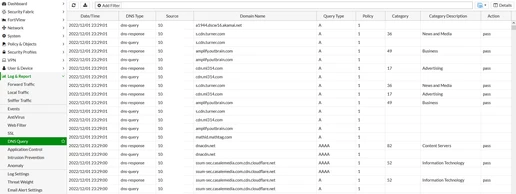
Then it may show the correct values in 'Category' column and 'Category Description' column for 'DNS Type': dns-response packet as below.
 |