VinayHM
Staff
Aug 25, 2023 2:26 PM UTC

Technical Tip: How to enable the visibility of proxy mode in firewall policies on v7.4.0+

Description

This article describes how to enable the visibility of proxy mode in firewall policies.

Scope

FortiGate v7.4.0 and above. 

Solution

By default, all policies will be in flow mode. To allow the policy to be changed to Proxy mode in the GUI, follow these steps:

  1. Go to System -> Feature visibility and enable Policy Advanced Options under Additional Features.

  2. Run the following commands:


config system settings
   set gui-proxy-inspection enable
end


Note: The 'gui-proxy-inspection' command has been removed from FortiOS v7.6.0 and above.


If the inspection mode is still not visible in the GUI, try the following steps:

  1. Log out and log back into the GUI.

  2. Clear the browser cache.

  3. As a last resort, restart the HTTPS daemon with the following command:


fnsysctl killall httpsd


Refresh the web page of the FortiGate GUI.
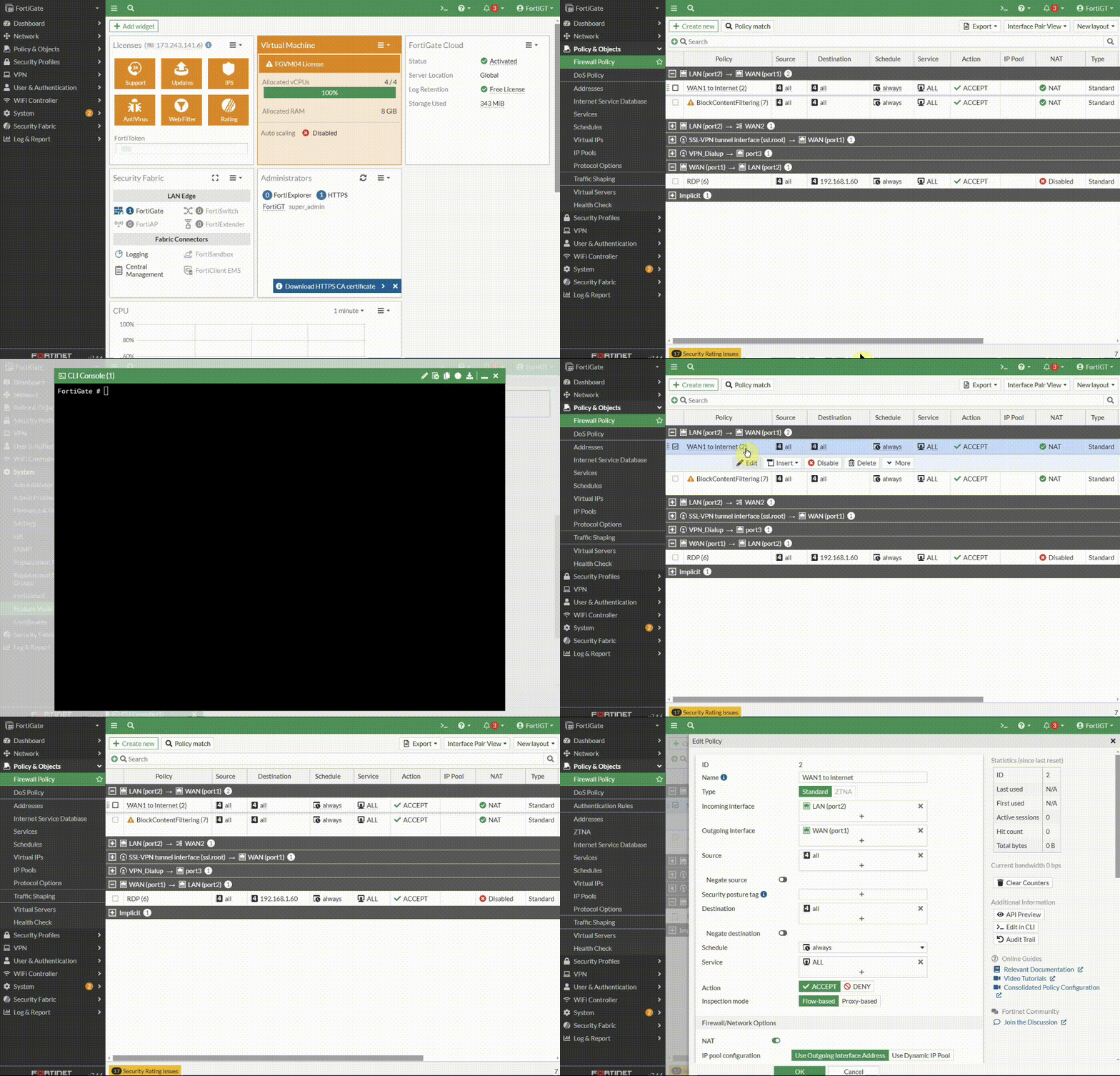
 

enable-proxy-mode.gif


Notes: 


Related documents:

Proxy-related features not supported on FortiGate 2 GB RAM models NEW

Technical Tip: Cannot enable Explicit Proxy feature in FortiGate 2GB Model

    Thought Leadership. Security Summit. Thursday, November 12th, PGA National Resort, Palm Beach Gardens, FL.
    Security Operations Summit: Modernize SecOps. Operate AI-Native.AMER: November 4 | 9:00 AM PST. India and SAARC: November 5 | 10:00 AM IST. EMEA: November 5 | 10:30 AM CET. APAC: November 5 | 11:00 AM SGT