


Technical Tip: How to configure SSL VPN with LDAP-integrated certificate authentication with UPN checking
Description
This article describes how to configure SSL VPN on FortiGate that requires users to authenticate using a certificate with LDAP UserPrincipalName (UPN) checking.
Scope
FortiGate.
Solution
- Client certificate.
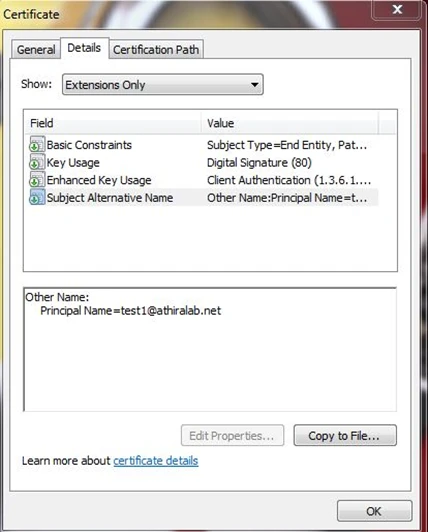
Make sure the UPN is added as the subject alternative name as below in the client certificate.
This is present in the personal store on the client's PC.
- To install the server certificate:
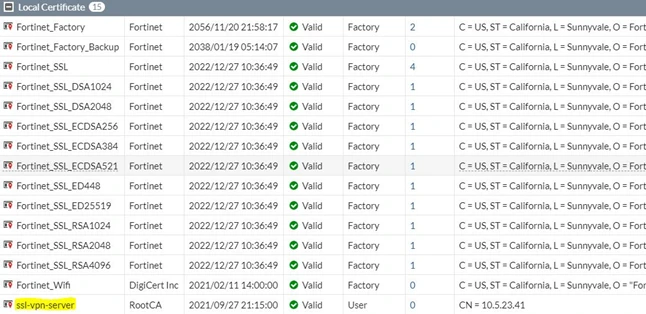
- Go to System -> Feature Visibility and ensure 'Certificates' is enabled.
- Go to System -> Certificates and select 'Import' -> Local Certificate.
Set Type to Certificate.
Choose the Certificate and Key files for the certificate, and enter the Password.
- To install the CA certificate.
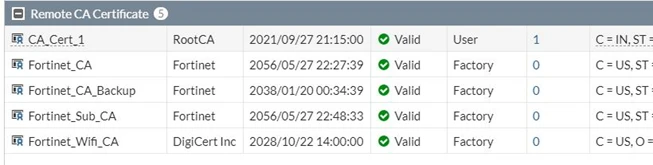
- Go to System -> Certificates and select 'Import' -> CA Certificate.
- Import the certificate.
- The CA certificate now appears in the list of External CA Certificates.
- Configure an LDAP server against which the UPI will be checked.
edit "ldar"
set server "1.1.1.1"
set cnid "sAMAccountName"
set dn "DC=athiralab,DC=net"
set type regular
set username "CN=Administrator,CN=Users,dc=athiralab,dc=net"
set password ENC MTAwNHqukCsFpIsL8zpIv/V0mK06TWwHuDPOoVCLy7fMsUJKvJkPK3asLBrrXpBViqto3xJEjNNqWfTnR7jP+1tYd/RmpOTJuq1gAF580DX3gt/FaBzysESQIkncIKELokWa59PvbFj4281iH6HvlQT1QySUks0/YKIjv/EKwVwBBcVr2VWKKq6XZvY2wknNULbcnw==
next
end
- Configure PKI user.
config user peer
edit "user1"
set ca "CA_Cert_1"
set ldap-server "ldap"
set ldap-mode principal-name #this will check the users second factor, the password, additional to the certificate against the LDAP server
next
end
Starting from FortiOS 7.4 version, the peer user can be configured as given below:
config user peer
edit "user1"
set ca "CA_Cert_1"
set mfa-mode subject-identity
set mfa-server "ldap"
next
end
- Create a user group.
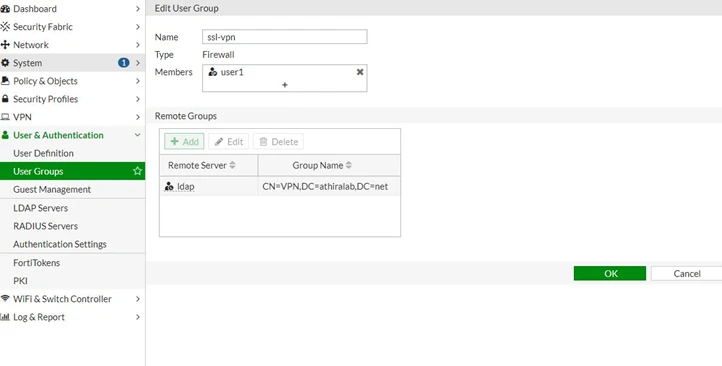
- Go to User & Device -> User Groups and create a new group.
- Add the PKI peer object previously created as a local group member.
- Next, add a remote group on the LDAP server and select the group of interest needed these users are to be members of using the LDAP browser window.
Note:
When using a PKI object in the 'member' field, the group object’s behavior changes and the group will only match if the PKI object is true (the certificate is valid and trusted, and the user exists in LDAP) AND the group memberships obtained from LDAP for the user also match one of the remote LDAP groups defined.
- Configure SSL VPN settings and policies.
Settings:
config vpn ssl settings
set reqclientcert enable
set servercert "ssl-vpn-server"
set tunnel-ip-pools "SSLVPN_TUNNEL_ADDR1"
set tunnel-ipv6-pools "SSLVPN_TUNNEL_IPv6_ADDR1"
set source-interface "port1"
set source-address "all"
set source-address6 "all"
set default-portal "full-access"
config authentication-rule
edit 1
set groups "ssl-vpn"
set portal "full-access"
next
end
end
Portal.
ssh vpn ssl web portal full-access
config vpn ssl web portal
edit "full-access"
set tunnel-mode enable
set ipv6-tunnel-mode enable
set web-mode enable
set ip-pools "SSLVPN_TUNNEL_ADDR1"
set split-tunneling disable
set ipv6-pools "SSLVPN_TUNNEL_IPv6_ADDR1"
next
end
Policy:
config firewall policy
edit 1
set name "ssl-access"
set uuid f64bd9ca-0180-51eb-bd8d-239943fc4b37
set srcintf "ssl.root"
set dstintf "port1"
set srcaddr "SSLVPN_TUNNEL_ADDR1"
set dstaddr "all"
set action accept
set schedule "always"
set service "ALL"
set groups "ssl-vpn"
set nat enable
next
end
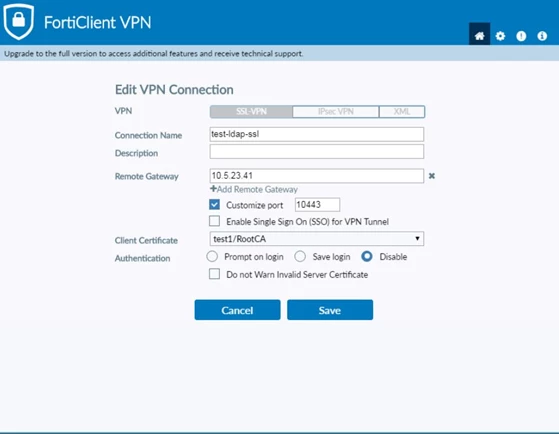
- Configure FortiClient as below.
- Make sure the correct client certificate is selected.
- Connecting to the VPN only requires the user's certificate. It does not require a username or password.
The user will be able to successfully connect with the below in fnbamd + sslvpnd debugs.
diagnose debug disable
diagnose debug reset
diagnose vpn ssl debug-filter src-addr4 x.x.x.x <-- Public IP of the device connecting to SSL VPN.
diagnose debug application sslvpn -1
diagnose debug application fnbamd -1
diagnose debug console timestamp enable
diagnose debug enable
To disable debugging :
diagnose debug disable
diagnose debug reset
[1466] peer_subject_cn_check-Cert subject 'CN = test1'
[1630] check_add_peer-check peer user 'user1' in group 'ssl-vpn', result is 4
[1566] add_group_list-Add group 'ssl-vpn'
[1779] cert_check_group_list-Status pending for group 'ssl-vpn'
[1889] fnbamd_auth_cert_check_status-res=4
[1714] fnbamd_ldap_init-search filter is: (&(userPrincipalName=test1@athiralab.net)(!(UserAccountControl:1.2.840.113556.1.4.803:=2))) <-----
[1723] fnbamd_ldap_init-search base is: DC=athiralab,DC=net
[1138] __fnbamd_ldap_dns_cb-Resolved ldap:10.220.11.9 to 10.220.11.9, cur stack size:1
[1144] __fnbamd_ldap_dns_cb-Connection starts ldap:10.220.11.9, addr 10.220.11.9
[867] __fnbamd_ldap_start_conn-Still connecting 10.220.11.9.
[1995] create_auth_cert_session-fnbamd_auth_cert_start returns 4, id=417595147
[1095] __ldap_connect-tcps_connect(10.220.11.9) is established.
[973] __ldap_rxtx-state 3(Admin Binding)
[206] __ldap_build_bind_req-Binding to 'CN=Administrator,CN=Users,dc=athiralab,dc=net'
[927] fnbamd_ldap_send-sending 71 bytes to 10.220.11.9
[939] fnbamd_ldap_send-Request is sent. ID 1
[973] __ldap_rxtx-state 4(Admin Bind resp)
[970] __fnbamd_ldap_read-Read 8
[1076] fnbamd_ldap_recv-Leftover 2
[970] __fnbamd_ldap_read-Read 14
[1150] fnbamd_ldap_recv-Response len: 16, svr: 10.220.11.9
[831] fnbamd_ldap_parse_response-Got one MESSAGE. ID:1, type:bind
[866] fnbamd_ldap_parse_response-ret=0
[1040] __ldap_rxtx-Change state to 'DN search'
[973] __ldap_rxtx-state 11(DN search)
[594] fnbamd_ldap_build_dn_search_req-base:'DC=athiralab,DC=net' filter:(&(userPrincipalName=test1@athiralab.net)(!(UserAccountControl:1.2.840.113556.1.4.803:=2))) <-----
[927] fnbamd_ldap_send-sending 147 bytes to 10.220.11.9
[939] fnbamd_ldap_send-Request is sent. ID 2
[973] __ldap_rxtx-state 12(DN search resp)
[970] __fnbamd_ldap_read-Read 8
[1076] fnbamd_ldap_recv-Leftover 2
[970] __fnbamd_ldap_read-Read 52
[1150] fnbamd_ldap_recv-Response len: 54, svr: 10.220.11.9
[831] fnbamd_ldap_parse_response-Got one MESSAGE. ID:2, type:search-entry
[866] fnbamd_ldap_parse_response-ret=0
[1212] __fnbamd_ldap_dn_entry-Get DN 'CN=test1,CN=Users,DC=athiralab,DC=net'
[100] ldap_dn_list_add-added CN=test1,CN=Users,DC=athiralab,DC=net
.
.
.
[16407:root:97]deconstruct_session_id:426 decode session id ok, user=[user1,cn=test1],group=[ssl-vpn],authserver=[ldap],portal=[full-access],host=[10.5.27.83],realm=[],idx=0,auth=32,sid=457a2555,login=1601406405,access=1601406405,saml_logout_url=no
[16407:root:97]deconstruct_session_id:426 decode session id ok, user=[user1,cn=test1],group=[ssl-vpn],authserver=[ldap],portal=[full-access],host=[10.5.27.83],realm=[],idx=0,auth=32,sid=457a2555,login=1601406405,access=1601406405,saml_logout_url=no
get vpn ssl monitor
SSL VPN Login Users:
Index User Group Auth Type Timeout From HTTP in/out HTTPS in/out
0 user1,cn=test1 ssl-vpn 32(1) 280 10.5.27.83 0/0 0/0
SSL VPN sessions:
Index User Group Source IP Duration I/O Bytes Tunnel/Dest IP
0 user1,cn=test1 ssl-vpn 10.5.27.83 160 17658/4966 10.212.134.200
diagnose firewall auth list
10.212.134.200, user1,cn=test1
type: fw, id: 0, duration: 161, idled: 161
expire: 28636, allow-idle: 28797
flag(80): sslvpn
server: ldap
packets: in 0 out 0, bytes: in 0 out 0
group_id: 2
group_name: ssl-vpn

