


Technical Tip: How to configure IKE version 1 or 2 in IPsec VPN FortiGate
Description
This article describes how to configure IKE version 1 or 2 in IPsec VPN FortiGate.
Scope
FortiGate.
Solution
Internet Key Exchange (IKE) is the protocol used to set up SAs in IPsec negotiation.
Choose IKEv2 over IKEv1 is possible if a route-based IPsec VPN is configured.
IKEv2 simplifies the negotiation process, in that it provides no choice of Aggressive or Main mode in Phase 1.
IKEv2 also uses less bandwidth.
Run the following CLI commands to configure the IKE version in phase1:
config vpn ipsec phase1-interface
edit "TUNNEL_NAME"
set type dynamic
set interface "port1"
set ike-version <Integer> <----- It could be 1 or 2.
end
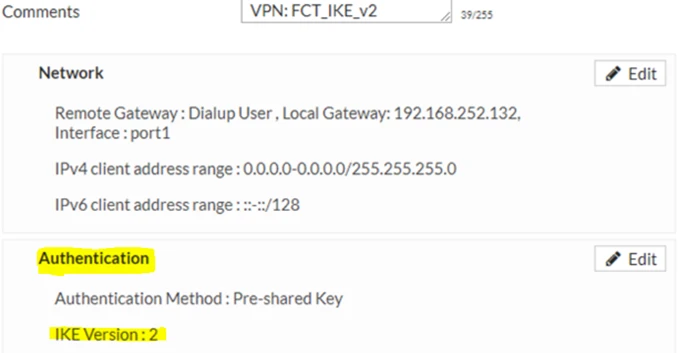
IKE version will be configured under the 'Authentication' section of phase1 in the VPN tunnel.
Note: The following commands need to be applied manually via CLI; these are needed for IKEv2 user authentication:
edit "TUNNEL_NAME"
set eap-identity send-request
set authusrgrp "GROUP_NAME"
The following command can be used to check the IKE version of the specific tunnel:
diagnose vpn tunnel list name <Tunnel name> | grep -n ver
Example:
FGVM04TM25002496 # diagnose vpn tunnel list name HUB2SPOKE1_p1 | grep -n ver
3:name=HUB2SPOKE1_p1 ver=2 serial=3 10.40.19.6:0->10.40.19.18:0 nexthop=0.0.0.0 tun_id=10.40.19.18 tun_id6=::10.40.19.18 status=up dst_mtu=1500 weight=1
4:bound_if=3 real_if=3 lgwy=static/1 tun=intf mode=auto/1 encap=none/552 options[0228]=npu frag-rfc run_state=0 role=primary accept_traffic=0 overlay_id=0
"ver=1" indicates IKEv1, and "ver=2" indicates IKEv2

