Gab_FTNT
Staff & Editor
Staff & Editor
Jan 9, 2025 2:07 PM UTC

Technical Tip: How to configure ALL traffic to be sent through an IPsec tunnel

Description

This article describes the required routing configuration to forward all traffic through an IPsec tunnel.

Scope FortiOS.
Solution

In some scenarios, it is required to forward forward all traffic to an IPsec tunnel on the FortiGate.
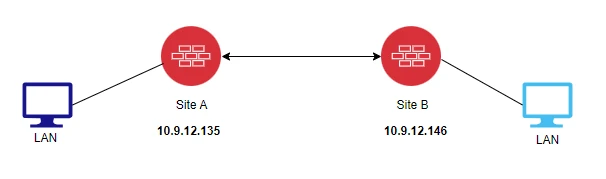
This example shows the scenario and explains the required routing configuration.


diag1.PNG

Site A has to forward all traffic to Site B.
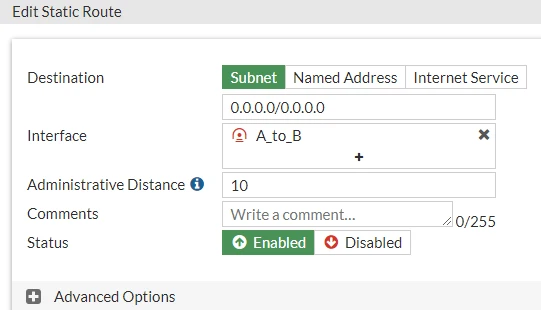
Since ALL traffic has to be forwarded, the default Static route can be configured as follows.


Static1.PNG

Routing table for VRF=0
S* 0.0.0.0/0 [1/0] via A_to_B tunnel 10.9.12.146, [1/0]

However, the Phase1 negotiation of the IPSec tunnel has to be sent through the WAN interface for the tunnel to established.
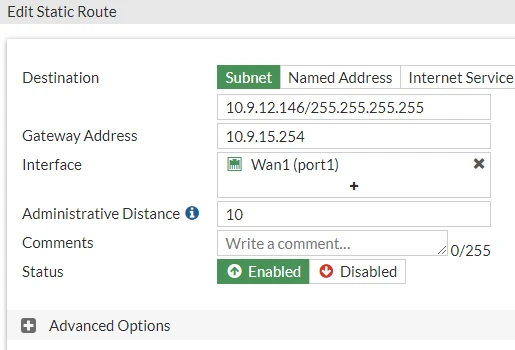
A solution for this is to create a Static route to reach the remote public IP through Wan1.

cap1.PNG

Routing table for VRF=0
S* 0.0.0.0/0 [1/0] via A_to_B tunnel 10.9.12.146, [1/0]
S 10.9.12.146/32 [10/0] via 10.9.15.254, port1, [1/0]

This route will let the FortiGate know how to reach the Remote IP of the tunnel for the negotiation.

    Risk and Resilience in the Age of AI. An OT Thought Leadership Summit for Houston's Critical Infrastructure Leaders. Date: Thursday, December 3, 2026. Time: 8:30 am - 1:30 pm (CT). Location: The Westin Houston, Memorial City | 945 Gessner Road, Houston, TX 77024