apFortinet
Staff
Staff
Sep 18, 2023 4:04 AM UTC

Technical Tip: How to Block Windows update by FortiGate

Description

This article describes possible ways to block Windows updates.

Scope FortiGate, Windows updates.
Solution

Two Ways to Block MS Updates:

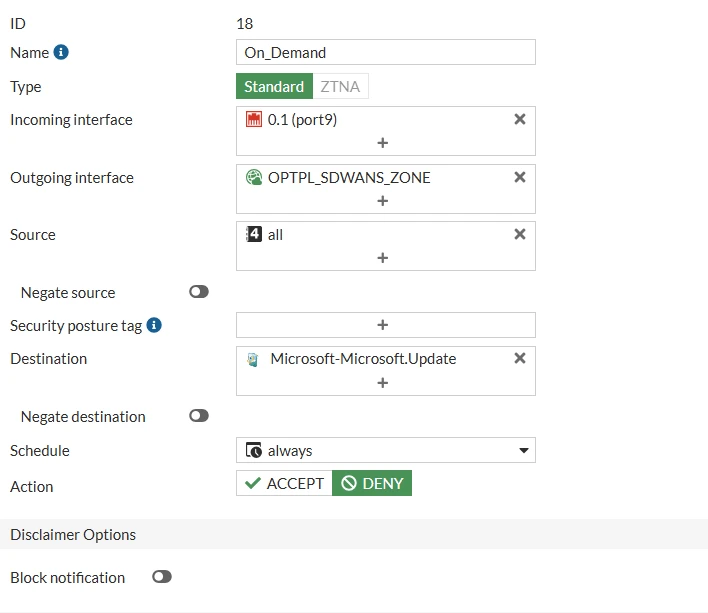
  1. ISDB. Create a denied firewall policy with 'Microsoft-Microsoft.Update' ISDB (Internet service database) as a destination in the firewall policy without any security profile applied.
 

image.png


Move it to the top above all firewall policies. After configuring the firewall policy as above, retry Windows updates and it will be blocked.


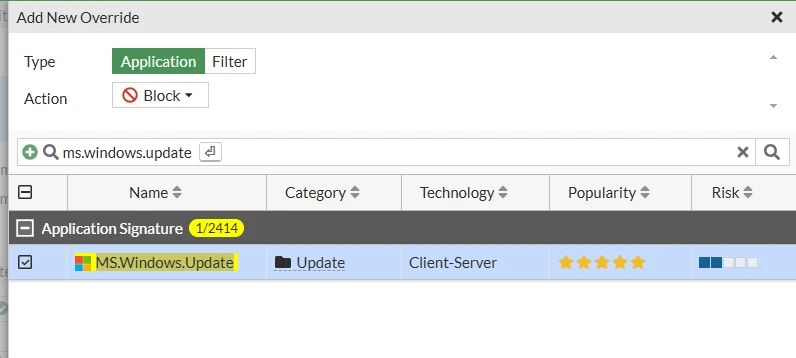
  1. Application control. Create an Application control with block application signature MS.Windows.Update 
 

image.png


After Creating a Firewall policy and applying application control. After configuring the firewall policy, retry Windows updates and it will be dropped.


    Risk and Resilience in the Age of AI. An OT Thought Leadership Summit for Houston's Critical Infrastructure Leaders. Date: Thursday, December 3, 2026. Time: 8:30 am - 1:30 pm (CT). Location: The Westin Houston, Memorial City | 945 Gessner Road, Houston, TX 77024