
Technical Tip: How to adjust the Maximum Transmission Unit (MTU) value on a FortiGate interface
Description
This article describes how to adjust the Maximum Transmission Unit (MTU) value on a FortiGate interface.
Scope
FortiGate.
Solution
MTU definition: The largest physical packet size, measured in bytes, that a network can transmit. Any packets larger than the MTU are divided into smaller packets before they are sent. The default MTU is 1500 on a FortiGate interface.
To change the MTU on a network interface from the GUI:
Note:
v5.4 and later (including v6.x and v7.x) no longer support configuring interface MTU from the GUI. This specific section only applies to v5.2 and earlier and is retained for historical purposes.
Go to System -> Network -> Interface.
Select the Edit icon for the interface.
Select Override default MTU value (1500).
Enter the new MTU value.
Select OK.
To change the MTU on a network interface from the CLI:
Edit the network interface and set mtu-override enable, then apply the desired MTU. This method is supported on all FortiOS versions:
config system interface
    edit <interface_name>
        set vdom "root"
        set mtu-override enable
        set mtu 9000
    next
end
MTU overrides can be configured for most interface types on the FortiGate (under config system interface), including the following:
Individual physical interfaces.
Aggregate/redundant interfaces.
VLAN/Hardware Switches
VLAN sub-interfaces
Note that VLAN sub-interfaces inherit the MTU of the parent interface as a default setting, and the parent interface also defines the upper limit for a VLAN's MTU override.
Example: If the parent interface has an MTU of 1500, the maximum configurable MTU for a VLAN on this interface is also 1500 (i.e., it is not possible to increase the VLAN MTU to 9000 bytes without first increasing the parent interface MTU).
Increasing the parent interface MTU to 9000 will also increase the VLAN interface's MTU to 9000 automatically, though it is possible now override the VLAN interface MTU to be below the parent interface's MTU (i.e. the VLAN can be set to 1500 bytes while the parent interface MTU remains at 9000 bytes).
IPsec tunnel interfaces (FortiOS 6.4.0 and later, see 611391 in the FortiOS 6.4.0 Release Notes).
Software Switches.
The MTU of a Software Switch is the lowest MTU among its interface members, or 1500 bytes, whichever is lower.
The MTU of the Software Switch is not checked when forwarding frames between the switch interface members. For example, if port1 (MTU 9000) and port2 (MTU 9000) are configured into a software switch (MTU 1500) and a device connected over port1 attempts to send traffic to a device connected over port2, then FortiGate can still forward frames greater than 1500 bytes from port1 out of port2.
In earlier firmware versions, it is possible to configure MTU on the software switch, although this has no effect.
Being able to configure MTU on a software switch directly is a known issue 945246, fixed in v7.6.0 and later.
It is possible to run 'diagnose netlink interface list <interface_name>' to validate that an MTU override change has taken effect:
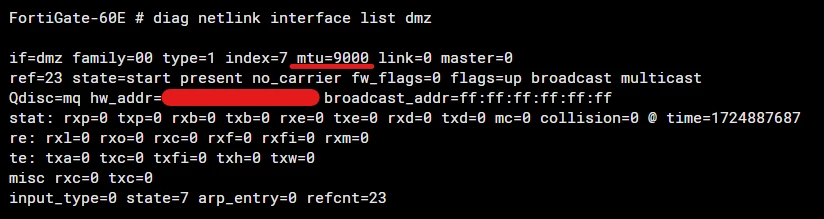
Each of these options allows an administrator to fine-tune the MTU based on specific requirements, whether it is for optimizing performance, troubleshooting, or dealing with specific network conditions.
For the FortiGate models listed in the link, the default MTU value for IPsec tunnel interfaces has been updated from 1420 to 1402 starting from FortiOS 8.0.0: See the Updated MTU for FortiGate models in Changes in default values.
Related articles:
