


Technical Tip: How restrictive Password Policy can prevent FortiExtender (FEX) setup on the FortiGate
| Description | This article describes that a restrictive Password Policy can cause issues during the FortiExtender (FEX) setup/configuration on the FortiGate. FortiGate has a predefined password policy for generating a preshared key for the FortiExtender IPsec. If the FortiExtender IPsec preshared key is not comforting the password policy, the IPsec tunnel interface won't be created. |
| Scope | Password Policy, FortiExtender (FEX), FortiGate. |
| Solution | When configuring FortiExtender on the FortiGate, FortiGate automatically creates the IPsec tunnel for FortiExtender. The IPsec tunnel preshared key FortiGate generates has a predefined length of 16 alphanumeric characters (a-z A-Z 0-9), without special characters. If there is a Password Policy configured on FortiGate:
GUI: Go to System -> Settings -> Password Policy.
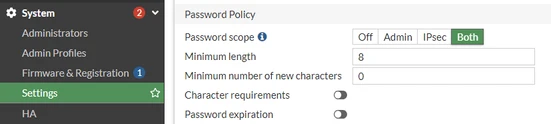 CLI:
* *
This Password Policy is restrictive enough so IPsec FortiExtender preshared key does not meet its requirements, and IPsec will not be created.
The output of the 'diagnose debug cli 8' debug command during the FortiExtender configuration on FortiGate shows the following:
2024-07-11 10:26:18 cmd=config vpn ipsec phase1-interface
Error code -49 is:
"-49": "The password must conform to the system password policy."
If this issue happens, there are two possible approaches to overcome it:
Note: Starting from FortiOS 7.6.1, the auto-created IPsec Preshared Key for lan-extension will have a randomly generated key with 30 characters long, containing at least 5 upper case alphabet and 5 lower case alphabet, 5 numbers, and 5 symbols. |
