


Technical Tip: HA cluster out-of-sync issue due to 'system.settings' mismatch
Description
This article describes the behaviour associated with an HA cluster out-of-sync issue caused by a mismatch in 'system.settings'.
Scope
FortiGate.
Solution
Devices in an HA cluster may become out of sync due to various factors, including system upgrades, reboots, failovers, or delays in synchronizing configurations from the primary to the secondary unit.
One of the cases where the cluster gets out of sync is due to the 'system.settings' object.

In this scenario, the 'system.settings' configuration of both the primary and secondary devices was verified through the CLI.
A comparison in Diffchecker shows that the 'application-bandwidth-tracking' option is enabled on the primary device and disabled on the secondary device, as shown below:
The following output shows the 'system.settings' configuration present on the primary device.
config system settings
set gui-email-collection disable
set gui-multiple-interface-policy enable
set gui-policy-disclaimer disable
set gui-ztna enable
set gui-ot disable
set gui-dynamic-device-os-id disable
set location-id 0.0.0.0
set ike-session-resume disable
set ike-quick-crash-detect disable
set ike-dn-format with-space
set ike-port 500
set ike-tcp-port 4500
set ike-policy-route disable
set block-land-attack disable
set application-bandwidth-tracking enable
end
The following output shows the 'system.settings' configuration present on the secondary device.
config system settings
set gui-email-collection disable
set gui-multiple-interface-policy enable
set gui-policy-disclaimer disable
set gui-ztna enable
set gui-ot disable
set gui-dynamic-device-os-id disable
set location-id 0.0.0.0
set ike-session-resume disable
set ike-quick-crash-detect disable
set ike-dn-format with-space
set ike-port 500
set ike-tcp-port 4500
set ike-policy-route disable
set block-land-attack disable
set application-bandwidth-tracking disable
end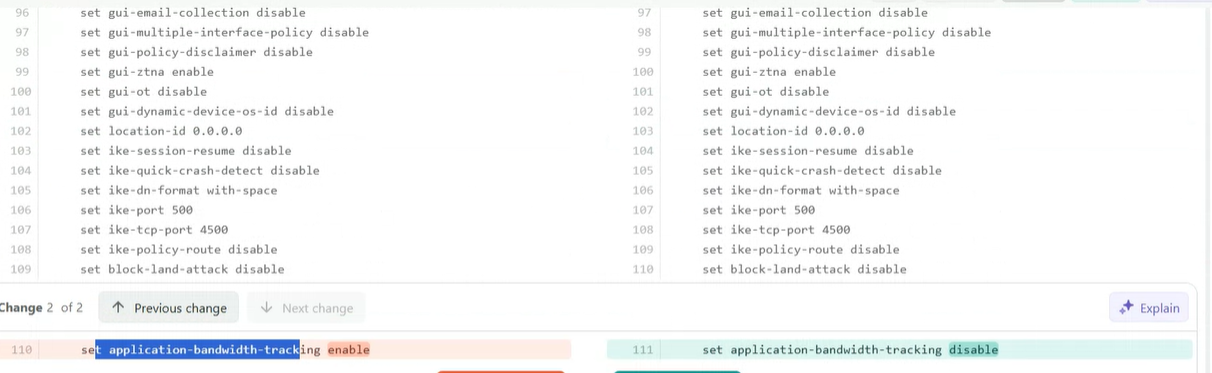
Application bandwidth tracking (application-bandwidth-tracking) under config system settings on a FortiGate is a CLI feature used to enable or disable the collection and display of real-time application bandwidth utilization data in FortiView.
Disabling the application-bandwidth-tracking option on the primary device resolved the issue, following which the HA cluster synchronized successfully.
Note:
Starting from v7.6 and above, disabling the 'application-bandwidth-tracking' option has been moved to 'config system global':
config system global
set application-bandwidth-tracking disable
end