


Technical Tip: GoToMeeting not working when SSL deep inspection is enabled
Description
On applying SSL deep inspection profile to the security policy, GoToMeeting stops working.
Solution
Citrix have made certain changes with their servers which render connection attempts made by devices whose traffic has been inspected by firewall to be dropped.
To work around this, traffic for these Citrix servers needs to be exempted from SSL inspection.
This can be done as follows.
Versions prior to 5.2
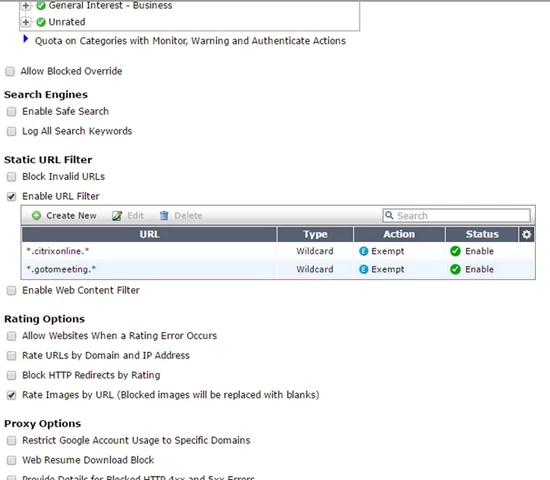
1) Go to Security Profiles > Web Filter > Profiles, select the Web Filter profile.
2) Turn on “Enable Web Site Filter”.
3) Add two new wild card entries. These will instruct the FortiGate to bypass UTM filtering for any web pages that contain 'gotomeeting' or 'citrixonline' in their names.
Versions 5.2 and later
In the SSL inspection profile (deep inspection profiles) that are being used, add the two FQDN objects 'gotomeeting' and 'citrix' to the ssl-inspection exempt list.
1) Go to Policy and Objects > SSL inspection profile that is being used on the security policy.
2) Go to Exempt from SSL inspection and in the Addresses tab, add Gotomeeting and Citrix.
To work around this, traffic for these Citrix servers needs to be exempted from SSL inspection.
This can be done as follows.
Versions prior to 5.2
1) Go to Security Profiles > Web Filter > Profiles, select the Web Filter profile.
2) Turn on “Enable Web Site Filter”.
3) Add two new wild card entries. These will instruct the FortiGate to bypass UTM filtering for any web pages that contain 'gotomeeting' or 'citrixonline' in their names.
Versions 5.2 and later
In the SSL inspection profile (deep inspection profiles) that are being used, add the two FQDN objects 'gotomeeting' and 'citrix' to the ssl-inspection exempt list.
1) Go to Policy and Objects > SSL inspection profile that is being used on the security policy.
2) Go to Exempt from SSL inspection and in the Addresses tab, add Gotomeeting and Citrix.
