


Technical Tip: FortiGate is unable to contact to LDAPS server, receives error message 'Can't contact LDAP server'
Description | This article describes that to authenticate the users via the LDAPS server, FortiGate should make a successful secure connection with the LDAPS server using port 636. |
Scope | FortiGate, FortiProxy. |
Solution | Case 1: Generally, this issue happens when the issuer of the incoming certificate from the LDAPS server to FortiGate in the 'Server Hello' packet is not valid on FortiGate. In this case, it is possible to see the error message 'Alert (Level: Fatal, Description: Unknown CA)' in the PCAP file:

To check the imported CA certificate on FortiGate, run the following command and look for the imported CA certificate:
Run the following sniffer command via CLI and then go to LDAPS config on FortiGate and select 'Test Connectivity' to see the possible reasons for a failed LDAPS connection:
In this example, it is possible that the issuer of the imported CA certificate does not match the issuer of the certificate coming from the LDAPS server:
While the issuer of the incoming certificate from the LDAPS server is Fortiservice-UNIVERSE-ESX41-CA.
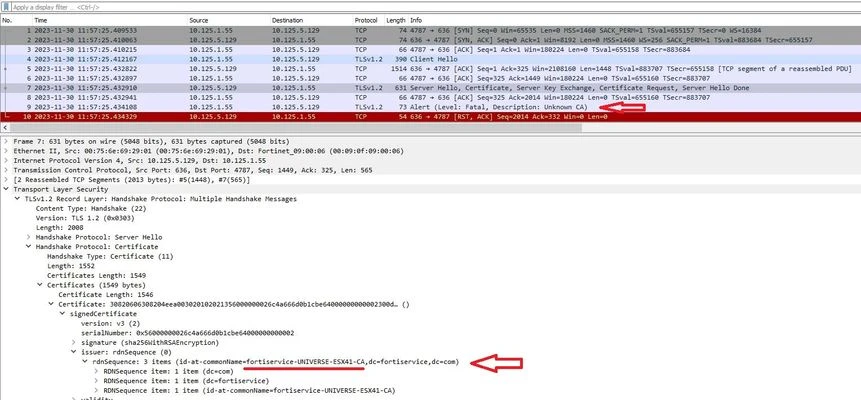
The issue is on the LDAPS server, and the certificate issue should be resolved on the LDAPS server side.
Case 2: If the server is sending an immediate RESET in response to the Client Hello from the FortiGate, it might indicate that the user account is blocked on the AD server. Unblocking the user account on the AD server can resolve the issue.

Note: From FortiOS v8.0, secure LDAP connections are enabled by default in the GUI, improving security by using encrypted LDAP communication to protect directory authentication traffic. Refer to the document for more information: Enable secure LDAP connection by default in the GUI.
Troubleshooting Tip: Status of LDAP server connected via IPsec VPN shows 'Can't contact LDAP server' |

