


Technical Tip: FortiGate-60E-DSL and FortiWifi-60E-DSL - Regional ISP configuration (ANZ)
Description
This article describes the settings required for FortiGate-60E-DSL and FortiWifi-60E-DSL for specific regions such as Australia and New Zealand, settings for different providers. This is based on build 5.6 (b4096) as the time of writing (Aug 2018).
Solution
Note on centralised managetsystgement: to manage above build with FortiManager please contact the SE for GA version of FortiManager.
FG60E # get system status
Version: FortiGate-60E-DSL v5.6.0,build4096,180809 (GA)
Virus-DB: 61.00240(2018-08-05 09:28)
…..(output omitted)
BIOS version: 05000002
System Part-Number: P21074-03
Log hard disk: Not available
Hostname: FG60E***********
Operation Mode: NAT
Current virtual domain: root
Max number of virtual domains: 10
Virtual domains status: 1 in NAT mode, 0 in TP mode
Virtual domain configuration: disable
FIPS-CC mode: disable
Current HA mode: standalone
Branch point: 1600
Release Version Information: GA
System time: Thu Aug 16 15:41:29 2018
ISP: Vodafone New Zealand (VDSL).
GUI and full CLI settings below:

Figure: settings network interfaces.
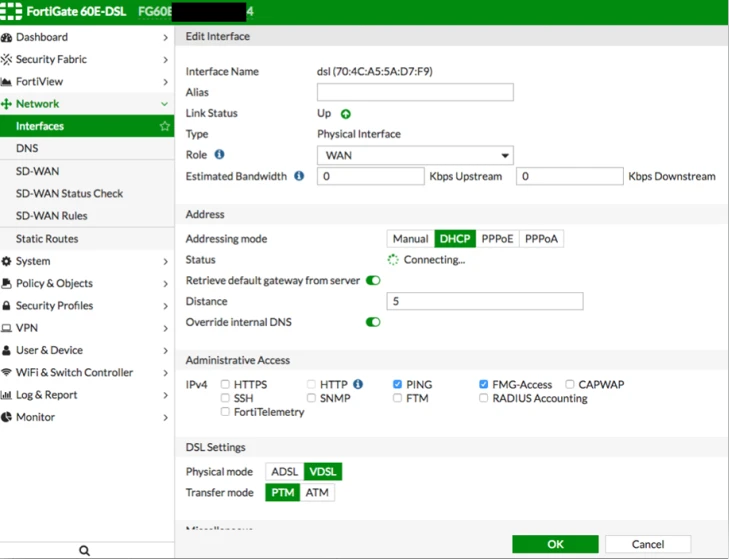
Figure: settings for DSL interface
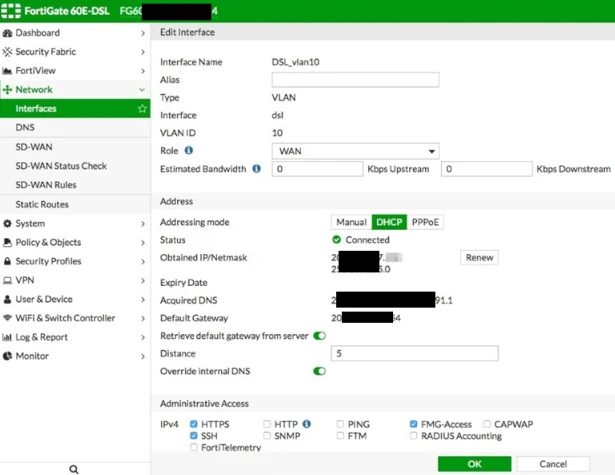
Figure: settings for vlan 10 under DSL interfaces
FG60E # config sys interface
FG60E (interface) # edit dsl
config system interface
edit "dsl"
set vdom "root"
set mode dhcp
set allowaccess ping fgfm
set type physical
set phy-mode vdsl
set tc-mode ptm
set role wan
set snmp-index 2
next
end
FG60E (dsl) # next
FG60E (interface) # edit DSL_vlan10
FG60E (DSL_vlan10) # show
config system interface
edit "DSL_vlan10"
set vdom "root"
set mode dhcp
set allowaccess https ssh fgfm
set role wan
set snmp-index 9
set interface "dsl"
set vlanid 10
next
end
FG60E (DSL_vlan10) # get
name : DSL_vlan10
vdom : root
cli-conn-status : 2
mode : dhcp
distance : 5
priority : 0
ip : 203.118.---.x 255.255.---.0
allowaccess : https ssh fgfm
type : vlan
devindex : 20
l2tp-client : disable
fortiheartbeat : disable
role : wan
snmp-index : 9
defaultgw : enable
DHCP Gateway : 203.118.---.254
dns-server-override : enable
Lease Expires : Thu Aug 16 16:52:21 2018
Acquired DNS1 : 203.109.191.1
Acquired DNS2 : 203.118.191.1
interface : dsl
vlanid : 10
ISP: Vodafone New Zealand (VDSL) (Tim)
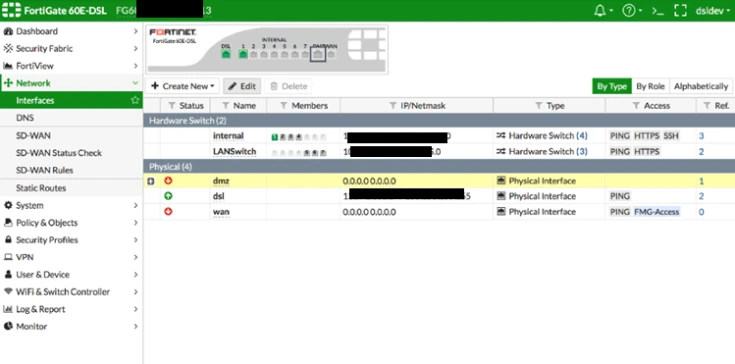
Figure: settings network interfaces
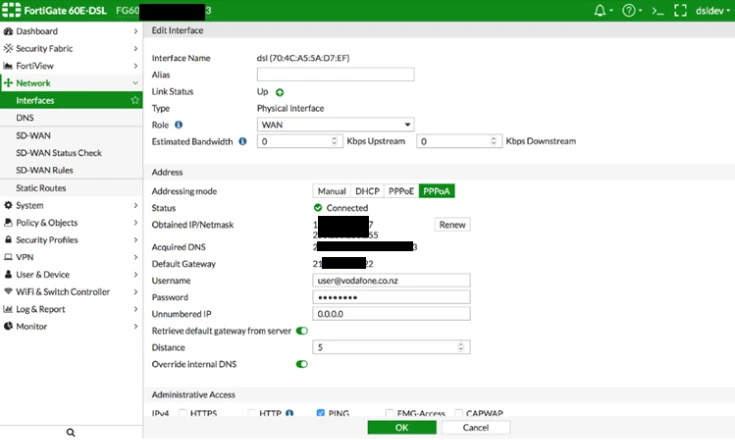
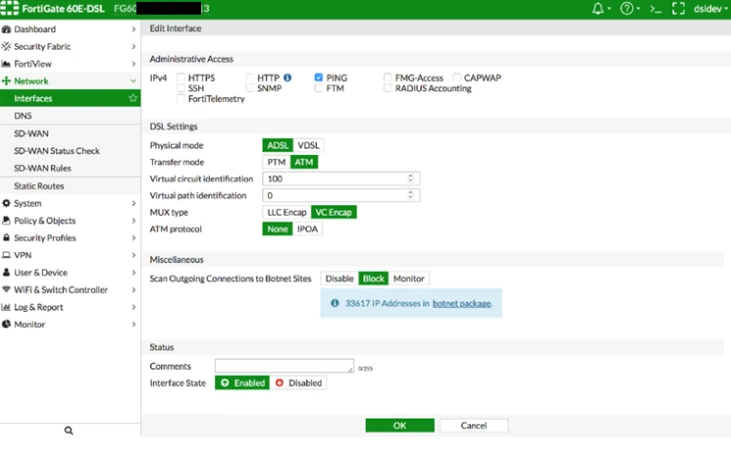
Figure: settings for DSL interface
FG60E # get system status
Version: FortiGate-60E-DSL v5.6.0,build4093,180808 (GA)
Virus-DB: 59.00623(2018-07-10 15:16)
Extended DB: 59.00623(2018-07-10 15:15)
IPS-DB: 6.00741(2015-12-01 02:30)
IPS-ETDB: 0.00000(2001-01-01 00:00)
APP-DB: 6.00741(2015-12-01 02:30)
INDUSTRIAL-DB: 6.00741(2015-12-01 02:30)
Serial-Number: FG60E***********
IPS Malicious URL Database: 2.00034(2018-07-10 05:11)
Botnet DB: 4.00258(2018-06-22 10:09)
BIOS version: 05000002
System Part-Number: P21074-03
Log hard disk: Not available
Hostname: FG60E***********
Operation Mode: NAT
Current virtual domain: root
Max number of virtual domains: 10
Virtual domains status: 1 in NAT mode, 0 in TP mode
Virtual domain configuration: disable
FIPS-CC mode: disable
Current HA mode: standalone
Branch point: 1600
Release Version Information: GA
System time: Thu Aug 16 21:59:11 2018
FG60E # config system interface
FG60E (interface) # edit dsl
config system interface
edit "dsl"
set vdom "root"
set mode pppoa
set allowaccess ping
set type physical
set scan-botnet-connections block
set vpi 0
set vci 100
set mux-type vc-encaps
set phy-mode adsl
set tc-mode atm
set role wan
set snmp-index 2
set username "user@vodafone.co.nz"
set password ENC cGFzc3dvcmQ=
next
end
FG60E (dsl) # get
name : dsl
vdom : root
cli-conn-status : 2
mode : pppoa
distance : 5
priority : 0
ip : 121.72.---.177 255.255.---.255
allowaccess : ping
type : physical
vpi : 0
vci : 100
mux-type : vc-encaps
phy-mode : adsl
tc-mode : atm
retransmission : enable
vectoring : enable
l2tp-client : disable
role : wan
snmp-index : 2
ipunnumbered : 0.0.0.0
username : user@vodafone.co.nz
password : *
idle-timeout : 0
detected-peer-mtu : 0
disc-retry-timeout : 1
padt-retry-timeout : 1
service-name :
ac-name :
lcp-echo-interval : 5
lcp-max-echo-fails : 3
defaultgw : enable
PPPoATM Gateway : 218.101.--.122
dns-server-override : enable
