| In the crash log, the WWAN interface may be brought up and down by the LTED process, with logs like the following generated for the LTE modem: 1821: 2024-10-11 12:36:11 Interface wwan is brought down. process_id=226, process_name="lted"
1822: 2024-10-11 12:36:12 the killed daemon is /bin/ltebilld: status=0x100
1823: 2024-10-11 12:36:13 the killed daemon is /bin/authd: status=0x0
1824: 2024-10-11 12:36:13 the killed daemon is /bin/modemd: status=0x0
1825: 2024-10-11 12:36:18 the killed daemon is /bin/lted: status=0x0
1826: 2024-10-11 12:36:22 the killed daemon is /bin/fgfmd: status=0x0
1827: 2024-10-11 12:36:34 the killed daemon is /bin/intgpsd: status=0x1
1828: 2024-10-11 12:39:56 Interface wwan is brought up. process_id=1556, process_name="lted"
1831: 2024-10-11 12:40:07 Interface wwan is brought down. process_id=1556, process_name="lted"
1832: 2024-10-11 12:40:27 the killed daemon is /bin/intgpsd: status=0x1
1833: 2024-10-11 12:41:00 Interface wwan is brought up. process_id=1556, process_name="lted"
1834: 2024-10-11 13:40:23 the killed daemon is /bin/eap_proxy: status=0x0
1835: 2024-10-11 00:00:42 the killed daemon is /bin/intgpsd: status=0x1
1836: 2024-10-11 00:01:15 Interface wwan is brought up. process_id=1556, process_name="lted"
1837: 2024-10-11 09:06:08 the killed daemon is /bin/intgpsd: status=0x1 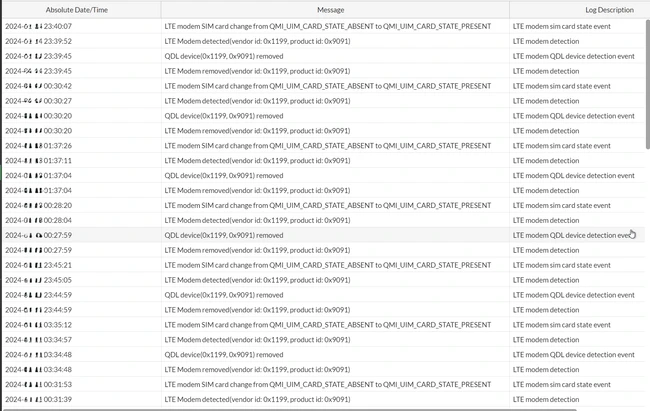
However, the signal information is good for the LTE connection.
diagnose sys lte-modem signal-info
LTE Modem signal information:
LTE:
RSSI: -65
RSRQ: -15
RSRP: -99
SNR: 70
Furthermore, the reset counter will increase in the LTE status.
diagnose test application lted 5
at!gstatus?
!GSTATUS:
Current Time: 221230 Temperature: 33
Reset Counter: 10 Mode: ONLINE <- Reset counter will increase after losing the modem connection.
System mode: LTE PS state: Attached
LTE band: B3 LTE bw: 20 MHz
LTE Rx chan: 1300 LTE Tx chan: 19300
LTE SCC1 state:ACTIVE LTE SCC1 band: B1
LTE SCC1 bw : 20 MHz LTE SCC1 chan: 500
LTE SCC2 state:ACTIVE LTE SCC2 band: B20
LTE SCC2 bw : 10 MHz LTE SCC2 chan: 6400
LTE SCC3 state:NOT ASSIGNED
LTE SCC4 state:NOT ASSIGNED
EMM state: Registered Normal Service
RRC state: RRC Connected
IMS reg state: No Srv
PCC RxM RSSI: -71 PCC RxM RSRP: -102
PCC RxD RSSI: -70 PCC RxD RSRP: -98
SCC1 RxM RSSI: -70 SCC1 RxM RSRP: -107
SCC1 RxD RSSI: -67 SCC1 RxD RSRP: -99
SCC2 RxM RSSI: -68 SCC2 RxM RSRP: -103
SCC2 RxD RSSI: -67 SCC2 RxD RSRP: -108
Tx Power: -- TAC: 7dca (32202)
RSRQ (dB): -14.5 Cell ID: 00d1431f (13714207)
SINR (dB): 4.8
OK The modem reset when the signal quality is bad for a while. The modem also does not switch to a better tower within range and sticks to the bad LTE tower. To overcome this issue, exclude LTE band B3 from the modem, as it appears to be happening when connected primarily to this band. Use the following commands to exclude them:
config system lte-modem set band-restrictions "0000000000000000-00000100130818DB" end Important Note: Before restricting the band, verify if the modem has a supported version of firmware and other parameters checks by checking the output of the commands, as per Technical Tip: Troubleshooting 5G SIM cards and LTE modem issues. Also, as of v7.2.x and above, the LTE configuration is available in the GUI: see Display LTE modem configuration on GUI. It is better to perform the change during off-Business/Maintenance hours to make sure it is not connected to this particular band being excluded in the above command. Related articles: |