Technical Tip: FortiClient customize download location
Description
This article describes how to configure customize download location in FortiGate for SSL VPN.
Solution
1) configure the SSL VPN settings.
2) Go to the SSL-VPN portals configured accordingly in SSL-VPN portals.
3) Refer to the image below:
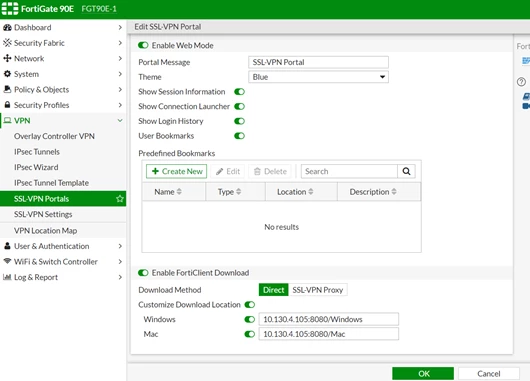
Note.
The address for the FortiClient download location can also be a URL, for example https://links.fortinet.com/forticlient/win/vpnagent for the FortiClient VPN only client for Windows
Or https://links.fortinet.com/forticlient/mac/vpnagent for the FortiClient VPN only client for MAC
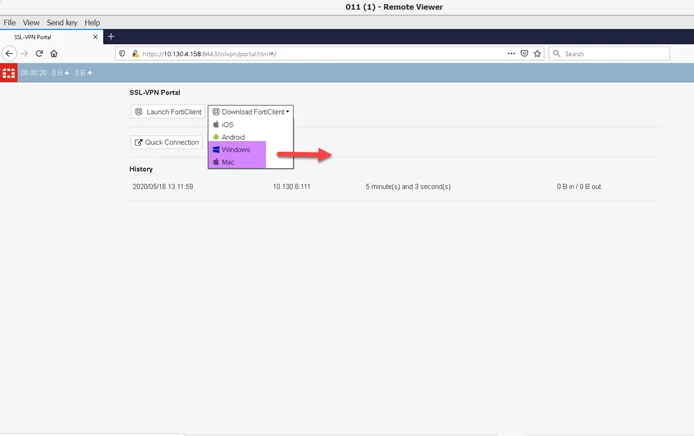
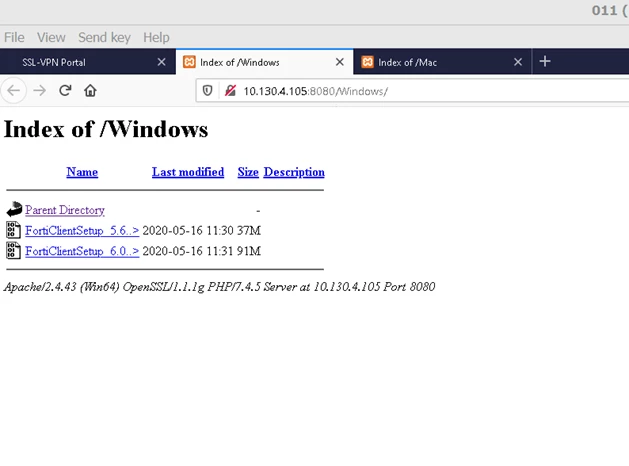
4) Once connected to the web mode, the option to download is proposed.5) Depending on the link added, the user will receive the download file or be able to choose from a possible download option as seen from a privately hosted server