Technical Tip: Enable LDAP user to renew expired password via VPN IPsec
| Description | This article describes the required configuration to allow LDAP users connected to a VPN IPsec Dial-up tunnel to change their password when it expires. |
| Scope | FortiGate with VPN IPsec tunnels in IKE version 1. |
| Solution | To allow password renewal from the FortiGate using any connection method (Wired, Wireless, VPN) is required to enable secure LDAP connection (LDAPS), and the password-renewal option must be enabled in the LDAP Server, as explained in the following technical document: Technical Tip: How to enable password renewal of remote LDAP user through FortiGate
VPN SSL is being replaced by VPN IPSec in new FortiOS versions: SSL VPN tunnel mode replaced with IPsec VPN
So VPN SSL should be migrated to VPN IPSec; however, in some cases, these configurations are based on LDAP Authentication, so the VPN SSL should be migrated using the instructions in the following document: Technical Tip: Remote Access IPsec VPN with LDAP authentication
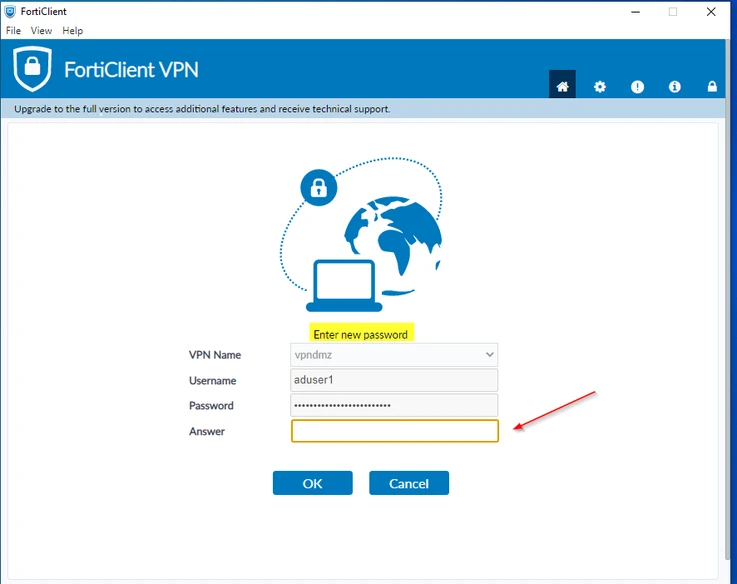
To allow LDAP users to change their password when it expires, the following configuration in Phase1 of the tunnel is required:
config vpn ipsec phase1-interface
The option reauth allows the FortiGate to resend the user credentials when client software requires a password change:
Note: This configuration only works with IKE v1, IKE v2 uses EAP for authentication. Integration with LDAP servers on IKE v2 requires using a different configuration making use of EAP-TTLS. More information is available in the following documents.
Note: Re-auth on IPsec IKEv1 does not work after upgrading to FortiOS v7.4.8, v7.6.3 and v7.6.4. This is resolved in FortiOS v7.4.9, v7.6.5 and v8.0.0. |