


Technical TIp: 'Easy Apply' option under Security Rating for the managed FortiGate is greyed
Description
This article describes how to activate the 'Easy Apply' option for a managed FortiGate under Security Rating.
Scope
FortiGate.
Solution
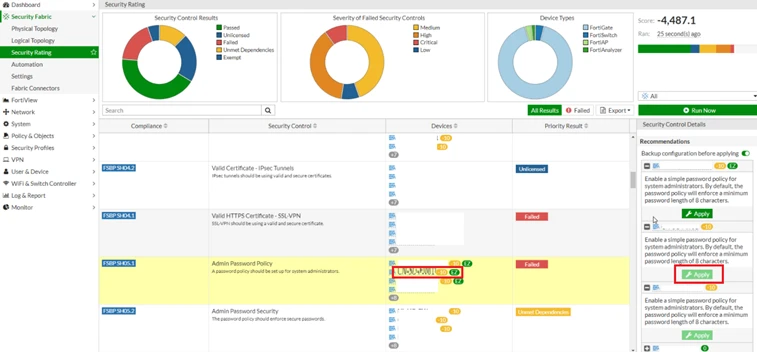
Verify the following:
- Make sure the used administrator account has super-admin privileges to make changes from the GUI.
- Ensure that the Security Rating results are not older than 30 minutes.
Related document:
Checking your Security Rating
Checking your Security Rating
- Check if the unit has an EZ symbol next to its name.
- It is important to assign a 'role' to the interface connecting the Root FortiGate and downstream units.
Related document:
FortiOS 6.2.4 cookbook (see page 70).
- The unit should be added to the pre-authorized FortiGate list.
CLI configuration:
config system csf
config trusted-list
edit <serial number of the FortiGate to apply the configuration to>
set action accept
end
end
Notes:
-
Security rating licenses are required to run security rating checks across all the devices in the Security Fabric and to display certain notifications. It also allows ratings scores to be submitted to and received from FortiGuard for ranking networks by percentile.
- Starting from FortiOS v7.6.2, physical FortiGate devices with 2GB of RAM no longer support Security Rating. For more information, refer to the release notes: 2 GB RAM FortiGate models no longer support Security Rating and Security Fabric topology.
