


Technical Tip: Creating Virtual IPs with the same external IP and mapped IP on the FortiGate
Description
This article describes how to configure a Virtual IP (VIP) on the FortiGate that has the External IP address and the Mapped IP configured to the same address. This can be useful in cases where the FortiGate needs to translate the destination network port but not the IP address of traffic as it passes through.
Scope
FortiOS, Virtual IP.
Solution
In FortiOS v5.6 and earlier, there were no restrictions on creating a VIP that had the same IP address set for the External IP and the Mapped IP. However, restrictions were added in FortiOS v6.0 and all later versions (v6.x, v7.x, v8.x) that prevented the default static-nat type VIP from being configured in this way.
When attempting to configure the same address for the External and Mapped IPs, the following errors will be observed, and the configuration will not be committed:
CLI:
FortiGate (test) # show
config firewall vip
    edit "test"
        set uuid 4cd65774-ad43-51f1-6bdf-7e4d3867f419
        set extip 11.11.11.11
        set mappedip "11.11.11.11"
        set extintf "any"
        set portforward enable
        set extport 666
        set mappedport 22
    next
end

FGT81F_PJ_3960(Primary) (test) # end
Static NAT's extip should be different from mappedip.
object check operator error, -8, discard the setting
Command fail. Return code -8
GUI:
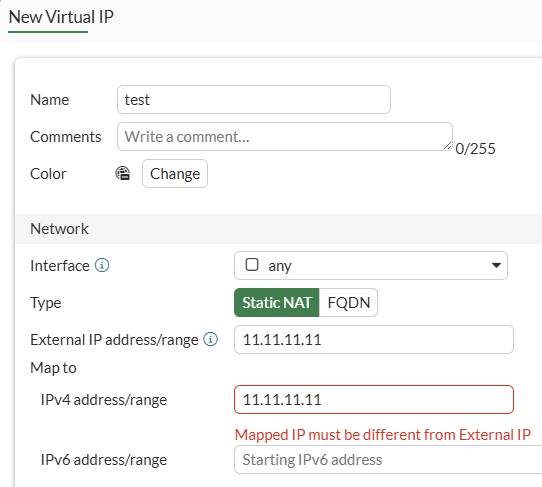
To workaround/resolve this restriction, the VIP must be created with the type setting changed from the default of static-nat to load-balance. This will remove the restriction and allow the VIP to be configured with matching External/Mapped IP addresses, but it does require the VIP to be created using the CLI (since the GUI does not expose this option). For example:
config firewall vip
    edit 'SSH_redirect'
        set extip 10.50.50.150
        set extintf 'any'
        set portforward enable
        set mappedip '10.50.50.150'
        set extport 666
        set mappedport 22
        set arp-reply disable
        set type load-balance
    next
end
Additional notes:
It is not possible to change the type setting on already-created VIPs, so a new VIP must be created in order to configure matching External/Mapped IPs.
For administrators upgrading from FortiOS v5.6 to v6.0 and later, CLI errors would be observed if there were Virtual IPs that were set to the static-nat type and had matching External/Mapped IPs. The workaround for this was to delete and recreate the VIPs using the load-balance type setting prior to the upgrade; otherwise, errors similar to the following would be observed post-upgrade.
FortiGate # diagnose debug config-error-log read
>>>  "next" @ root.firewall.vip.SSH_redirect:failed command (error 1)
>>>  "set" "dstaddr" "SSH_redirect" @ root.firewall.policy.1:value parse error (error -3)
>>>  "next" @ root.firewall.policy.1:failed command (error 1)
While similar sounding, the load-balance VIP type is fully separate from Virtual Server objects, which are of type server-load-balance.
Additionally, it may be necessary to disable arp-reply in some cases to prevent the FortiGate from replying to ARP requests for the External IP with its own MAC address (such as when the FortiGate is connected to the same subnet as the mapped host).
FortiOS v7.2.0 removed overlap checks for VIPs, such that multiple VIP objects may have overlapping External and Mapped IP addresses (see also: Remove overlap check for VIPs). However, this still does not allow an individual VIP to configure overlapping/matching addresses for its own External/Mapped IP addresses, so the above solution is still relevant in modern FortiOS (checked as of FortiOS v8.0.0).
