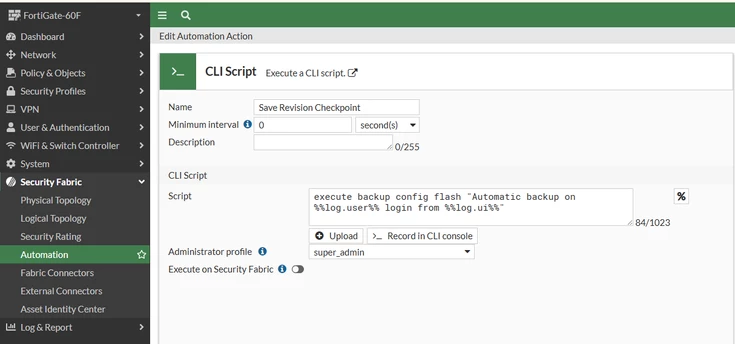
| Solution | - Create an automation action, set it up under Security Fabric -> Automation -> Action -> Create New -> CLI Script. Name it as desired and use the following CLI syntax in the script field:
execute backup config flash "Automatic backup on %%log.user%% login from %%log.ui%%"
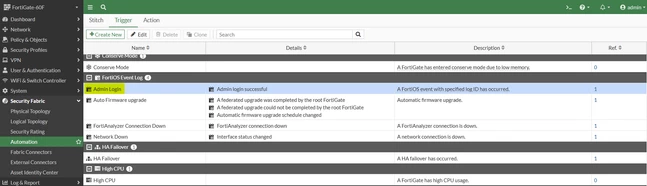
- Ensure there is a built-in Trigger available for 'Admin Login' under Security Fabric -> Automation -> Trigger. If there is not, create one.
- To create the stitch, go to Security Fabric -> Automation -> Stitch-> Edit or Create New.
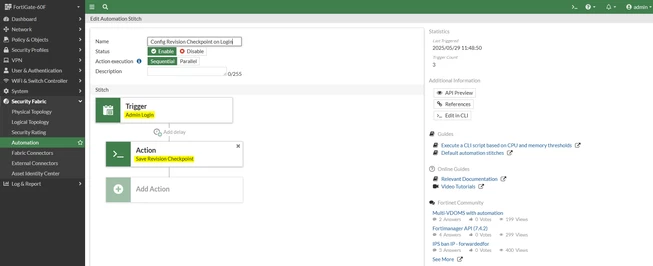
- Once the Stitch is created, verify its functionality by logging into the FortiGate using the GUI or SSH. To view the saved revision checkpoints, select the username at the top right corner, then navigate to Configuration -> Revisions.

Related articles: Technical Tip: Configuring automation stitches on the Security Fabric Technical Tip: How to save and restore configuration changes using revisions |