


Technical Tip: Block audio or video file download by using DLP sensor
Description
This article describes the steps to block Audio(mp3)/Video(mpeg) file formats using the Data Leak Prevention
Solution
Screenshot of Creating the DLP profile sensor (ex: mp3/mpeg)
Create a DLP sensor
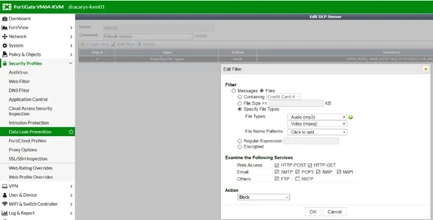
1. Go to Security profiles > Data Leak Prevention > Create new Filter > select Files
2. Specify File Types > File Name Pattern > Enter the pattern * mp3 & mpeg*
3. Select the services such as HTTP-GET, POP3 or imap to block the download over HTTP, pop3, and imap.
4. To block the upload and download over HTTP or SMTP, select service HTTP-POST, HTTP-GET, SMTP.
5. Set the ACTION to BLOCK
Screenshot of creating the firewall policy with DLP sensor on the respective policy
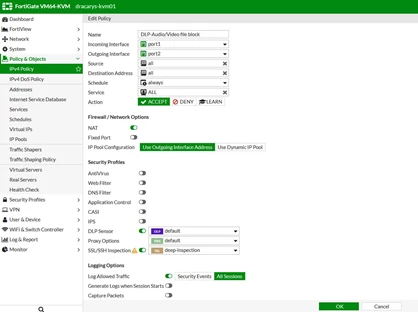
1. Go to policy & objects > IPv4 policy > Create new > specify the DLP sensor on the policy to the user
2. Use deep-inspection on the SSL/SSH inspection on the same policy
Screenshot of deep-inspection profile enable the required ports to scan https, smtps, pop3s, imaps, ftps
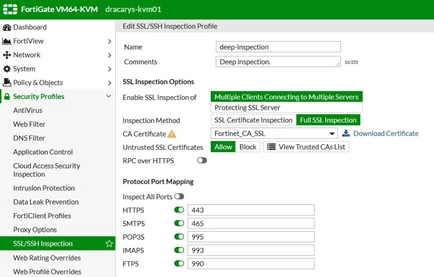
Configuration CLI
In order to block mp3/mpeg format file types disable the streaming-content-bypass on the profile-protocol-options which enabled by default.
# config firewall profile-protocol-options
# edit default --> Edit the specific profile
# config http
# set streaming-content-bypass disable
# end
# end
Related Articles
How to block the upload or download of files using DLP for HTTP, smtp,pop3,imap
