Technical Tip: A common use case for captive portal exemption with Microsoft ISDB
| Description | This article explains how to handle a scenario where the user wants to exempt specific destinations from captive portal authentication and match an IP based rule. All other traffic needs to match the user based captive portal policy. |
| Scope | FortiGate. |
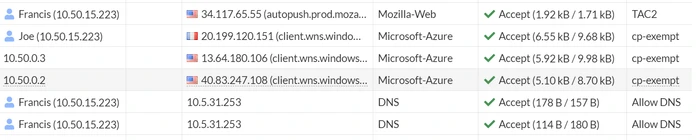
| Solution | In this example, a Microsoft ISDB is used for captive portal exemption. User based policies are created with full and restricted access. Ensure a DNS policy is created on top with an captive portal exemption. Step 1: Enable captive portal in LAN interface. Include the security group and add an exemption for the Microsoft ISDB. config system interface edit "port2" set vdom "root" set ip 10.50.15.214 255.255.240.0 set allowaccess ping https ssh snmp http telnet set type physical set security-mode captive-portal set security-exempt-list "port2-exempt-list" set security-groups "LDAP1" "LDAP2" set snmp-index 2 next end Step 2: Create a user group from remote server in FortiGate: config user group edit "LDAP1" set member "PRI" config match edit 1 set server-name "PRI" set group-name "CN=Fortinet,DC=Wilber,DC=local" next end next edit "LDAP2" set member "PRI" config match edit 1 set server-name "PRI" set group-name "CN=Domain Users,CN=Users,DC=Wilber,DC=local" next end next end Step 3: Create a firewall policy. In this example, four policies have been configured. Policy ID-9 to allow DNS traffic. Captive portal exempt needs to be enabled. Policy ID-7 created for microsoft ISDB. Captive portal exempt needs to be enabled. Policy ID-3 as full access user based policy for LDAP1 group. Policy ID-8 as restricted access user based policy for LDAP2 group. config firewall policy edit 9 set name "Allow DNS" set uuid 1ec8dcaa-0c45-51ee-1b9d-246a9506fd1d set srcintf "port2" set dstintf "port1" set action accept set srcaddr "all" set dstaddr "all" set schedule "always" set service "DNS" set logtraffic all set nat enable set captive-portal-exempt enable next edit 7 set name "cp-exempt" set uuid 324c3d4a-0c35-51ee-a020-742af4c281ef set srcintf "port2" set dstintf "port1" set action accept set srcaddr "all" set internet-service enable set internet-service-name "Microsoft-Azure" "Microsoft-Azure.AD" "Microsoft-Azure.Connectors" "Microsoft-Azure.Data.Factory" "Microsoft-Azure.Front.Door" "Microsoft-Azure.Monitor" "Microsoft-Azure.Power.BI" "Microsoft-Azure.SQL" "Microsoft-Azure.Virtual.Desktop" "Microsoft-DNS" "Microsoft-Dynamics" "Microsoft-FTP" "Microsoft-ICMP" "Microsoft-Inbound_Email" "Microsoft-Intune" "Microsoft-LDAP" "Microsoft-Microsoft.Update" "Microsoft-NetBIOS.Name.Service" "Microsoft-NetBIOS.Session.Service" "Microsoft-NTP" "Microsoft-Office365" "Microsoft-Office365.Published" "Microsoft-Office365.Published.Allow" "Microsoft-Office365.Published.Optimize" "Microsoft-Office365.Published.USGOV" "Microsoft-Other" "Microsoft-Outbound_Email" "Microsoft-Outlook" "Microsoft-RTMP" "Microsoft-Skype_Teams" "Microsoft-SSH" "Microsoft-Teams.Published.Worldwide.Allow" "Microsoft-Teams.Published.Worldwide.Optimize" "Microsoft-Web" "Microsoft-WNS" set schedule "always" set logtraffic all set nat enable set captive-portal-exempt enable next edit 3 set name "TAC1" set uuid 46696de6-fc83-51ed-e058-766088e856ea set srcintf "port2" set dstintf "port1" set action accept set srcaddr "all" set dstaddr "all" set schedule "always" set service "ALL" set logtraffic all set nat enable set groups "LDAP1" next edit 8 set name "TAC2" set uuid 49e6e0d4-0c41-51ee-5ea4-2d73f0e7c79d set srcintf "port2" set dstintf "port1" set action accept set srcaddr "all" set dstaddr "all" set schedule "always" set service "ALL" set utm-status enable set ssl-ssh-profile "certificate-inspection" set webfilter-profile "Test" set logtraffic all set nat enable set groups "LDAP2" next end Output of Forward traffic logs:
|