FortiGate offers a variety of web filter categories. For a comprehensive list of these categories and their corresponding IDs, refer to FortiGuard web filter categories - FortiOS 7.6.2 documentation. Web filters can be configured to present users with a warning prompt when attempting to access websites for each of the categories.
To implement this functionality, it is necessary to enable the command 'set warning-prompt per-domain' within the web filter profile for the desired category. Additionally, the inspection mode for the traffic must be set to proxy. For instance, to configure a warning prompt for users visiting websites categorized under 'Games', follow the steps outlined below: Clone the default web filter and assign it a new name. For example: 'Test'. In the GUI, access the CLI for the newly created web filter 'Test' profile by selecting 'Edit in CLI'. Apply the following configuration changes within the 'Test' web filter profile:
config webfilter profile
    edit "Test"
        config ftgd-wf
            config filters
                edit 1
                    set category 20
                    set action warning
                    set warn-duration 5s
                    set warning-prompt per-domain
                next
            end
        end
    end
end
In this example, category 20 refers to "Games". The following are the category options available to be configured:
config ftgd-wf
config filters
edit 1
set category ?
<id>    Category ID

Adult/Mature Content:
    2 Alternative Beliefs
Bandwidth Consuming:
   19 Freeware and Software Downloads
   24 File Sharing and Storage
   25 Streaming Media and Download
   72 Peer-to-peer File Sharing
   75 Internet Radio and TV
   76 Internet Telephony
General Interest - Personal:
   17 Advertising
   18 Brokerage and Trading
   20 Games
   23 Web-based Email
   28 Entertainment
   29 Arts and Culture
   30 Education
   33 Health and Wellness
   34 Job Search
   35 Medicine
   36 News and Media
   37 Social Networking
   38 Political Organizations
   39 Reference
   40 Global Religion
   42 Shopping
   44 Society and Lifestyles
   46 Sports
   47 Travel
   48 Personal Vehicles
   54 Dynamic Content
   55 Meaningless Content
   58 Folklore
   68 Web Chat
   69 Instant Messaging
   70 Newsgroups and Message Boards
   71 Digital Postcards
   77 Child Education
   78 Real Estate
   79 Restaurant and Dining
   80 Personal Websites and Blogs
   82 Content Servers
   85 Domain Parking
   87 Personal Privacy
   89 Auction
General Interest - Business:
   31 Finance and Banking
   41 Search Engines and Portals
   43 General Organizations
   49 Business
   50 Information and Computer Security
   51 Government and Legal Organizations
   52 Information Technology
   53 Armed Forces
   56 Web Hosting
   81 Secure Websites
   84 Web-based Applications
   92 Charitable Organizations
   93 Remote Access
   94 Web Analytics
   95 Online Meeting
   97 URL Shortening
  100 Artificial Intelligence Technology
  101 Cryptocurrency
Local Categories:
  140 custom1
  141 custom2
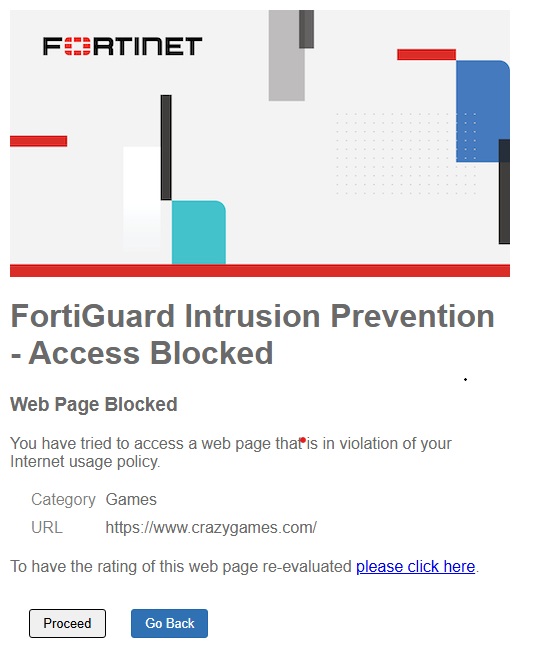
After making the necessary changes to the 'Test' web filter profile, ensure that this web filter profile is attached to the relevant traffic policy. The inspection mode should be set to proxy, and SSL inspection can be configured as either certificate or deep inspection. When a user attempts to access any website within the 'Games' category, a warning prompt will be displayed in the browser, prompting the user to select the 'Proceed' button to access the website.
 Related document: Custom warning page when accessing an AI website | 


